Netizen Blog and News

The Netizen team sharing expertise, insights and useful information in cybersecurity, compliance, and software assurance.

  • There is an age-old debate about what qualifies as “Software Engineering” versus “Programming” or “Coding” and it stems from a misconception in many parts of the tech community about exactly what true engineering entails. As software engineers do not generally have the rigorous certification processes in the United States that our civil and other engineering counterparts do, there tends to be a lot of people calling themselves “engineers” when, in fact, they are more like “coders” or “programmers,” not that it is a bad thing by any means.  They both have equally important parts to contribute to the field of software development, just at different levels and with different responsibilities.

    So, what exactly qualifies someone as a Software Engineer?

    Software Engineering is a highly technical field, but also one that is not merely concerned with writing code. Software engineering is typically much more about the process and lifecycle of software development than actual programming. Software engineering is thinking about the long term and big picture utilizing a systematic methodology. In other words, building systems for tomorrow and not just features for today. Software engineers are sort of like technical project managers in that the processes of developing software are established and/or managed by them, but unlike project managers in that they can jump in to help guide, validate and work with code or supervise junior programmers. Different organizations treat software engineers in different ways, but the one thing that always remains the same is that engineers are process oriented first and programmers second.

    And a coder, programmer or “hacker” is…? 

    Let me break this down a little more. Coders and programmers generally refer to the same thing – basically, someone who writes software based on requirements or specifications, whereas “hackers” typically refers to a more “shoot from the hip” and less organized, but more creative, way to produce software or systems. On the software development spectrum, engineers are at one end and “hackers” at the other – but that is not to say you can’t be a little bit of both at the same time. Almost anyone can learn to code in as little as a few weeks because the effort involved in creating software has decreased dramatically over the years but engineering, however, takes much more experience, education and time to get right.

    Moving from “coder” to “engineer”

    Most young companies begin with a single person creating their product or managing their IT operations. They don’t have the luxury of hiring enough personnel to establish a junior-senior hierarchy. Since coding (or programming, or hacking) is an entirely different mindset than management, all startups typically begin operations without proper engineering processes. It is when things pick up, and the business grows, that there is a need to standardized for the sake of quality, security, stability and predictability. No more can we edit code on the live server through FTP, no more half-baked verbal requirements or seat-of-the-pants scheduling, no more skipping comments and documentation, no more selecting your technology stack simply because you read about it on a blog and it sounded hip, and no more excuses for lacking adequate test coverage. Your business needs to start thinking and acting more methodically if you want to grow without falling apart at the seams.

    The move to an engineering-based operation typically starts with the hiring of experienced talent, whether a person or a business, to implement the needed processes. Someone who is familiar with bringing order to the lawlessness that generally is startup coding. In doing this for many other companies, it is something that I can say with confidence can only be learned from a varied combination of education and experience.

  • Ever find yourself bragging about working a 60, 80 or even 100 hour work week or publicly complaining on social media about that incessantly heavy workload of yours? This is not a badge of honor. It is generally a sign that something is wrong, and it could be the way you go about your work.

    We’ve all heard the old adage “work smarter, not harder” and this tends to ring true for a number of reasons. When I say “smarter” here I’m talking about choosing more efficient ways of going about things over using raw labor hours spent on a task as your metric for productivity. Smarter work does not mean that you should kick up your feet and call it a day after putting in the bare minimum. First and foremost as a reason for not working longer than you should have to, however, is that study after study has shown that our effectiveness as workers decreases dramatically after just 8 to 10 hours daily, or about 40 to 50 hours weekly. Pushed even further, there is also a severe amount of cognitive degradation caused by those marathon work sessions which some people boast so openly and proudly about. Some studies have shown that simply saying awake more than 19 to 24 hours without rest is akin to having a 0.1% blood alcohol content, well above legal limits in the United States for driving. Longer term sleep deprivation has also been shown to cause other severe physiological side effects including depression, hallucinations, confusion, weight gain, and much more, including harming our short term memory which is critical for work-related tasks. As the average nightly rest has plummeted from 12 hours about 100 years ago to just 6.8 hours today, we have to realize that there are going to be substantial impacts to health and productivity. So why again are so many people so proud of these countless hours wasted not working to their full potential?

    Some researchers have gone even further, proposing that this strong desire to outwork the other guy (or gal) in terms of labor hours alone is a major contributing factor causing so many popular tech startups, as many as 75%, to outright fail. This seems very plausible given the detrimental effects a constant push to produce has on actually getting things accomplished effectively and efficiently. So why do we do it? It’s human nature I suppose, at least in this country, to outdo your competitors – real or imagined – by any means possible. This is especially true if you lack the necessary experience, training or processes to work at peak efficiency. If you’re working 60 or more hours per week, you must be getting ahead of them, right? Not necessarily. In fact, the opposite is generally true and we should stop treating longer work days and weeks as a competitive advantage just because it is popular.

    Yet another reason this occurs is that some individuals simply want to look and sound relevant. Putting in (or pretending to put in) those few dozen extra hours every week means you must be that much better at your job or more important to your organization, right? Not at all. Perpetuating this myth only hurts others, especially up and coming startup and business leaders, by making them believe that working marathon hours is smarter and the only way to get ahead. But, if someone is putting in all those extra hours legitimately and failing to get ahead it is almost always a sign of processes breaking down, inadequate training, or a lack of the necessary skills and experience to efficiently perform their job.

    Processes, love ’em or hate ’em, are what will make or break your business and preserve your sanity. We’ve had the opportunity to help several companies implement standardized processes for everything from IT support and software development to operations and project management. Because of this, I can say confidently, speaking from experience, that investing resources up front to do this will absolutely save you precious time and can even prevent failure of crucial projects or your business in general. That being said, without standardized processes you simply aren’t managing time effectively, balancing workloads properly, or operating at peak efficiency. You’ll find yourself constantly struggling to catch up, regardless of the amount of hours being put in. If this sounds at all familiar, it may be time to bring in an expert to help put things in line. After all, those absurdly long hours spent working not only negatively affect your team’s health and well-being, but also have detrimental impacts on their personal and family lives as well which further impact their productivity. In the end, family is all that matters and there are some simple techniques to streamline your business or technical operations today which will enable you to spend more time with them. That is ultimately what counts.

  • What if I told you there was a large pool of incredibly talented, disciplined and eager employees out there just waiting for the right opportunity but find themselves passed over because of a lack of understanding regarding their particular skills? Well, there is. They are our military veterans.

    Study after study has shown that the benefits of hiring someone with military experience, regardless of their profession while they served, is hugely beneficial for the employer in terms of raw company performance. Don’t believe me or need a little more convincing? Here’s some more reading material: 1  2  3  4 …  and the list goes on an on. New studies and reports come out almost monthly touting the benefits that hiring veterans brings to your bottom line.

    To surmise some of the findings, according to a recent 2012 study conducted by the Center for a New American Security (CNAS), they found that not only do veterans make good employees, they typically rate amongst the best of all employees time and time again. Beyond teamwork, discipline and their rapid ability to acclimate to changing environments, veterans bring unparalleled levels of loyalty, dedication, work ethic and character to the mix. The only thing holding them back is an inability to translate their skills effectively for corporate America and an unfair stigma associated with military service in certain circles.

    Some of the aforementioned positive attributes, as well as the 11 or so others mentioned in the CNAS study and so many others, are the primary reasons that we actively recruit military veterans. Not only do we seek them out, but our goal is to also train and prepare them for a fulfilling technology career as best we can, regardless of how comprehensive their technical background may be. This is because they already tend to have a foundation of relevant professional skills that just can’t be taught in a classroom, but are shaped solely by experience. This gives them a valuable edge, as intangible as it may be at first. The rest can typically be learned over time on the job or in a class.  For the employer, giving a veteran a chance to prove themselves is one investment that pays innumerable dividends over time. It is what makes our particular team special, and what makes us able to serve our clients as well as we do around the clock.

  • Cheap, Fast or Good Software – Pick Two. Pick Right.

    Software Development

    There is a lot of buzz out there about the pace at which software is being made today. Forty-eight hour hackathons, endless “sprints” pushing developers to their breaking point to crank out new features, and countless nights trying to finalize “just one more” feature which was added to the project scope at the last moment. Many of us have been there. The issue is that the prevailing perception appears to be that cheap, fast code is “good enough” for everyone. However, that is not at all the case and here we intend to quickly describe why cutting corners is simply not good for business regardless of what the up-front tangible costs may be.

    The problem first seems to occur when the “business” side of organizations make their push to generate new revenue through the creation of new features or products and, at the same time, insist on cutting back drastically on programming costs by outsourcing to far less experienced developers. In such a situation, the pressure is on from the get-go to deliver as fast and cheaply as possible. However, what they don’t realize is that for every $100 saved in costs or gained in revenue by launching a few weeks early with this “good enough” code created by comparatively cheap novice labor, your company will end up spending $1000’s more at some point in the future when conditions necessitate hiring senior developers to patch, refactor or outright replace that code. Believe me, it will happen.

    This type of thing is a problem we’ve been seeing more and more of and one that we have been hired to fix many times now: software running just fine for years at a time even, but then completely breaking down or getting hacked at some point because of poor coding, bad architecture or insecure practices brought about by business pressure to launch fast while drastically reducing development costs. You can’t possibly expect positive results in such a scenario in the long term. In some cases, these problems can easily become catastrophic if not fixed immediately and most often they will require capital outlays in the range of tens of thousands of dollars (or more) to effectively remedy the situation. So, in raw economic terms, that $5000 you saved a couple years ago during development just became a $50,000 expense to fix a broken or insecure product.

    What Can Be Done To Make Things Better

    Don’t fall into the “cheap and fast is good enough” trap. Insist that software is developed right the first time around and stand strong when there is pressure to do otherwise. Unless your particular organization is perfectly fine with the increased legal liability and the ruinous effects on their reputation that insecure, buggy software brings about, it is far wiser to devote a few more senior development resources and budget some more time for your coding and testing regimen up front. Also, get some standardized processes in place if you don’t already have them. Software development is no longer the wild west full of rogue cowboy/cowgirl coders – someone is going to have to support that product, so be considerate if you care at all about your career and professional reputation. Best practices are named such for a reason.

    While I’m on the subject of standardized processes and best practices – you are testing…right? I’m talking the full gamut – unit, functional, component, integration, etc. – whatever is needed based on the scope and scale of your application. If not, the problem is even bigger than what I just described and it’s time to completely reevaluate your development practices (something we’re quite good at doing for you, by the way, to get you on track for success). Even in the era of “lean” teams, startups and businesses, there is absolutely no excuse for putting your users at risk with insecure, buggy code that wasn’t tested and reviewed adequately before a launch or release.

    So, after all is said and done, here are a few tips to get on the path to software development success:

    • There should be at least one very senior development resource for every three to five junior or mid-level ones on your team. This is to ensure that all code is, at the very least, reviewed by someone with enough experience to know when something isn’t quite right.
    • Test, test and re-test. At the minimum, functional testing (black box or white box) is needed. But, we almost always advocate for a multi-tiered approach consisting of unit testing through end-user acceptance testing for every new feature at different intervals. You need to include time for this in your schedule, or accept that you’ll be producing a bug-ridden product which will ultimately be reviled by your users or clients.
    • Don’t cut corners for the sake of saving time or money up front. You need something delivered rapidly? Either plan to spend a little more money to get it done right or plan on producing a vastly sub-par product. Need something done cheaply? Then either give those junior developers you just brought on ample time to get up to speed or plan on and budget for your product needing a complete overhaul at some point in the near future.
    • Processes. Too much becomes a bureaucracy, too little and it’s utter chaos. Find your particular balance and put in place just enough of them to get everyone on the same page. Standard processes need to be documented, even if just in a quick bulleted list that is distributed to new team members. While you’re at it, do a little research and see what other organizations have in place or hire a company specializing in software project management, like us, to set your projects on the road to success with a set of documented best practices tailored specifically for your organization’s needs.

    I’m sure some of you reading this will have your own stories and tips, so I encourage you to share them in the comments section.

  • January 7, 2014

    Netizen Corporation, a trusted veteran owned provider of software and cyber security solutions to the public sector and commercial clients, is proud to announce that they have been verified by the Department of Veterans Affairs Center for Veterans Enterprise (CVE) as a Service Disabled Veteran Owned Small Business (SDVOSB) as defined by Public Laws 106-50 and 108-183.

    Completion of this rigorous verification program demonstrates the accountability, trust and dedication that are the hallmarks of our services and solutions. It also
    provides for increased contract and subcontract opportunities in accordance with the Veterans Benefits Act of 2003 including sole-source and set-aside eligibility for certain acquisitions.

    A copy of the verification document is available upon request. Contact us with any questions.

  • In a previous post I tried to dispel some of the myth of how entrepreneurs in “hip” startups perceive project management.  It is not (well, it doesn’t have to be) a stodgy, stifling bureaucratic nightmare, and, on the other hand, just calling your operations “Lean” or “Agile” does not mean it is effective project management.  Lest we forget, somewhere around 80% of IT projects in large organizations fail due to ineffective management, and I surmise that the same is a major contributing factor for why nearly the same percentage of new technology startups also fail within a few years.  Today, I’ll demonstrate a few tools of the trade, elaborating on the pro and cons a little of each.

    First up, my perennial favorite for smaller scale software development: Trello.

    trello

    Now, Trello has been praised as a sort of “do-all” type project management application, but I have found it really excels mostly in workflow situations.  For example, tracking software development teams in terms of bugs fixed or features requested/under development.  The card view provides a wonderful sort of dashboard for management and the price of the application (free to start) can’t hurt either.  Outside of project management, Trello is incredible at doing things ranging from tracking sales leads to working an applicant pipeline for HR to keeping tabs on a scalable to-do list.  This generalist mentality of the platform comes with a few drawbacks, however.  For one, advanced tools to track Agile metrics such as velocity and burndown are basically nonexistent.  I’ve tested a few add-ons and such using the API, but nothing really comes close to what most professional teams really need.  Overall, if you just need simple, easy to use tracking mechanism for workflows and smaller scale projects, nothing beats Trello as far as I’m concerned.

    If you need a more robust solution, here comes Jira.

    Jira Project Dashboard

    Jira is sort of like the enterprise Trello, though it is much more specialized, expensive, and complex to set up and maintain.  The largest benefit of Jira is the metrics it can provide for Agile/Scrum managers that Trello does not (yet, anyway).  Jira also includes nifty features like automatic Sprint planning calculations based on previous velocities, which can certainly save a lot of time.  But this sort of specialty and advanced metrics comes at a steep cost – beyond just a handful of users, the annual price goes into the thousands, even tens of thousands, for larger companies.  Pivotal Tracker is another similar solution that I have found which tends to be slightly less complicated than Jira but nearly as expensive for teams with more than a few people.  Either way, in the early stages of a startup, I highly recommend Trello due to its low price point and generalist nature (which can be overcome if you are bold enough to create your own internal apps using their API).  Only when an organization matures to a level where is needs more fine-grained controls for increasingly complex programs would I recommend switching to something like Jira, or if you absolutely need something behind your own firewall.

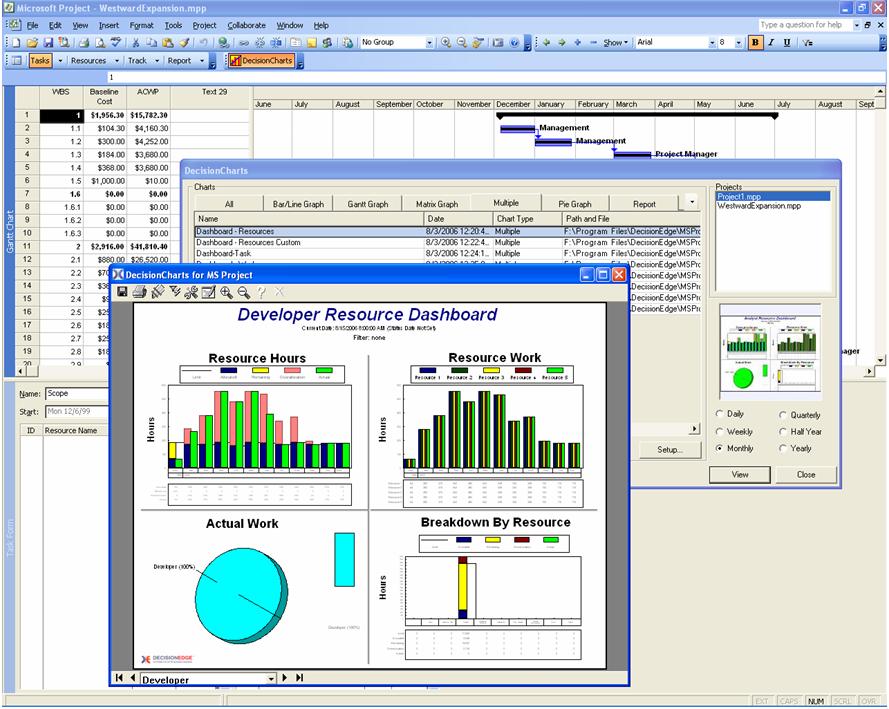
    Now, the 800 pound gorilla in the room – Microsoft Project.

    MS Project

    Universally standardized at larger companies, MS Project has long been the dominant player in traditional waterfall project management.  Its features are beyond robust, and account for metrics that few of us would typically care about in small projects.  Integrating with SharePoint, MS Project and Project Server can create magnificent dashboards the likes of which are currently in use tracking tens of billions of dollars worth of projects at large federal agencies.  This robustness, however, comes with several drawbacks.  Project was developed in an era of very linear software development, and many of those limitations remain to this day.  It is entirely possible and feasible to use Project for Agile/Scum type work, but many advanced metrics and automation tools will be of little use at that point. Setup, especially for the server, can range from a bit complex to requiring an entire IT division.  However, recent updates have incorporated many enhancements as a tip of the hat towards the wide adoption of Agile/Scrum and Lean methodologies, with the hope that more will be coming in the future.  The biggest drawback with Project, however, is the relative complexity of setting everything up and the lack of malleability in adapting to recent methodologies.  Still, many enterprises and virtually every US federal agency require it to be used, holding it in high regard as a gold standard to this day and for the foreseeable future.

    You may have noticed I left a very popular “project management” tool out here, one that is common amongst startups.  That being Basecamp by 37Signals.  I purposely left this out because I feel that Basecamp is a more of a communication tool than a project management solution.  This is because task lists work for small teams working on small projects, but quickly grow complex and inundating.  Data on assignments, progress, issues and such are easily lost amidst a haystack of communications that rapidly overlap one another.  We are visual creatures who gravitate towards simple layouts, graphs and other visualizations yet Basecamp is driven at this time seemingly entirely by lists and message boards with a very verbose interface.  There is rumor of a revamped version of Basecamp coming out soon and one can hope that it will learn from the visual cues of the likes of Trello and others, because working on anything beyond simple projects can be quite cumbersome in the current setup.

    Well, I’ve covered a few of the tools and various pros and cons of each.  Hopefully some of this will be useful.  Next time, we will discuss how Netizen Corporation uses some of these tools and some best practices for tracking and managing various types of projects with each.

  • We reposted this from a blog our founder wrote some time back, thinking it was pertinent to the required mentality of entrepreneurs looking to break into the tech scene.

    Look, tech startups are hot now, but they aren’t for everyone, regardless of what Silicon Valley says. If you aren’t willing to put in the time and/or effort to at least TRY and learn the technology you’re selling to people, you are bound to fail. Simple as that.

    I’ve worked with founders both highly technical and some of the “couldn’t even name a single mainstream programming language” non-technical types. However, in that latter category, there is a sub-category of founders who, though utterly non-technical at the start, put in 110% effort to learn, going so far as to even teach themselves how to code in every spare minute they have. That other sub-category consists of founders who refuse to learn anything new, refuse to even browse the codebase or put in more than a superficial, scant effort to try and understand the complex system they want or had created.

    Look, in a new tech startup, you’re either coding or selling. And most of the time, doing both. Technical or not, you need to understand the product to sell it. If you aren’t putting in the time to learn it at a deep level, your potential customers will take notice and won’t even bother to consider your solution, regardless of how great it may be.

    I’m not saying you need to be the next Bill Gates, Steve Wozniak/Steve Jobs or Larry and Sergey, but you should at least strive to know your own product well enough to explain it to a customer’s IT management at their level.

    On another note, coders and engineers need to learn sales, too. Don’t think I would leave them out here. Selling is not something a startup can outsource. I’m of the mindset that “every founder a salesperson,” much like the Marine Corps’ “every Marine a rifleman” mantra. If you outsource your first few sales to some hired or commissioned talent, you aren’t going to learn anything or get anywhere in the long term. Sure, you’ll probably score a few quick wins, but then, inevitably, that sales talent departs and customers scatter faster than roaches when the lights come on (no, I’m not insinuating that customers are roaches, just that the hired facade you hid behind will become very transparent, very quickly to them). What then?

    All in all, being an entrepreneur is about being willing to learn new things, constantly. You will have to do things to earn success that aren’t always going to be in your technical or professional comfort zone (but they should ALWAYS be morally comfortable, however).

  • For clarification, we wanted to point out that this particular praise for this system only applies to a small portion of the site – the static interface.  It has become apparent, unfortunately, that the majority of the back-end was developed with typical procurement mechanisms, and handled much like many other turbulent federal projects.  This example points out one small area of success, as we felt there was a notable glimmer of hope in  a small part of the implementation of this otherwise problematic application.

    Back in June, The Atlantic ran a story about a scrappy little startup working out of a DC garage that completely influenced the course of how the web-facing portions of the Affordable Care Act were to be implemented (link).  However, there is more to this story than people realize and give credit for.  Sure, a small company on the cusp of the DC tech scene transformed how the static portions of the Healthcare.gov site were created and deployed, but the real credit goes to the heads of Health and Human Service (HHS) who were not only open to, but invited and spurred on this innovation.

    This high-level support for taking calculated risks for the sake of innovation is sadly often a rarity in government contracting.  More often that not, contracting officers and program managers alike are heavily risk-averse, sometimes for good reason, but at the cost of innovation (and price).  The main reason outside contractors are supposedly retained is for their ability to adapt and innovate, but all too often that is stifled by rote adherence to procedure and policy on the part of career-focused government leadership afraid to roil their superiors.  However, federal managers should look to this HHS team as a model for future procurements because doing so could revolutionize how government operates and save millions, even billions,  of dollars in the process while providing superior services to the citizens of this country.  Not to mention, it is an exceptional example of how government should perceive contractors – as an integrated part of their team, not simply as temporary hired help.

    Not to say that the program is not without hiccups, but all programs are fraught with issues at some level.  As far as I can tell, however, the outcome greatly exceeded the issues encountered.  For example, one such benefit allowed the reduction of hosting infrastructure from a planned 32 servers down to only 2.  Yes – 2 servers and Amazon S3.  Unfortunately, the pundits will declare the technical outages a sign of calamity and cry foul.  But I dare you to find any single program of this scale in the private sector that didn’t experience such issues on day one (or even years thereafter).  Ultimately, regardless of how one views this law, people should look to how the program to implement the web-based face of this law to tens of millions of people as a success and a model for how government innovation should be implemented and supported – from the top down.

    Link to full article: http://www.theatlantic.com/technology/archive/2013/06/healthcaregov-code-developed-by-the-people-and-for-the-people-released-back-to-the-people/277295/

  • Let us preface this blog entry by saying up front that Netizen Corporation is not in any way sponsored by these two companies nor did they pay anyone for this content.  We are just avid fans of these particular technologies and choose to share some of what we have learned with them. So, let’s begin.

    Today I’m going to write about something I learned along the way in my journey to test out a variety of web conferencing and screen sharing utilities.  Two applications have really stood out for me – Microsoft Lync Online for Office 365 (the de-facto standard of enterprise desktop sharing and communication) and a new teleconferencing startup based out of the Washington, D.C. metropolitan area called Speek (link).  Separately they are good, but together they rock the competition.  Here’s why I love them.

    Speek offers self-described “super-simple phone conferencing” for the masses.  Their free plan allows unlimited calls with unlimited minutes, but with only up to 5 users per call whereas their $10/month “pro” plan offers unlimited users for every conference.  You can join a conference by going to your own “dashboard” page (e.g. http://speek.com/yourname) and entering a phone number, or they also offer more traditional dial-in PIN numbers for users.

    Microsoft Office 365 Lync Online offers enterprise-grade desktop sharing and video conferencing starting at $2/month (or $6/month combined with their entry-level Office 365 small business package which also has SharePoint, SkyDrive and Web Outlook).  Whether using the Lync desktop client, mobile app, or just in the web browser, it provides everything from screen sharing to whiteboarding and more.  Working with a lot of large clients, especially in the public sector, Lync is stable, trusted and secure while presenting a polished and professional appearance for clients.  Definitely my first choice, however, the dial-in providers for Lync are both obsolete by today’s standards and rather expensive.

    Now, we get to the point.  Here is how to set up Lync Online to automatically populate your Speek conferencing number and PIN in every invitation:

    1. From your Office 365 Admin Dashboard, click on the “Service Settings” link.

    2. On the “Service Settings” page, click the “IM, meetings, and conferencing” on the left side.

    3. On the right side, which just loaded, under the “Dial-in Conferencing” section at the top, click “Manage” (or configure).

    4. Go through the setup process, but here is the trick – when it asks for a conferencing provider, select ANY of them and continue through.

    5. When it asks for the “phone number” and “passcode” you received from the conferencing provider, enter your Speek phone number and access PIN (from your dashboard).  Click save.

    6. If necessary, add these numbers to each person in your organization as needed.

    Now, you can go to your Outlook Calendar, set up an event and click on the “Online Meeting” link about halfway down the page. After a brief pause, you’ll see your Lync access link and your Speek number with the passcode in the body of the event invite.  Invite your attendees and send away!

    That’s it.  Hopefully if Speek becomes affiliated or registered with Lync Online this process will be a lot easier but, until then, this workaround seems to work flawlessly at the moment.  It will provide enterprise-class desktop sharing with affordable, unlimited dial-in conferencing for under $15/month per user (assuming you use multiple Speek accounts, otherwise it is just the cost of Lync, currently ~$2/month, to share your number and PIN). Can’t beat that.

    Enjoy!

    Team Netizen

    http://www.NetizenCorp.com