• Netizen Threat Brief: 23 May 2018 Edition

    Threats:

    Listed below is information regarding three of this week’s most critical threats and preventative measures to lessen the chances of a breach:

    1. DNS-Hijacking Malware
    2. Kerberoasting
    3. Mirai Botnet Evolved
    4. Misconfigured Reverse Proxy Servers
    5. Layered Backup Security to Combat Ransomware

    1. DNS-Hijacking Malware

    Overview

    A new DNS-hijacking malware known as Roaming Mantis is being utilized to target Android devices, as well as iOS devices. The malware was initially found to hijack internet routers to distribute banking malware that would steal a user’s login credentials as well as the secret code used for multifactor authentication (MFA). In addition to Android targets, Roaming Mantis has begun phishing attacks for iOS devices and a cryptocurrency mining script for PC users.

    The DNS-hijacking takes place when the hacker changes the DNS settings of the wireless routers to redirect traffic to malicious websites that are controlled by the hackers themselves. These malicious websites possess:

    • Fake apps infected with banking malware to Android users,
    • Phishing sites to iOS users,
    • Sites with cryptocurrency mining scripts to desktop users

    Recommendations

    We recommend the following strategies to mitigate or prevent a breach:

    • Ensure that your router is operating at its latest firmware version and protected with a strong and complex password.
    • If at all possible, disable the router’s ability for remote administration. It would also be useful to hardcode a trusted DNS server into the OS network settings.
    • Android users should install apps from official stores and disable the installation of applications from unknown sources.
    • Perform routinely scheduled DNS settings checks of the DNS server address. If the DNS address does not match one you have specifically set or one from your provider, change it back to the appropriate one and change all account passwords immediately.

    2. Kerberoasting

    Overview

    Kerberoasting is an effective method for extracting service account credentials from Active Directory as a regular user without sending any packets to the target system. This method is especially effective to those that employ poor passwords. The attack itself is geared towards tricking a popular authentication protocol used on Windows known as Kerberos.

    There are several different types of Kerberos attacks ranging from recon (SPN Scanning), to offline service account password cracking (Kerberoast), to persistence (Silver & Golden Tickets). The vulnerability surfaces due to Microsoft’s legacy support in Active Directory for older systems and protocols (Windows NT, RC4 Kerberos, etc.).

    Here are the most popular AD Kerberos attacks:

    • SPN Scanning – finding services by requesting service principal names of a specific SPN class/type.
    • Silver Ticket – forged Kerberos TGS service ticket
    • Golden Ticket – forged Kerberos TGT authentication ticket
    • MS14-068 Forged PAC Exploit – exploitation of the Kerberos vulnerability on Domain Controllers.
    • Diamond PAC – blended attack type using elements of the Golden Ticket and the MS14-068 forged PAC.
    • Skeleton Key In-memory Malware – malware “patches” the LSASS authentication process in-memory on Domain Controllers to enable a second, valid “skeleton key” password with which can be used to authenticate any domain account.

    Recommendations

    To protect yourself from being Kerberoasted, we recommend the following:

    • Enforce strong passwords. Poor passwords are the root cause for Kerberoasting. Strong passwords should especially be enforced for service accounts associated with SPN’s.
    • Utilize Microsoft’s “Managed Service accounts”. These types of accounts will automatically change passwords at determined intervals, lowering the usefulness of any cracked passwords.
    • Employ endpoint protection in addition to having an up to date antivirus agent.
    • Implement network monitoring for Kerberoasting attacks, such as scheduled vulnerability scanning.

    3. Mirai Botnet Evolved

    Overview

    The Mirai Botnet, initially utilized to launch massive Distributed Denial of Service (DDoS) attacks, has since had its code modified to attack unpatched Internet of Things (IoT) devices; turning them into cryptocurrency miners and proxy servers for delivering malware.

    Internet of Things is the networking of physical devices, appliances, and other items that have electronics, software, or sensors embedded within them that enables the connection of these objects to exchange data. Notable industries that possess this technology are healthcare and manufacturing. IoT devices continue to be a popular target for hackers as they often lack built-in security features and are most often installed and forgotten about.

    Recommendations

    Solutions for IoT devices are not always the easiest to implement—however there are actions that an organization can take to better protect their healthcare equipment and people:

    • Identify all IoT devices on the network, no matter how long it has been there. You cannot protect what you don’t know is there.
    • Data flows should be documented to ascertain what is needed and what is unnecessary and does not add value. With this knowledge, the network can be segmented appropriately—firewalling off any unneeded traffic.
    • Control the acquisition and implementation process—smart tv’s, fridges, etc. could open subtle channels for attackers to use to gain entry inside of the network. This happened in the well-known Target breach several years ago where a smart refrigerator was used to inject malware into the network and steal credit card numbers.
    • Perform regular vulnerability assessments on internal and external networks to reveal any hidden weaknesses or openings into environment. These risks should then be reviewed at regular intervals, implementing mitigation strategies as feasible.
    • Have a structured plan for the organization. Identify key stakeholders, establish security objectives, and coordinate actions to implement controls across the IoT spectrum.

    4. Misconfigured Reverse Proxy Servers

    Overview

    A proof of concept (PoC) attack has been discovered to allow unauthenticated users to extract user credentials from misconfigured reverse proxy servers in order to delete, manipulate, or extract data from websites and applications. Targets of the PoC attack include major cloud service providers (CSP) such as Amazon Web Services (AWS) MS Azure, and Google Cloud.

    The PoC attack targets APIs that provide access to the metadata associated with identity services (AWS Identity and Access Management (IAM), MS Azure Managed Service Identity (MSI), and Google’s Cloud IAM).

    Recommendations

    When dealing with Cloud Service Providers, we offer a few recommendations to make sure your data is secure in the hands of someone else:

    • Research your cloud solution. Vet the CSP and make sure they take the proper measures when it comes to securing customer data.
    • Implement end-to-end encryption for your cloud storage. Typically uploaded and downloaded data is encrypted, however encrypted cloud storage is often overlooked.
    • Perform routine patches and updates to in-house software. Unpatched systems can leave a wide opening for hackers to access information.
    • Scrutinize your cloud configuration. Disable items not needed, or that are known vulnerabilities.

    5. Layered Backup Security to Combat Ransomware

    Overview

    Ransomware attacks continue to make news. In just the last couple of months, high-profile victims included the city of Allentown and a school district in Massachusetts. Many attacks, though, go unreported or unmentioned to the media.

    Ensuring your company is prepared for Disaster Recovery, whether it involves data hijacking or natural disasters, is crucial to all business planning.  Organizations as a whole should continue to follow the standard “3-2-1” backup plan:

    • three different copies of data
    • using two different media types
    • one of which is off-site or offline.

    How can Netizen Help?

    Netizen ensures that security gets built-in and not bolted-on. Providing advanced solutions to protect critical IT infrastructure such as the popular “CISO-as-a-Service” wherein companies can leverage the expertise of executive-level cybersecurity professionals without having to bear the cost of employing them full time.  We also offer compliance support, vulnerability assessments, penetration testing, and more security-related services for businesses of any size and type.

    Additionally, Netizen offers an automated and affordable assessment tool that continuously scans systems, websites, applications, and networks to uncover issues. Vulnerability data is then securely analyzed and presented through an easy-to-interpret dashboard to yield actionable risk and compliance information for audiences ranging from IT professionals to executive managers.
  • Netizen Threat Brief: 16 May 2018 Edition

    Threats:

    Listed below is information regarding this week’s most critical threats and preventative measures to lessen the chances of a breach:

    1. MFA Bypass
    2. Windows IIS 6.0 Cryptomining
    3. Malicious Chrome Extensions
    4. Vulnerable PGP Tools
    5. GDPR Phishing Scam

    1. MFA Bypass

    Overview

    Two-factor authentication (2FA) or multi-factor authentication (MFA) are commonly used as an added layer of security for logins. The extra security proves beneficial when it comes to phishing attacks looking for a user’s password. MFA can be secure. However, hackers have discovered a way to spoof a login page, tricking the user into giving away their username, password, and MFA credentials; often they trick users by way of phishing campaigns. In short, the credentials taken from the spoofed site can be used to access the legitimate site.

    Recommendations

    Attackers will attempt to spoof a website and will try tricking a user to log into it. It is best practice to:

    • Train users on the tell-tale signs of phishing emails and websites (improper formatting, grammar, style, lack of professional tone, etc.). Scrutinize emails, verify senders, and hover over links to see where they actually go.
    • If possible, utilize Fast Identity Online (FIDO) authentication. FIDO stores personally identifiable information (PII) locally on the user’s device to protect it. FIDO also utilizes the Universal Second Factor (U2F) protocol, which creates a new key pair during registration with an online service and then retains the private key. The public key is then registered with the online service.

    2. Windows IIS 6.0 Cryptomining

    Overview

    Windows Internet Information Services 6.0 possesses an open vulnerability that is being targeted to mine a cryptocurrency known as Electroneum. While this operating system had been declared to have reached its ‘end of life’ (EOL) three years ago, there are still operational systems online and vulnerable. Campaigns have been launched by the hacking group Lazarus, exploiting this vulnerability to install malware targeting specific organizations.

    The campaign:

    • The campaign targets Windows IIS 6.0 servers through a vulnerability (CVE-2017-7269) released over a year ago.
    • The “Squiblydoo” technique is used to download and execute the malware.
    • The author named the malware file “Isass.eXe”, likely to camouflage it as the legitimate Isass.exe process.
    • The malware hosting server resides in Beijing, China, inside China Unicom’s network.

    Recommendations

    The recommend searching your systems for the following indicators of compromise:

    Malware Hosting Server:

    • 117[.]79[.]132[.]174

    Mining pool addresses:

    • electroneum.hashvault.pro:80
    • etn-eu1.nanopool.org:13333
    • etn-eu2.nanopool.org:13333
    • etn-us-east1.nanopool.org:13333
    • etn-us-west1.nanopool.org:13333
    • etn-asia1.nanopool.org:13333
    • etn-jp1.nanopool.org:13333
    • etn-au1.nanopool.org:13333

    Files:

    • sct: c7b01b6a732b06174a1d36da46463e22
    • eXe: 2f3ec555526902d25454d6bfc4495da7

    We also recommend:

    • Discontinuing the use of EOL software as much as feasible.
    • Patch any critical vulnerabilities as soon as an update or patch is released.
    • If patching is not an option consider using other forms of control, such as a Web Application Firewall (WAF).
    • If at all possible, segment your network and do not allow vulnerable systems to touch the internet. If it has no business talking to the outside world then it should remain on the internal network.

    3. Malicious Chrome Extensions

    Overview

    Malicious Google Chrome extensions have infected over 100,000 users. The extensions are pushed in links over Facebook, where it would lead victims to a fake YouTube page that would then ask for that particular extension to be installed. After the bad agent is installed in the victim’s Chrome browser, the extensions then execute JavaScript code, claiming the victim’s computer a part of a botnet. As a part of the botnet, the victim’s Facebook, among other social media content, credentials are stolen. Armed with the information of the user’s social media, the malicious links that started this whole process can then be delivered to the friends of the infected person.

    To add insult to injury the botnet also installs cryptocurrency miners among other added measures to prevent an infected user from removing the malicious extensions. The extensions tab will close automatically upon opening and a variety of security tools that are normally offered by Facebook and Google, are blacklisted from running.

    Recommendations

    The following extensions should not be trusted or installed:

    • Nigelify
    • PwnerLike
    • Alt-j
    • Fix-case
    • Divinity 2 Original Sin: Wiki Skill Popup
    • Keeprivate
    • iHabno

    We also recommend not using any third-party chrome extensions if at all feasible. If they serve a valid business function that is required by the organization, then all extensions used either by the company or on the company network should be vetted and confirmed of legitimacy before use.

    4. Vulnerable PGP Tools

    Overview

    Software vulnerabilities have been discovered in two email and data encrypting techniques: Pretty Good Privacy (PGP) and Secure/Multipurpose Internet Mail Extensions S/MIME. The vulnerabilities open the possibility of encrypted data being read in plaintext, including past emails. Attackers exfiltrate data by first accessing these encrypted emails by way of network eavesdropping, compromising accounts, servers, backup systems, or client computers commonly by way of phishing. Once this has been accomplished the attacker will create exfil channels by abusing the active content of HTML emails (externally loaded images or styles) to retrieve through requested URLs. The threat exists in implementation errors and not the protocols themselves.

    Recommendations

    We recommend discontinuing, disabling, or uninstalling tools that automatically decrypt PGP-encrypted email, if at all feasible. We also recommend:

    • Not using HTML mails if at all possible
    • Disallow any access to external links if not required
    • While a patch is not yet available, we recommend doing so for PGP and S/MIME controls as soon as it is released.

    5. GDPR Phishing Scam

    Overview

    Apple users are being targeted by a phishing campaign that tricks users into updating their profiles, falsely claiming that the “update” is a preventative security hardening preparation of General Data Protection Regulation (GDPR) policies. GDPR is a legitimate happening set to take effect on May 25th. The attack, if executed successfully, tricks users into disclosing their Apple account credentials to steal further personally information (credit card and other Apple account information).

    A phishing email is sent with a malicious link that takes the user to a legitimate-looking Apple web page. The user is threatened to click the link or risk the suspension of a service to their account.

    Recommendations

    Phishing emails are all too common. This one, in particular, had the classic signs of intimidation/threats of taking something away from the user. While it has been said many times, users must always have security in mind with the internet, and so we recommend:

    • Scrutinize your emails before clicking anything. Did you order or ask for anything for which you’re expecting a confirmation? Did the email come from a store you don’t usually order supplies from or a service you don’t use? If so, it’s probably a phishing attempt.
    • Verify that the sender is actually from the company sending the message
    • Did you receive a message or email from someone you don’t recognize? Are they asking you to sign into a website to give Personally Identifiable Information (PII) such as credit card numbers, social security number, etc. A legitimate company will never ask for PII via instant message or email—this is huge red flag.
    • Do not give out personal or company information.
    • Review both signature and salutation.
    • Do not click on attachments

    Do not click on unrecognized links. If you do proceed, verify that the URL is the correct one for the company/service and it has the proper security in place, such as:

    • Be wary of poor spelling, grammar, and formatting. As can be seen with the Dropbox phishing email, there are multiple spelling, grammar, and formatting errors, leading us to believe that the message is illegitimate. If an email is visually unprofessional, the sender is likely not who they say they are.
    • Many phishing emails pose a sense of urgency or even aggressiveness to prompt a form of intimidation. Any email requesting immediate action or that is addressing you in a threatening manner should be questionable. Also, beware of messages that seek to tempt users into opening an attachment or visiting a link. For example, an attachment titled “Staff Pay Raises 2018” may seem like something you really want to know about, but it could just be a ploy to plant malware on your system or steal your credentials.

    How can Netizen Help?

    Netizen ensures that security gets built-in and not bolted-on. Providing advanced solutions to protect critical IT infrastructure such as the popular “CISO-as-a-Service” wherein companies can leverage the expertise of executive-level cybersecurity professionals without having to bear the cost of employing them full time.  We also offer compliance support, vulnerability assessments, penetration testing, and more security-related services for businesses of any size and type.

    Additionally, Netizen offers an automated and affordable assessment tool that continuously scans systems, websites, applications, and networks to uncover issues. Vulnerability data is then securely analyzed and presented through an easy-to-interpret dashboard to yield actionable risk and compliance information for audiences ranging from IT professionals to executive managers.

     

  • Netizen Threat Brief: 9 May 2018 Edition

    Threats:

    Listed below is information regarding this week’s most critical threats and preventative measures to lessen the chances of a breach:

    1. SamSam Ransomware
    2. Process Doppelgänging
    3. Phishing Email
    4. Android P
    5. Drupal Cryptojacking Campaign

    1. SamSam Ransomware

    Overview

    A ransomware known as SamSam is primarily being utilized to target organizations and public industries like hospitals and schools. SamSam operates in a manner that is different from the usual strains of malware in that it takes advantage of software vulnerabilities to infiltrate networks instead of the usual phishing and spam campaigns. It is characteristic of SamSam to use brute-force methods of attack to break weak Remote Desktop Protocol (RDP) passwords.

    Recommendations

    To protect critical information, we recommend the following:

    • Update your systems regularly. SamSam infiltrates vulnerable systems by exploiting outdated software and unpatched bugs. To protect your network, apply the latest security patches as soon as you can and never use obsolete and unsupported software.
    • Back up data regularly. This is the best way to recover your critical data if your computer is infected with ransomware.
    • Make sure your backups are secure. Do not connect your backups to computers or networks that they are backing up.
    • Have strong security software. This will help prevent the installation of ransomware on your gadget.
    • Implement strong and complex RDP passwords.

    2. Process Doppelgänging

    Overview

    A fileless code injection method known as Process Doppelgänging is being used by attackers to evade detection while the malware, in this case ransomware, carries out its intended purpose. A default function of Windows, NTFS transactions, is taken advantage of by Process Doppelgänging to replace the memory of a legitimate process. This tricks other process monitoring tools, as well as antivirus software, into trusting that the legitimate process is actually running.

    Recommendations

    Process Doppelgänging affects all versions of Windows versions and is able to bypass most antivirus solutions. To mitigate a breach, we recommend the following:

    • Despite the malicious method bypassing most AV software, we still recommend keeping your antivirus up to date. Antivirus solutions are often created with layers of security, so that if there is a breach, it may at least be contained.
    • The method works in conjunction with ransomware, which typically comes by way of phishing emails, malicious advertisements, and malicious third-party applications and programs. Exercise caution when opening emails; examine links, verify senders, open and download items only from those that you trust.
    • Have routine backups implemented that houses all important files that is segmented off of the main network in case of a breach.

    3. Phishing Email

    Overview

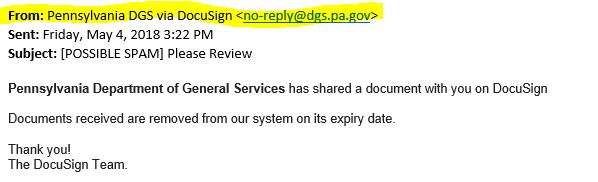
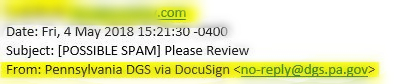
    Netizen has seen an uptick in phishing emails claiming to be from the Pennsylvania Department of General Services (DGS) and other government agencies. One particular email had an attached PDF form for download containing a link to a site that presents itself as a Microsoft login screen designed to steal credentials. However, further inspection of the email and, with closer scrutiny of the message headers, shows the true origin of this message, as seen in the images below. The PA DGS has sent out emails warning businesses about this campaign and has advised them to be cautious.

    phishing1

    The original message is listed above, claiming to be from the DGS.

    phishing2

    Taking a look at the original author’s ID, it is clearly not from the DGS but rather a breached private company that an attacker is using as a staging point to send spoofed email messages to other targets.

    Recommendations

    • Scrutinize your emails before clicking anything. Did you order or ask for anything for which you’re expecting a confirmation? Did the email come from a store you don’t usually order supplies from or a service you don’t use? If so, it’s probably a phishing attempt.
    • Verify that the sender is actually from the company sending the message
    • Did you receive a message or email from someone you don’t recognize? Are they asking you to sign into a website to give Personally Identifiable Information (PII) such as credit card numbers, social security number, etc. A legitimate company will never ask for PII via instant message or email—this is huge red flag.
    • Do not give out personal or company information.
    • Review both signature and salutation.
    • Do not click on attachments

    Do not click on unrecognized links. If you do proceed, verify that the URL is the correct one for the company/service and it has the proper security in place, such as:

    HTTPS2

    • Be wary of poor spelling, grammar, and formatting. As can be seen with the Dropbox phishing email, there are multiple spelling, grammar, and formatting errors, leading us to believe that the message is illegitimate. If an email is visually unprofessional, the sender is likely not who they say they are.
    • Many phishing emails pose a sense of urgency or even aggressiveness to prompt a form of intimidation. Any email requesting immediate action or that is addressing you in a threatening manner should be questionable. Also, beware of messages that seek to tempt users into opening an attachment or visiting a link. For example, an attachment titled “Staff Pay Raises 2018” may seem like something you really want to know about, but it could just be a ploy to plant malware on your system or steal your credentials.

    4. Android P

    Overview

    The current Android OS allows applications to access networking data by asking for permission, however, the permission’s text is ambiguous, leading users to give more access to these applications than they intend to. Threats to mobile phones are not typically taken into consideration, amplifying the risk if the phone affected is a work phone containing company information

    User-installed applications obtain permission and then tap into what is known as the “/proc/net” process, that allows these apps to detect any time whether or not a user is initiating a network connection, as well as what server they are connecting to. It is this information that allows the app’s creators to sell that data to advertisers.

    Recommendations

    We recommend upgrading to the latest Android OS known as Android P. Android P restricts access to the core OS processes, and will only allow said access to VPN applications, while any other must undergo a code audit. When available, Android P will:

    • Block cleartext (HTTP) traffic from apps.
    • Use the same UI when requesting fingerprint authentication across apps and devices.
    • Block background apps from accessing the phone’s camera and microphone.
    • Encrypt backups on the device with a local secret key before sending the backup for storage on Google’s servers.
    • Support for MAC address randomization.
    • Support for DNS over TLS

    5. Drupal Cryptojacking Campaign

    Overview

    Drupal has come under attack once more, as those who have not yet patched their sites have fallen victim to backdoors and coin miners. Given the aforementioned, more and more malware campaigns are targeting Drupal site, two of which have been discovered in the last week.

    Given the most recently discovered campaign, an estimated 350+ Drupal sites are running an in-browser coin-miner while the other crusade leaves PHP-based backdoors on all compromised servers for future access despite updating.

    Recommendations

    To prevent a breach or to mitigate site damage, we recommend:

    • Updating to the current Drupal versions that have patched these vulnerabilities if you have not already.
    • If you were hacked previously and then updated, run a thorough vulnerability scan of the site(s) to search for any backdoors as updating a hacked site will not completely remove the threat.
    • If compromised, consider restoring from an older backup, or try reinstalling the site from scratch.

    How can Netizen Help?

    Netizen ensures that security gets built-in and not bolted-on. Providing advanced solutions to protect critical IT infrastructure such as the popular “CISO-as-a-Service” wherein companies can leverage the expertise of executive-level cybersecurity professionals without having to bear the cost of employing them full time.  We also offer compliance support, vulnerability assessments, penetration testing, and more security-related services for businesses of any size and type.

    Additionally, Netizen offers an automated and affordable assessment tool that continuously scans systems, websites, applications, and networks to uncover issues. Vulnerability data is then securely analyzed and presented through an easy-to-interpret dashboard to yield actionable risk and compliance information for audiences ranging from IT professionals to executive managers.


  • Netizen Threat Brief: 2 May 2018 Edition

    Threats:

    Listed below is information regarding this week’s most critical threats and preventative measures to lessen the chances of a breach:

    1. Drupal Update
    2. HenBox
    3. Contagious WebEx
    4. USB Stick of Death

    1. Drupal Update

    Overview

    A critical vulnerability has been discovered in a popular open-source Content Management System (CMS) called Drupal. The platform is now being actively exploited by hackers to install cryptocurrency miners and also to launch Distributed Denial of Service (DDoS) attacks from the systems that they have compromised.

    In the wake of the discovered exploit a botnet has been identified as Muhstik. The Muhstik botnet is piggybacking off the Drupal bug, accessing URLs and injecting publicly available exploit code. The method by which the botnet injects code is allowing hackers to execute commands on targeted servers that are running Drupal.

    Update

    For the second time this month, websites utilizing the Drupal content management system have come under siege. The bug exists within multiple subsystems of Drupal 7.x and 8.x. While Drupal maintainers did not release the details of how the vulnerability can be exploited, they have confirmed that attacks are coordinated remotely.

    2. HenBox

    Overview

    A new strain of Android malware named HenBox has been masquerading as a variety of legitimate Android apps. HenBox impersonates applications such as VPN and Android system apps and often installs genuine versions of these apps along with HenBox, fooling users into thinking they downloaded the valid app. While some of the legitimate apps HenBox uses as decoys can be found on Google Play, HenBox applications themselves have only been found on third-party (non-Google Play) app stores. Users with company phones with access to company information would be a prime target for these malicious third-party apps.

    A hostname is an indicator of compromise commonly used as a target for communicating with malware, hosting malware, or serving as a vector for attacking targets in watering hole attacks. Malicious hostnames may exist within non-malicious domains, and usually indicate that the hostname’s domain has been compromised as part of a previous attack. This particular indicator of compromise is 3w.tcpdo.net.

    Recommendations

    We recommend:

    • Business smartphones should NOT use third-party party apps

    3. Contagious WebEx

    Overview

    Cisco’s popular web conferencing software, WebEx, can be exploited by an attacker to spread malware directly to other meeting participants, tricking them into executing it on their computers. Cisco’s vulnerability allows a maliciously laced Flash file (.swf) to be uploaded to a WebEx conference meeting attendee because there is by the WebEx client software. This means that within the software there is a lack of proper testing of an input that is supplied by either the user or the application. The point of input validation is to prevent any malformed data from entering a device, system, or process, that would otherwise cause damage.

    The vulnerability is deemed critical as many businesses utilize the conference software and a breach could most certainly prove disastrous. A threat actor interested in targeting a particular organization could take advantage of this flaw to introduce malware to their designated victim’s network. Typically, malware intended for a company arrives by way of a phishing email, making WebEx an unexpected entry point. When a file is shared among a trusted colleague over WebEx, the file is expected to be trustworthy as well.

    Recommendations

    We recommend updating your WebEx client to its most current version. The most recent updates address the vulnerability by simply no longer allowing the shared usage of Flash (.swf) files. This should not be too disruptive as it is not common to share such files in a WebEx meeting.

    4. USB Stick of Death

    Overview

    USB sticks outfitted with a maliciously crafted image of a Windows NT file system (NTFS), can be used to crash a Windows machine by simply inserting the USB stick into the appropriate port on the device without any further user interaction. The crashed system will display what is commonly referred to as the Blue Screen of Death (BSOD).

    A function known as auto-play is activated by default, leading to the automatic crash of the system once the USB stick is inserted. Regardless of whether autoplay has been disabled, the system will still crash so long as the file is accessed. The file access could from a user clicking on the file, or from passive access: Windows Defender scans, other Microsoft services or tool, etc. All of this can be accomplished even if the machine is locked.

    Recommendations

    Microsoft seemed hesitant, if not uninterested, when the issue was discovered. While it appears that a patch or update will not be possible, we still recommend the following to protect against malicious USB sticks:

    • It is always best practice to lock one’s workstation before leaving. This particular threat can still be activated even when locked, therefore we advise taking a mental note of your desk and device before leaving.
    • Do not accept any USB sticks from anyone that you do not know or trust. It is a common social engineering tactic among malicious actors to impersonate legitimate agencies and will stop by with trinkets like that of pens or USB sticks, in hopes that someone in the company will plug one of them into their computers.
    • Practice proper physical security of your If there are any visitors, whether they are present for a short or extended amount of time, they should not be left unattended anywhere in the office or building. An unsupervised, unauthorized individual may plug malicious USB sticks into workstations, servers, or even set up their own rouge access point, granting them access to the network.
    • Affected versions of Windows includes: Windows 7 Enterprise 6.1.7601 SP1, Build 7601 x64; Windows 10 Pro 10.0.15063, Build 15063 x64; and Windows 10 Enterprise Evaluation Insider Preview 10.0.16215, Build 16215 x64.

    How can Netizen help?

    Netizen ensures that security gets built-in and not bolted-on. Providing advanced solutions to protect critical IT infrastructure such as the popular “CISO-as-a-Service” wherein companies can leverage the expertise of executive-level cybersecurity professionals without having to bear the cost of employing them full time.  We also offer compliance support, vulnerability assessments, penetration testing, and more security-related services for businesses of any size and type.

    Additionally, Netizen offers an automated and affordable assessment tool that continuously scans systems, websites, applications, and networks to uncover issues. Vulnerability data is then securely analyzed and presented through an easy-to-interpret dashboard to yield actionable risk and compliance information for audiences ranging from IT professionals to executive managers.

  • Netizen Threat Brief: 24 April 2018 Edition

    Threats:

    Listed below is information regarding this week’s most critical threats and preventative measures to lessen the chances of a breach:

    1. Drupal Bug
    2. SCADA Router Flaws
    3. Windows Tech Support Scams
    4. LinkedIn AutoFill Plugin Flaw

    1. Drupal Bug

    Overview

    A highly critical vulnerability has been discovered in a popular open-source Content Management System (CMS) called Drupal. The platform is now being actively exploited by hackers to install cryptocurrency miners and to also launch Distributed Denial of Service (DDoS) attacks from the systems that they have compromised.

    In the wake of the discovered exploit a botnet has been identified as Muhstik. The Muhstik botnet is piggybacking off the Drupal bug, accessing URLs and injecting publicly available exploit code. The method by which the botnet injects code is allowing hackers to execute commands on targeted servers that are running Drupal.

    Recommendations

    The Muhstik botnet exploits versions 6, 7, and 8 of the Drupal CMS platform. The afflicted versions could potentially allow an attacker to exploit several vectors on a Drupal site, resulting in the site becoming completely compromised. Over a million Drupal sites have been discovered to be vulnerable to a condition where unauthorized and untrusted users (the attackers) could modify or even delete data hosted on the affected CMS platforms. Muhstik has the capability to install two coinminers – XMRig (XMR) and CGMiner – to mine the open-source, peer-to-peer Dash cryptocurrency.  Drupal has since released a patch for the exploit. We recommend upgrading and patching your Drupal site to the most current version.

    We also recommend:

    • Multifactor Authentication (MFA). It is always good to have an added layer of security if a password becomes compromised.
    • Utilizing complex and strong passwords. Muhstik scans for weak SSH passwords; don’t have one of them.
    • Examine install configurations for any issues (safe extensions, no default passwords, employ the principle of least privilege, access control etc.)
    • Apply all relevant patches and updates

    Muhstik Crypotmining Pool:

    • 47.135.208.145:4871

    Muhstik scans the following TCP ports using the aiox86 scanning module:

    • 80
    • 8080
    • 7001
    • 2004

    2. SCADA Router Flaws

    Overview

    The Moxa EDR-810 Series router protects critical facilities while also maintaining a fast transmission of data. Other features include redundancy protection measures: industrial firewall, NAT, VPN, and L2 (Layer 2) switching structures. Common vulnerabilities among Supervisory Control and Data Acquisition (SCADA) systems include firmware flaws, injections, and weak password encryption.

    An industrial router model is designed to provide multifunctional protection within industrial controls systems (ICS) and some models have been identified as having 17 security vulnerabilities. ICS includes pumping and treatment, distributed control systems, oil, energy, and automated manufacturing sectors to name a few. Some of the vulnerabilities are prone to high severity injection commands and denial of service (DoS) flaws, and some medium weaknesses such as password storage and encryption.

    However, with the Moxa EDR-810 series of SCADA router, it was discovered that attackers exploited vulnerabilities allowing the them escalate privileges through a specially crafted HTTP POST request, gaining access to the root shell and enabling control of the targeted device. Another flaw lets attackers exploit DoS flaws in the web server and Service Agent by way of specially crafted and designed HTTP URI and TCP ports of 4000 or higher; because of this vulnerability, an attacker can send a network packet that they created to, say, port 4001 causing the system to crash. In addition to the password storage and weak encryption threats, attackers were also able to perform cross-site request forgery (CSRF) to execute malicious code and reconfigure the device.

    Recommendations

    As always, we recommend updating the firmware to its latest version to avoid any weaknesses in the routers features. It is also recommended to apply the following practices to better safeguard your systems:

    • Network Segmentation: Partition and define the system into specific security zones to isolate and to implement layers of protection, especially for the critical parts of the network.
    • Patch Management: Ensure that your overall control system security is safe from the newest vulnerabilities by regularly installing vendor-released software patches.
    • Intrusion Detection: Establish system-monitoring methods for early identification of malicious activity in the network, from inside the organization to all other possible points of entry.
    • Periodic Assessment and Audits: Periodic testing and verification ensures that the security components of a system are running as assigned, thereby reducing windows of opportunity for threat actors.
    • Incident Planning and Response: Identify and establish a comprehensive proactive and reactive response plan that allow members of the organization to prevent incidents from scaling, as well as to know how to identify these incidents when they happen and what to do when they occur. This also calls for collaborative assessment, planning, maintenance, and implementation.

    3. Windows Tech Support Scams

    Overview

    Microsoft has revealed an increase in tech support scams around the world, jumping about 24% from previous statistics. An estimated 153,000 reports were received in response to the scams from users in 183 different countries. Of these reports, about 15% of victims gave the scammers their personal information. That is roughly 22,000 users that lost somewhere between $200-$400 each. One user in particular had their account drained of $110,000.

    Recommendations

    We also recommend the following to recognize a scam and what to do about it:

    • Verify the call. Is there a reason for them to be calling you?
    • Do not give out personal or company information over the phone.
    • Be aware that many of these scams attempt to tray and pose a sense of urgency or intimidation that is threatening (i.e. We are going to close out your account if you do not update your information.). These characteristics are indicative of a scam or phishing phone call.

    Microsoft states that receiving a phone call is never a good sign. An error message from Windows will not display a phone number. If any support were offered, they would direct you to the support section of their own website(s). Microsoft also stated that they would never just call out of the blue.

    4. LinkedIn AutoFill Plugin Flaw

    Overview

    LinkedIn’s widely popular AutoFill functionally was discovered to leak its users’ sensitive information to third party websites without the user even knowing about it. The AutoFill function described allows users to fill in their profile data quickly for convenience purposes. The information that can automatically be applied includes the user’s full name, email address, ZIP code, as well as their company and job title. It was previously understood that the AutoFill feature works solely on whitelisted websites, however this has been discovered to not be the case.

    A legitimate website would, more often than not, place an AutoFill button near the fields that can be populated, however, an attacker could use that kind of feature on their own website and change the properties so that the button is spread across the entire webpage, invisible to the user. The user then clicks anywhere on that page, and LinkedIn interprets this as the AutoFill button being pressed and sends the users’ data via an HTTP POST message to the malicious site.

    Recommendations

    LinkedIn has since released a patch, however we recommend not using autofill functions in general as they pose a security risk. Personal information should not be readily available in one click. In addition, be wary of phishing attempts, such as fake websites:

    • Do not click on attachments from unknown senders or for information that you did not request or even know anything about
    • Do not click on unrecognized links. If you do proceed, verify that the URL is the correct one for the company/service and it has the proper security in place (HTTPS).
    • Be wary of poor spelling, grammar, and formatting. Only give personal information to a known site that you trust.

    How can Netizen help?

    Netizen ensures that security gets built-in and not bolted-on. Providing advanced solutions to protect critical IT infrastructure such as the popular “CISO-as-a-Service” wherein companies can leverage the expertise of executive-level cybersecurity professionals without having to bear the cost of employing them full time.  We also offer compliance support, vulnerability assessments, penetration testing, and more security-related services for businesses of any size and type.

    Additionally, Netizen offers an automated and affordable assessment tool that continuously scans systems, websites, applications, and networks to uncover issues. Vulnerability data is then securely analyzed and presented through an easy-to-interpret dashboard to yield actionable risk and compliance information for audiences ranging from IT professionals to executive managers.


  • FDA plans to improve medical device cybersecurity
  • Netizen Threat Brief: 18 April 2018 Edition

    Threats:

    Listed below is information regarding this week’s most critical threats and preventative measures to lessen the chances of a breach:

    1. UPnP Vulnerability
    2. Microsoft Outlook Flaw
    3. Gh0st Rat

    1. UPnP Vulnerability

    Overview

    Over 65,000 home routers were discovered to proxy bad traffic for botnets, qualifying as an Advanced Persistent Threat (APT). Botnet operators as well as other cyber-espionage groups have been abusing the Universal Plug and Play (UPnP) protocol that has become standard among modern routers, to hide their real location from investigators.

    UPnP is a contemporary feature that makes it easier to interconnect local Wi-Fi-enabled devices and forward ports and services to the Internet. UPnP has become a crucial service, however, it has proven to be woefully insecure for many years and has since been exploited several times. Hackers have newly exploited a flaw in the service that lets the router expose UPnP meant for inter-device discovery via their WAN (Wide Area Network (external Internet)) interface.

    Misconfigured UPnP services may allow the injection of malicious routes inside of the router’s NAT (Network Address Translation) Tables, which is a set of rules that controls how IP addresses and ports from the routers internal network are mapped to the Internet. The custom NAT rules let an attacker connect to the router’s public IP with a specific port and then get redirected automatically to another IP and port; it is this vulnerability that hackers can exploit as a proxy server for their illegal operations.

    Recommendations

    Over 4.8 million routers are potentially vulnerable to the UPnP exploit. Around 400 models and 73 vendors have deemed vulnerable. While mass firmware updates would be ideal from vendors, there are steps that can be taken to mitigate the risks of becoming part of a botnet from the UPnP Proxy:

    2. Microsoft Outlook Flaw

    Overview

    A serious vulnerability has come to light in the popular mailing application, Microsoft Outlook. The vulnerability would allow attackers to steal sensitive information, including users’ Windows login credentials; convincing victims to preview an email with Microsoft Outlook absent of any required additional user authentication and interaction.

    The attackers exploit how Microsoft Outlook renders remotely-hosted Object Linking and Embedding (OLE) content when a Rich Text Format (RTF) email message is previewed and thus automatically initiates a Service Message Block (SMB) connection. SMB connections are used for sharing files.

    Microsoft Outlook automatically renders OLE content automatically and will initiate an immediate authentication with the attacker’s own controlled remote server over SMB (445) protocol using the single sign-on (SSO) feature, thus handing over the victim’s username and the NTLMv2 (Microsoft LAN Manager) hashed password; this has the potential to let the attacker gain access to the victim’s system.

    Recommendations

    The exploitation may leak a user’s IP address, domain name, username, hostname, and password hash. Furthermore, if the user’s password is not complex enough, then an attacker may be able to crack a password in a very short amount of time.

    While the patch is considered incomplete, there are still preventative measures one can take to protect their Microsoft Outlook account:

    • Avoid clicking on UNC style links that start with “\\”. These likely will connect to an SMB server.
    • Apply the latest MS Outlook update
    • As feasible, block specific ports (445/tcp, 137/tcp, 139/tcp, along with 137/udp and 139/udp) used for incoming and outgoing SMB sessions.
    • Block NT LAN Manager (NTLM) Single Sign-on (SSO) authentication.
    • Always use complex passwords, that cannot be cracked easily even if their hashes are stolen (you can use password managers to handle this task).
    • Most important, don’t click on suspicious links provided in emails.

    3. Gh0st RAT

    Overview

    Gh0st RAT (Remote Access Terminal) is a trojan Remote Access Tool that is typically used on Windows platforms, and has since been used to hack into some of the most sensitive computer networks on Earth.

    Gh0st RAT is capable of taking full control of the remote screen on the infected host. It also provides real time, as well as offline, keystroke logging. The malware is also known to:

    • Provide live feed of webcam, microphone of infected host.
    • Download remote binaries on the infected remote host.
    • Take control of remote shutdown and reboot of host.
    • Disable infected computer remote pointer and keyboard input.
    • Enter into shell of remote infected host with full control.
    • Provide a list of all the active processes.
    • Clear all existing SSDT of all existing hooks.

    Gh0st RAT consists of two components: client and server. The client is a Controller Application, which is often a Windows application that is used to track and manage Gh0st servers on remote compromised hosts. The main functions of this component is the management and control of Gh0st servers and the ability to create customized server install programs.

    Recommendations

    A Threat Group named “Iron Tiger” is one of the more prevalent crypto mining bot-farms currently in existence.  Iron Tiger is currently utilizing a variant of Gh0st RAT.

    Some Gh0st RAT keywords to look out for:

    • 7hero
    • Adobe
    • B1X6Z
    • BEiLa
    • BeiJi
    • ByShe
    • FKJP3
    • FLYNN
    • FWAPR
    • FWKJG
    • GWRAT
    • Gh0st

    For firewall traffic, be on the lookout for the following IPs:

    • 23.227.207.137
    • 89.249.65.194

    Should you notice traffic to these IP addresses, check the offending machine for the following IOCs:

    Malicious files directory:

    • C:\ProgramData\HIDMgr
    • C:\ProgramData\Rascon
    • C:\ProgramData\TrkSvr

    Malicious service name:

    • HIDMgr
    • RasconMan
    • TrkSvr

    Registry Key:

    • ‘rundll32.exe_malicious_DLL_path’ in ‘HKCU\Software\Microsoft\Windows\CurrentVersion\Run’

    How can Netizen help?

    Netizen ensures that security gets built-in and not bolted-on. Providing advanced solutions to protect critical IT infrastructure such as the popular “CISO-as-a-Service” wherein companies can leverage the expertise of executive-level cybersecurity professionals without having to bear the cost of employing them full time.  We also offer compliance support, vulnerability assessments, penetration testing, and more security-related services for businesses of any size and type.

    Additionally, Netizen offers an automated and affordable assessment tool that continuously scans systems, websites, applications, and networks to uncover issues. Vulnerability data is then securely analyzed and presented through an easy-to-interpret dashboard to yield actionable risk and compliance information for audiences ranging from IT professionals to executive managers.

  • Allentown, PA: Netizen Corporation, an award-winning provider of cyber security and related solutions for government and commercial markets, has hired Rocco Zegalia as Vice President (VP) of Sales and Marketing. Rocco was a successful Account Executive at a large advertising firm prior to joining Netizen and has over a two decades of enterprise sales and marketing experience. He is also veteran of the U.S. Air Force.

    At Netizen, Rocco oversees all commercial sales activities. He is responsible for continuing the rapid growth of Netizen’s commercial solutions division while enhancing the processes, tools and techniques utilized for company-wide sales and marketing. He also assists with government and defense business development activities on occasion.

    “We see in Rocco an ambition and talent for nurturing long-term relationships that is so critical for success in our industry. His marketing and advertising background will also help bring the message of our team’s deep cyber expertise, award-winning track record, and trusted products and services to new commercial markets worldwide,” said Max Harris, the Chief of Business Development for Netizen. He added that Rocco will work out of Netizen’s Allentown headquarters and target key geographic areas such as the Lehigh Valley, New York, Philadelphia, Harrisburg, Washington D.C. and other regions.

    Netizen, a security-cleared and certified veteran-owned company, has been awarded dozens of contracts to provide enterprise-level cyber security, compliance, and related solutions for federal government, Department of Defense (DoD), and Fortune Global 500 clients over the past few years. They also provide these solutions to state government, municipal, healthcare, and other commercial customers to aid in maintaining the security and compliance of IT systems, critical infrastructure, industrial controls, medical devices and more.

    About Netizen Corporation: Named the Lehigh Valley’s “Emerging Business of the Year” in 2015 and a recipient of Department of Defense (DoD) awards for superior customer service, Netizen is an Allentown, Pennsylvania based Service Disabled Veteran-Owned Business (SDVOSB) specializing in cyber security, compliance, and software assurance for defense, federal, and commercial markets. Their CyberSecure Solutions™ products and services are trusted by organizations both large and small to monitor and protect critical systems in a cost-effective manner.

    Learn more at https://www.NetizenCorp.com.

    POINT OF CONTACT:

    Max Harris
    Chief of Business Development
    1-800-450-1773 ext. 704
    mharris@netizencorp.com

     #####

  • U.S. and U.K. Warn of Cybersecurity Threat From Russia

    LONDON — The United States and Britain on Monday issued a first-of-its-kind joint warning about Russian cyberattacks against government and private organizations as well as individual homes and offices in both countries, a milestone in the escalating use of cyberweaponry between major powers.

    Read More………

  • Netizen Threat Brief: 11 April 2018 Edition

    Threats:

    Listed below is information regarding this week’s most critical threats and preventative measures to lessen the chances of a breach:

    1. Remote Keyboard App Vulnerability
    2. Cisco Switch Flaw
    3. Mirai Botnet
    4. Matrix Ransomware
    5. Auth0 Bypass Vulnerability

    1. Remote Keyboard App Vulnerability

    Overview

    A popular Android and iOS app known as Intel Remote Keyboard has come under siege as it has been discovered that local attackers can actually inject keystrokes into a remote keyboard session when the application is in use. The app is compatible with Intel’s min-PC platform called Next Unit of Computing (NUC) as well as Intel’s Compute Stick.

    The Intel Remote Keyboard application allows Android and iOS users to control their NUC and other Compute Stick devices with their smartphone or tablet using what is known as the peer-to-peer (P2P) network Protocol via Wi-Fi Direct. It was later discovered that a critical escalation of privilege vulnerability was possible in all versions of the Intel Remote Keyboard app. This critical vulnerability would allow an attacker to inject keystrokes as if they were a local user.

    Recommendations

    In addition to the main vulnerability, two other bugs had been found, granting the attackers the access to execute arbitrary code as a privileged user. Despite the rollout of patches in response to these glaring threats, Intel has intentions of discontinuing the application. There is still a product page for Remote Keyboard, and it is still available for download despite Intel’s statement. We recommend not downloading this app to completely prevent the risk of keyboard injections. If the application is already downloaded, we recommend entirely deleting the app altogether.

    2. Cisco Switch Flaw

    Overview

    Hackers haven begun to exploit and abuse a flaw in misconfigured Cisco switches in an effort to gain a point of entry into organizations across the world. A prior US-CERT advisory had warned that “Russian government cyber actors” and have targeted and infiltrated active organizations in the US energy grid, among other critical infrastructure networks. It is believed that the most recent exploitation of these Cisco switches are related to the same group.

    The attack itself targets the Cisco Smart Install (SMI) Client functionality of the Cisco switches. SMI is a legacy utility that is designed to allow a no-touch installation of Cisco switches. The SMI feature has since been superseded by the Cisco Network Plug and Play solution. The problem, however, is not inherent in the switches themselves, but rather in how they are configured. Many Cisco switch owners do not configure or disable the Smart Install protocol, which leaves the SMI client to run and wait in the background for installation or configuration commands. This overlooked switch configuration allows hackers to:

    • Modify TFTP server setting to exfiltrate configuration files via the TFTP protocol
    • Modify the switch general configuration file
    • Replace the IOS operating system image
    • Set up local accounts to let attackers log in and execute any IOS commands

    Recommendations

    Cisco has released the information that over 168,000 SMI-enabled Cisco devices still exist and are exposed on the Internet. We recommend disabling the SMI feature on the Cisco switch if at all possible; SMI operates on port 4786. Instructions for disabling the functionality can be found here: http://blog.talosintelligence.com/2018/04/critical-infrastructure-at-risk.html

    If SMI cannot be disabled for operational reasons, the switch should then be updated to its most recent OS version, which fixes this flaw as well. If it is unknown whether or not SMI-enabled devices exist on the local network, a port scan of the LAN should be able to discover any that allow this utility.

    3. Mirai Botnet

    Overview

    A botnet variant, known as Mirai, was used in at least one major attack against a financial sector company this past January. This is quite possibly the first time an Internet of Things (IoT) botnet has been observed to use a Distributed Denial of Service (DDoS) attack since a previous Mirai botnet takedown of multiple websites in 2017.

    The first attack, DNS amplification, occurred in late January of this year. A DNS amplification attack is a reflection-based DDoS attack; look-up requests are spoofed to DNS servers to hide the source of the exploit and direct the response to the target. The second attack targeted a financial sector company which had experienced a DDoS attack, likely using the same botnet.

    The companies affected were not identified, however it was disclosed that they are Fortune 500 firms. It was discovered that at least seven IP addresses acted as the controllers for the botnet and more likely than not were involved in the coordination of the attack. One of the companies had their customer services temporarily disrupted, but the full extent of financial or network damage is currently not yet known.

    Recommendations

    While this is the first botnet DDoS this year, it is reported that creators of a botnet made of infected home and small office routers are selling DDoS attacks for just $20 per target. Popular website and leading software development platform, Github, was also struck with a massive DDoS attack this past March. We recommend implementing the following strategies to any organizations using IoT devices to mitigate the risk of their devices being hacked by a botnet:

    • Always replace default manufacturer passwords immediately upon use.
    • Keep the firmware for devices current and up to date.
    • For IP camera and similar systems that require remote access, invest in a VPN.
    • Disable unnecessary services (e.g., Telnet) and close ports that are not required for the IoT device.

    4. Matrix Ransomware

    Overview

    Two new variants of Matrix Ransomware have recently been revealed. The malware is being installed through hacked Remote Desktop services (RDP). Both of these variants encrypt your computer’s files, characteristic of ransomware, however one of these variants is a bit more advanced and debugs more messages and uses ciphers to wipe free space disallowing victims the ability to use file recovery tools to recover their files.

    According to reports, this particular strain of ransomware is currently being distributed to victims by way of brute force attacks on Remote Desktop services connected directly to the internet. Once the attackers gain access to a computer, they can then proceed with uploading the Matrix Ransomware installer and then execute it.

    As mentioned previously, the two variants of the malware are being installed over a hacked RDP session where they then encrypt unmapped network shares, display status windows while encrypting, clear shadow volume copies, and then encrypt the filenames.

    Recommendations

    When protecting a company from ransomware, it is always good practice to use proper computing habits and security software. If computers running Remote Desktop services are connected directly to the Internet, make sure they are behind VPNs so that they are only accessible to those with VPN accounts on the company network. It would be useful to employ lockout policies to avert any brute force attack attempts over RDP. A strong defense would also include the implementation of an Antivirus software that operates based on recognized signatures or behaviors. We also recommend:

    • Employ routine backups
    • Do not open attachments if you do not know who sent them.
    • Do not open attachments until you confirm that the person actually sent you them,
    • Scan attachments with tools like VirusTotal.
    • Make sure all Windows updates are installed as soon as they come out! Also make sure you update all programs, especially Java, Flash, and Adobe Reader. Older programs contain security vulnerabilities that are commonly exploited by malware distributors, therefore it is important to keep them updated.
    • Make sure you use have some sort of security software installed that uses behavioral detections or white list technology. White listing can be a pain to train, but if you’re willing to stick with it, could have the biggest payoffs.
    • Use hard passwords and never reuse the same password on multiple sites.

    Matrix Ransomware variant hashes:

    • Variant 1: a26087bb88d654cd702f945e43d7feebd98cfc50531d2cdc0afa2b0437d25eea
    • Variant 2: 996ea85f12a17e8267dcc32eae9ad20cff44115182e707153006162711fbe3c9

    Associated Files:

    • #Decrypt_Files_ReadMe#.rtf
    • !ReadMe_To_Decrypt_Files!.rtf

    Associated email addresses:

    • RestorFile@tutanota.com,
    • RestoreFile@protonmail.com
    • RestoreFile@qq.com
    • Files4463@tuta.io
    • Files4463@protonmail.ch
    • Files4463@gmail.com

    How can Netizen help?

    Netizen ensures that security gets built-in and not bolted-on. Providing advanced solutions to protect critical IT infrastructure such as the popular “CISO-as-a-Service” wherein companies can leverage the expertise of executive-level cybersecurity professionals without having to bear the cost of employing them full time.  We also offer compliance support, vulnerability assessments, penetration testing, and more security-related services for businesses of any size and type.

    Additionally, Netizen offers an automated and affordable assessment tool that continuously scans systems, websites, applications, and networks to uncover issues. Vulnerability data is then securely analyzed and presented through an easy-to-interpret dashboard to yield actionable risk and compliance information for audiences ranging from IT professionals to executive managers.