• Overview

    • Phish Tale of the Week
    • Ransomware Attacks Hit Baltimore City Servers
    • Hospitals Demanding Better Cybersecurity from Device Makers
    • How Can Netizen Help?

    Phish Tale of the Week

    Malicious actors are often attempting to find an unassuming victim to target with the goals of persuading them to provide log-in credentials or download malware. Some of these targets are college students, busy with studies and maybe unaware to phishing attempts. 

    This week, we have an example of a phishing email that was sent to Lehigh University students, a local college renowned for its technologically advanced campus. This one contains a message to students claiming that their school-assigned email inbox has reached its data limit. There is a link that the phishing email claims to be a sign-in page for students to use in order to extend their “data quota”. As is the case with most phishing emails, there are many red flags in the email that should signal a malicious attempt on the recipient of the email.  

    Take a look below:

    Some tell-tale signs that raise suspicions:

    • Notice the awkward phrasing of the email body text, as well as the obvious error in repetition of the message beginning with the words “Further incoming…”.
    • With the mouse hovering over the link, it is clear to see that the link will not direct the student to a domain used by Lehigh University.


    General Recommendations:

    A phishing email will typically direct the user to visit a website where they are asked to update personal information, such as a password, credit card, social security, or bank account numbers. A legitimate company already has this sensitive information and would not ask for it again, especially via email. 

    • Scrutinize your emails before clicking anything. Did you order or ask for anything for which you’re expecting a confirmation? Did the email come from a store you don’t usually order supplies from or a service you don’t use? If so, it’s probably a phishing attempt.
    • Verify that the sender is actually from the company sending the message.
    • Did you receive a message or email from someone you don’t recognize? Are they asking you to sign into a website to give Personally Identifiable Information (PII) such as credit card numbers, social security number, etc. A legitimate company will never ask for PII via instant message or email—this is a huge red flag.
    • Do not give out personal or company information.
    • Review both signature and salutation.
    • Do not click on attachments.
    • Do not click on unrecognized links. If you do proceed, verify that the URL is the correct one for the company/service and it has the proper security in place, such as HTTPS.
    • Be wary of poor spelling, grammar, and formatting. As can be seen with the with this email, there are multiple spelling, grammar, and formatting errors, leading us to believe that the message is illegitimate. If an email is visually unprofessional, the sender is likely not who they say they are.

    Many phishing emails pose a sense of urgency or even aggressiveness to prompt a form of intimidation. Any email requesting immediate action or that is addressing you in a threatening manner should be questionable. Also, beware of messages that seek to tempt users into opening an attachment or visiting a link. For example, an attachment titled “Staff Pay Raises 2019” may seem like something you really want to know about, but it could just be a ploy to plant malware on your system or steal your credentials.

    Cybersecurity Brief

    In this week’s Cybersecurity Brief: Ransomware Attacks Hit Baltimore City, Hospitals Are Pushing For Better Device Cybersecurity

    Hospitals Taking Initial Steps In Improving Device Cybersecurity

    With the amount of connected devices hospitals use in daily operations, there is an initiative by hospitals pushing device makers to ensure the security of their products. This comes as a response to increased reports of cyberattacks and a growing recognition of both financial and patient safety concerns, especially as the threat becomes more real. The attention to cybersecurity follows health-care’s embrace in recent years of digital technologies, from electronic medical records to mobile lab tests. For hospitals, internet-connected devices offer the potential to monitor patients more continuously and closely, and use the data to guide—and improve—care.

    In stepping up their efforts, hospitals have gone beyond building firewalls and taking other actions to shield their own networks—they have moved into demanding information like the software running devices that manufacturers have long considered proprietary. Hospitals are running tests to detect device weaknesses, asking manufacturers to reveal proprietary software to assess vulnerabilities, and sometimes even rejecting bids or canceling orders for devices that don’t have adequate safety features. Some of these hospital’s requests have caused tensions with device manufacturers, although there’s also collaborations between the two parties in efforts to improve device cybersecurity. 

    In February of 2019, credit-rating agency Moody’s Investors Service ranked hospitals and healthcare facilities as one of the sectors most vulnerable to cyberattacks.

    Hospitals and Healthcare Facilities statistics:

    • More than 150 million personal health records have been breached in health-care company hacks since 2009.
    • The healthcare industry was the victim of 88 percent of all ransomware attack in U.S. industries in 2016.
    • In the past two years, 89 percent of healthcare organizations were breached.

    To read more about the increased hospital cybersecurity efforts, click here.

    Ransomware Attacks Hit Cleveland Airport

    For over a week, some Baltimore City government departments have been offline as a result of ransomware attacks on the city’s servers. The attacks, believed to be a ransomware called RobbinHood, have taken the city’s email services and other services offline. Fortunately, police, fire, and emergency response systems have not been affected by the attack, but nearly every other department of the city government has been affected in some way. 

    Baltimore Chief Information Officer Frank Johnson explained in a press conference last week that the malware was “the very aggressive RobbinHood ransomware” and that the FBI had identified it as a “fairly new variant” of the malware. The newer version of the ransomware has emerged over the past month. The nature of the ransomware, believed to be spread directly to the individual machines via psexec and/or domain controller compromise, since the ransomware itself does not have any network spreading capabilities and is meant to be deployed for each machine individually, means that the attacker would need to already have gained administrative-level access to a system on the city’s network.

    The city is still recovering from the attacks, which have disrupted everything from real estate transactions, on-line bill payments for residents, and services such as telecommunications. Ransomware attacks typically are all about making money: Attackers demand a fee to decrypt victims’ files they have accessed and encrypted. This is the second successful attack on Baltimore, in such a short time frame, which highlights the obstacles many local governments face when it comes to cyber security.

    The Big Picture:

    No business or organization is invulnerable to a cyberattack, as these incidents prove. Business and safety operations can be heavily impacted and result in the loss of millions of dollars. To better protect your business or organization, take a proactive stance about cybersecurity. 

    To read the original article by arsTECHNICA, click here.

    How Can Netizen Help?

    Netizen ensures that security gets built-in and not bolted-on. Providing advanced solutions to protect critical IT infrastructure such as the popular “CISO-as-a-Service” wherein companies can leverage the expertise of executive-level cybersecurity professionals without having to bear the cost of employing them full time. 

    We also offer compliance support, vulnerability assessments, penetration testing, and more security-related services for businesses of any size and type. 

    Additionally, Netizen offers an automated and affordable assessment tool that continuously scans systems, websites, applications, and networks to uncover issues. Vulnerability data is then securely analyzed and presented through an easy-to-interpret dashboard to yield actionable risk and compliance information for audiences ranging from IT professionals to executive managers.


    Netizen is an ISO 27001:2013 (Information Security Management) certified company. We are a proud Service-Disabled Veteran-Owned Small Business that is recognized by the U.S. Department of Labor for hiring and retention of military veterans. 


    Copyright © 2019 Netizen Corporation. All rights reserved.

  • Overview

    • Phish Tale of the Week
    • Microsoft Reveals Email Services Hack
    • Cleveland Hopkins International Airport Attacked by Ransomware
    • How Can Netizen Help?

    Phish Tale of the Week

    People always assume they can spot a malicious email because they’ve seen them before.  And to a point, that’s true. However, the malcontents who send them are always changing their methods. The more times people fall prey to phishes, the more success (and money) the authors enjoy.

    This week, we have an example of an improvement in the level of sophistication of a phishing email. This one contains formatting that is consistent with the Microsoft Outlook environment, which makes it more attractive to employees. Plus, there’s a green box telling the reader ‘the sender of this message is trusted’, meaning it’s legit, right? 

    Take a look below:

    Once again, however, some tell-tale signs raise suspicions:

    • An unusually long email address in the FROM field, and one with an unfamiliar domain. This one appears to have originated in Japan.
    • The time stamp says the message was received at 4:29 PM, yet the body of the message claims “a message wasn’t delivered at 7:59 AM”.
    • Unless there is a digital signature employed, the phrase the sender of this message is trusted is far from a guarantee. 

    Additionally, as mentioned in our previous bulletins, the subject line is prefaced with the [EXTERNAL] tag, which is a feature of Microsoft Office 365. This is easy to identify as coming from outside the Netizen environment.


    General Recommendations:

    A phishing email will typically direct the user to visit a website where they are asked to update personal information, such as a password, credit card, social security, or bank account numbers. A legitimate company already has this sensitive information and would not ask for it again, especially via email. 

    • Scrutinize your emails before clicking anything. Did you order or ask for anything for which you’re expecting a confirmation? Did the email come from a store you don’t usually order supplies from or a service you don’t use? If so, it’s probably a phishing attempt.
    • Verify that the sender is actually from the company sending the message.
    • Did you receive a message or email from someone you don’t recognize? Are they asking you to sign into a website to give Personally Identifiable Information (PII) such as credit card numbers, social security number, etc. A legitimate company will never ask for PII via instant message or email—this is a huge red flag.
    • Do not give out personal or company information.
    • Review both signature and salutation.
    • Do not click on attachments.
    • Do not click on unrecognized links. If you do proceed, verify that the URL is the correct one for the company/service and it has the proper security in place, such as HTTPS.
    • Be wary of poor spelling, grammar, and formatting. As can be seen with the with this email, there are multiple spelling, grammar, and formatting errors, leading us to believe that the message is illegitimate. If an email is visually unprofessional, the sender is likely not who they say they are.

    Many phishing emails pose a sense of urgency or even aggressiveness to prompt a form of intimidation. Any email requesting immediate action or that is addressing you in a threatening manner should be questionable. Also, beware of messages that seek to tempt users into opening an attachment or visiting a link. For example, an attachment titled “Staff Pay Raises 2019” may seem like something you really want to know about, but it could just be a ploy to plant malware on your system or steal your credentials.

    Cybersecurity Brief

    In this week’s cybersecurity brief: Ransomware Attacks Hit Cleveland Airport, Microsoft Email Services Accounts Compromised by Hackers

    Microsoft Email Services Accounts Compromised by Hackers

    In an alert notification sent by Microsoft to impacted users, the software giant informed its customers about a breach in its email services that gave hackers access to user’s information for nearly three months. Microsoft says that among the information that was breached were email addresses, subjects of emails, and contact names. 

    In an official statement released by Microsoft, officials said “This unauthorized access could have allowed unauthorized parties to access and/or view information related to your email account (such as your email address, folder names, the subject lines of emails, and the names and email addresses you communicate with), but not the content of any emails or attachments.” 

    Initially, Microsoft notified users that their login credentials were not directly impacted by the hack, but the software company did advise that users change passwords. Microsoft also said that only a limited subset of customer accounts were affected by the breach and the scheme was already addressed by blocking the attacker’s access. Around 6% of the affected individuals were notified that the attackers could have had unauthorized access to the content of their email accounts.

    Recommendations:

    • Reset your Microsoft account password
    • Be wary of an increase in phishing or spam emails
    • Pay attention to questionable domain names in emails
    • Do not provide personal information or payments
    • Avoid suspicious email links and attachments

    To read more about the Microsoft hack, clickhere.

    Ransomware Attacks Hit Cleveland Airport


    Cleveland Hopkins International Airport was hit by a ransomware attack that has halted the services for days as an investigation is underway by the FBI.

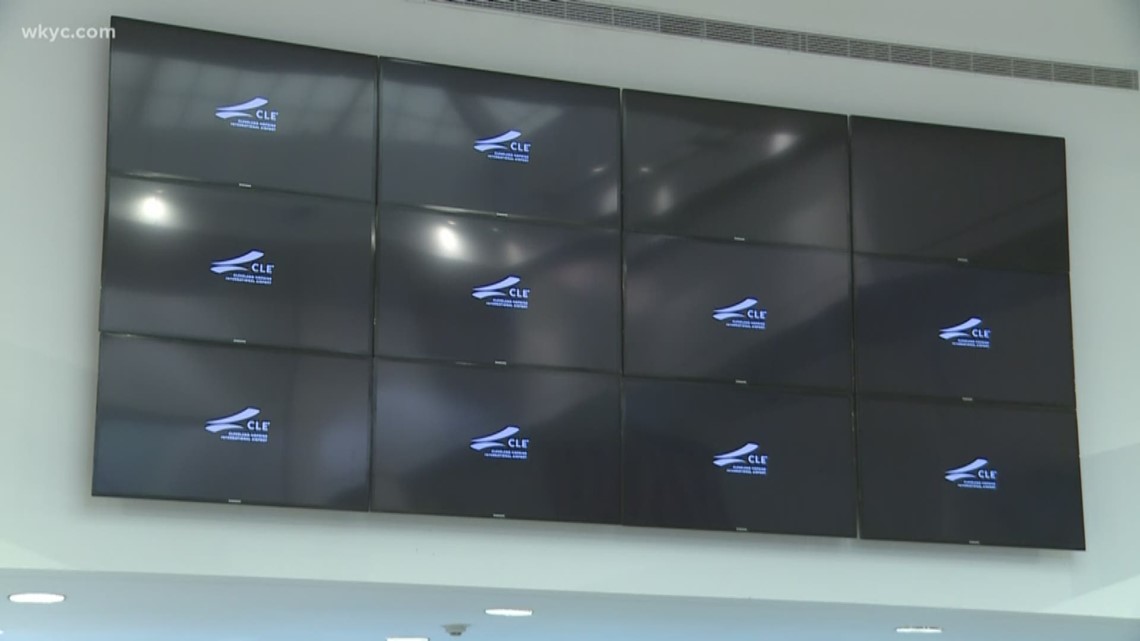
    Cleveland Hopkins International Airport’s information systems were targeted by a cyberattack that crippled information screens that display in-airport flight arrivals, departures and baggage claims. An investigation is under way by the FBI in order to determine the source of the attack and to restore the services back to normal operations. Additionally, the airport-affiliated emails were taken down by the attack as well. 

    In a statement released by the City of Cleveland, officials said:

    “Email is temporarily down as well as in-airport flight and baggage information screens. All other systems are functioning as normal and there are no impacts to flights or safety and security operations…To help clarify some misinformation that is being circulated, core business systems such as accounting, payroll, timekeeping, etc., which are maintained at the City level, were not compromised and remain fully functional.”

    The Big Picture:

    No business is invulnerable to a cyberattack, as these incidents clearly show. Business operations and safety operations can be heavily impacted and result in the loss of millions of dollars. To better protect your business or organization, take a proactive stance about cybersecurity. 

    To read the original article by CYWARE, clickhere.


    How Can Netizen Help?

    Netizen ensures that security gets built-in and not bolted-on. Providing advanced solutions to protect critical IT infrastructure such as the popular “CISO-as-a-Service” wherein companies can leverage the expertise of executive-level cybersecurity professionals without having to bear the cost of employing them full time. 

    We also offer compliance support, vulnerability assessments, penetration testing, and more security-related services for businesses of any size and type. 

    Additionally, Netizen offers an automated and affordable assessment tool that continuously scans systems, websites, applications, and networks to uncover issues. Vulnerability data is then securely analyzed and presented through an easy-to-interpret dashboard to yield actionable risk and compliance information for audiences ranging from IT professionals to executive managers.


    Netizen is an ISO 27001:2013 (Information Security Management) certified company. We are a proud Service-Disabled Veteran-Owned Small Business that is recognized by the U.S. Department of Labor for hiring and retention of military veterans. 

    Copyright © 2019 Netizen Corporation. All rights reserved.

  • Overview

    • Phish Tale of the Week
    • Security Flaws in Enterprise VPN Apps
    • WPA3 Security Vulnerabilities Discovered
    • How Can Netizen Help?

    Phish Tale of the Week

    Phishing attacks are attempts by a hacker, masquerading as a trusted person or entity, to steal vital information such as login credentials, credit card information, or personal information by persuading the victim to open an email, instant message or text message. 

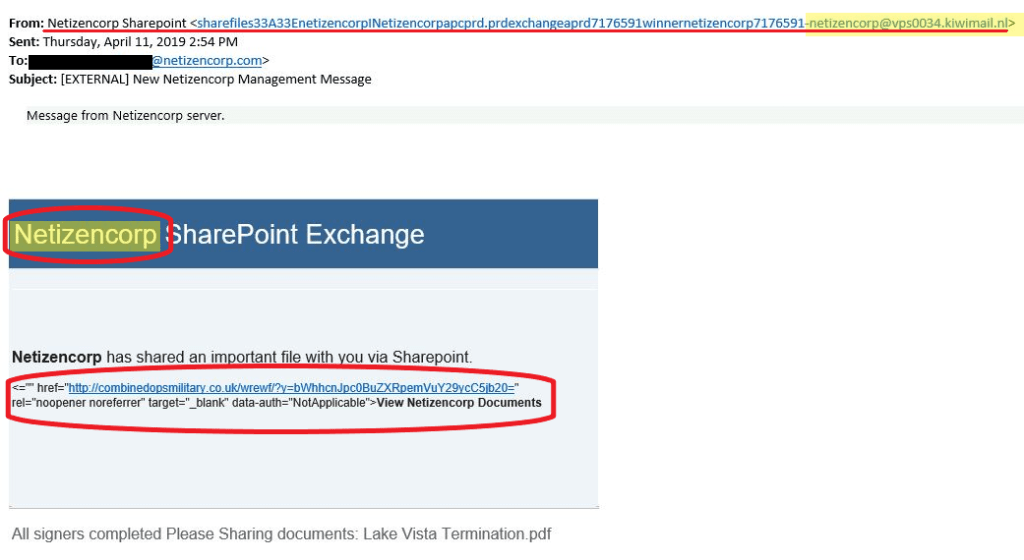
    In this particular attempt sent to an executive faculty member, a malicious actor tries to lure his would-be victim into clicking on links with malware packages. The attacker attempts to persuade the recipient of the email to click on an “important file” shared from a colleague. Again, the attacker is relying on people’s inherent trust in others to gain access to sensitive information. 

    An example email follows below:

    As mentioned in the previous Cybersecurity Bulletin, the subject line is prefaced with the [EXTERNAL] tag, which is a feature of Microsoft Office 365.  This is easy to identify as coming from outside the Netizen environment.

    The items that draw attention to a likely phish attempt include:

    • An unusually long email address in the FROM field, and one with an unfamiliar domain
    • An unusual corporate name; Netizen’s own internal server is not called “Netizencorp”
    • Broken HTML string in the body of the message


    General Recommendations:

    A phishing email will typically direct the user to visit a website where they are asked to update personal information, such as a password, credit card, social security, or bank account numbers. A legitimate company already has this sensitive information and would not ask for it again, especially via email. 

    • Scrutinize your emails before clicking anything. Did you order or ask for anything for which you’re expecting a confirmation? Did the email come from a store you don’t usually order supplies from or a service you don’t use? If so, it’s probably a phishing attempt.
    • Verify that the sender is actually from the company sending the message.
    • Did you receive a message or email from someone you don’t recognize? Are they asking you to sign into a website to give Personally Identifiable Information (PII) such as credit card numbers, social security number, etc. A legitimate company will never ask for PII via instant message or email—this is a huge red flag.
    • Do not give out personal or company information.
    • Review both signature and salutation.
    • Do not click on attachments.
    • Do not click on unrecognized links. If you do proceed, verify that the URL is the correct one for the company/service and it has the proper security in place, such as HTTPS.
    • Be wary of poor spelling, grammar, and formatting. As can be seen with the with this email, there are multiple spelling, grammar, and formatting errors, leading us to believe that the message is illegitimate. If an email is visually unprofessional, the sender is likely not who they say they are.

    Many phishing emails pose a sense of urgency or even aggressiveness to prompt a form of intimidation. Any email requesting immediate action or that is addressing you in a threatening manner should be questionable. Also, beware of messages that seek to tempt users into opening an attachment or visiting a link. For example, an attachment titled “Staff Pay Raises 2018” may seem like something you really want to know about, but it could just be a ploy to plant malware on your system or steal your credentials.

    Cybersecurity Brief

    In this week’s cybersecurity brief: Four Enterprise Vendor’s VPN Apps Have Security Flaws, WPA3 Revealed to be Susceptible to Security Bugs

    Department of Homeland Security Reveals Security Flaws in VPN Apps

    An alert issued by the Department of Homeland Security’s Cybersecurity and Infrastructure Security Agency states that a vulnerability bug present in several enterprise VPN apps may allow a hacker to remotely access a company’s internal network. The warning was issued following a public disclosure by CERT/CC, the vulnerability disclosure center at Carnegie Mellon University. 

    These enterprise VPN apps, built by vendors Cisco, Palo Alto Networks, Pulse Secure and F5 Networks contain a security bug that stores the session cookies and authentication tokens on a user’s computer to allow the user to remain logged into the VPN without having to reenter their credentials frequently. However, if these tokens were ever to be stolen, the hacker would be granted access to the internal network without needing the user’s password. These tokens could be stolen through malware and used to infiltrate company apps, systems and data. 

    As of now, the only vendor to confirm the vulnerability of their app and issue a patch was Palo Alto Networks. F5 networks reportedly knew about the security bug since 2013 but recommended that users simply apply two-factor authentication instead of releasing a patch. Neither Cisco nor Pulse Secure have patched their apps. 

    To read more about the VPN security flaw, click here.

    WPA3 Discovered to be Susceptible to WPA2 Backwards Compatibility Flaws


    The newest version of Wi-Fi Protected Access protocol has been released for nearly a year and a half. Before that, Wi-Fi networks had been protected by WPA2, which contained many critical vulnerabilities. Primarily centered around the authentication handshake between devices connecting to a network, these vulnerabilities were exploited by hackers frequently, prompting the creation of the new standard, WPA3. WPA3 was designed to protect against those vulnerabilities by employing a new handshake method called “Dragonfly”, which was hailed as invulnerable to the security vulnerabilities of WPA2. However, security researchers Mathy Vanhoef and Eyal Ronen discovered that the new Dragonfly has vulnerabilities due to its backward compatibility with devices that can’t connect using WPA3. Fortunately, the vulnerabilities were caught early in the life cycle and can be fixed with software patches.

    The vulnerabilities included means for an attacker to gather information from the handshake about the passwords being used on the network and even a way to bypass the protocol’s security feature and obtain the handshake by masking the WPA3 as a version of its predecessor. 

    In a statement released by the Wi-Fi Alliance, the industry group that commissioned WPA3, officials said:

    “Recently published research identified vulnerabilities in a limited number of early implementations of WPA3-Personal, where those devices allow collection of side channel information on a device running an attacker’s software, do not properly implement certain cryptographic operations, or use unsuitable cryptographic elements. WPA3-Personal is in the early stages of deployment, and the small number of device manufacturers that are affected have already started deploying patches to resolve the issues. These issues can all be mitigated through software updates without any impact on devices’ ability to work well together. There is no evidence that these vulnerabilities have been exploited.”

    To read the original article by ArsTechnica, click here.


    How Can Netizen Help?

    Netizen ensures that security gets built-in and not bolted-on. Providing advanced solutions to protect critical IT infrastructure such as the popular “CISO-as-a-Service” wherein companies can leverage the expertise of executive-level cybersecurity professionals without having to bear the cost of employing them full time. 

    We also offer compliance support, vulnerability assessments, penetration testing, and more security-related services for businesses of any size and type. 

    Additionally, Netizen offers an automated and affordable assessment tool that continuously scans systems, websites, applications, and networks to uncover issues. Vulnerability data is then securely analyzed and presented through an easy-to-interpret dashboard to yield actionable risk and compliance information for audiences ranging from IT professionals to executive managers.


    Netizen is an ISO 27001:2013 (Information Security Management) certified company. We are a proud Service-Disabled Veteran-Owned Small Business that is recognized by the U.S. Department of Labor for hiring and retention of military veterans. 

    Copyright © 2019 Netizen Corporation. All rights reserved.

  • Overview

    • Phish Tale of the Week
    • U.S. Government Contractor Hacked
    • New Malware Targets Point-Of-Sale Systems
    • How Can Netizen Help?

    Phish Tale of the Week

    It’s early morning, and you open your e-mail in-box and see a message from your boss.  Your boss is asking you for your personal cell phone number, telling you there is an urgent task that needs to be done by you. What do you do?

    An example email follows below:

    This is an example of phish that was received by several people in our organization last week.  At a quick glance, many would be willing to provide the CEO of the company; who wants the boss to be kept waiting, especially when there’s an urgent task to be completed??

    That reaction is what the hackers are hoping to capitalize. Having an employee’s personal cell phone number is an attack vector which can be leveraged to encourage the employee to, perhaps, make purchases or transfer funds on behalf of the CEO

    Once again, there is a trail of clues that you can use to identify this phishing email as a scam.

    • Unusual email addresses in the heading: in this case, the address is an external address, not the corporate address, and is generic in naming. 
    • An unusual request for a cell phone number; would the CEO ask you for your number? The odds are pretty good that the CEO has your phone number already if there was a need to reach out to you for such a request.

    This kind of phishing email relies on our desire to help, and it effective, since the examples are so commonly found.  Companies should ensure positive confirmation when any such request is made, to prevent this kind of attack of being effective.

    General Recommendations:

    A phishing email will typically direct the user to visit a website where they are asked to update personal information, such as a password, credit card, social security, or bank account numbers. A legitimate company already has this sensitive information and would not ask for it again, especially via email. 

    • Scrutinize your emails before clicking anything. Did you order or ask for anything for which you’re expecting a confirmation? Did the email come from a store you don’t usually order supplies from or a service you don’t use? If so, it’s probably a phishing attempt.
    • Verify that the sender is actually from the company sending the message.
    • Did you receive a message or email from someone you don’t recognize? Are they asking you to sign into a website to give Personally Identifiable Information (PII) such as credit card numbers, social security number, etc. A legitimate company will never ask for PII via instant message or email—this is a huge red flag.
    • Do not give out personal or company information.
    • Review both signature and salutation.
    • Do not click on attachments.
    • Do not click on unrecognized links. If you do proceed, verify that the URL is the correct one for the company/service and it has the proper security in place, such as HTTPS.
    • Be wary of poor spelling, grammar, and formatting. As can be seen with the with this email, there are multiple spelling, grammar, and formatting errors, leading us to believe that the message is illegitimate. If an email is visually unprofessional, the sender is likely not who they say they are.

    Many phishing emails pose a sense of urgency or even aggressiveness to prompt a form of intimidation. Any email requesting immediate action or that is addressing you in a threatening manner should be questionable. Also, beware of messages that seek to tempt users into opening an attachment or visiting a link. For example, an attachment titled “Staff Pay Raises 2018” may seem like something you really want to know about, but it could just be a ploy to plant malware on your system or steal your credentials.

    Cybersecurity Brief

    In this week’s cybersecurity brief: US Data Contractor Suffers Massive Data Breach, New Malware Targets POS Systems to Steal Credit Card Information

    Citrix Suffers Massive Data Breach

    Citrix has been hacked by IRIDIUM, a group of Iranian-backed hackers, who had extracted over 6 terabytes of data during Christmas time and was notified by the FBI of the incident on Mar 6. The group seems to have gained access using a technique called ‘password spraying’, which takes a small number of very common passwords and attempts them on many user accounts, thereby avoiding many account lockout mechanisms. This technique is harder to detect than brute-force password techniques. Password spraying is initially targeted towards a small group of users in hopes of a compromise. If access is gained, the attackers download the Global Address List for that organization in order to continue the password spraying on a larger target group. The group has been focusing on U.S. Government contractors & agencies, being linked to over 200 attacks. While there is no evidence the attacks directly penetrated U.S. Government networks, the breach carries a potential risk that the hackers could eventually find their way into sensitive government networks.
    To read more about the Citrix breach, click here.


    GlitchPOS Is a New Malware Targeting Point-Of-Sales Systems

    A new malware called GlitchPOS has been recently gained   popularity amongst cyber criminals as an easy-to-use credit  card capturing malware. The malware infects a point-of-sale  (PoS) system through a phishing email that is downloaded  onto a computer in the same network. Once the malware  infects the PoS, it begins sending credit card information  back to the owner of the malware. The alarming  characteristic about this malware is that it was developed for non-technical criminals to target PoS systems. The malware package even has a dashboard that allows the criminal to access the “clients list” of infected systems and a panel listing all of the stolen credit card information. 

    The pre-built software sells for $250, and can be a very enticing deal for cyber criminals looking to target the restaurant and hospitality industries, as recent trends show. 

    What does this mean for you?

    Business Owners: If your business commonly uses a PoS system and credit card transactions, it is important to ensure that you remain PCI compliant. Getting on-going network monitoring from cybersecurity experts is also highly recommended. 

    Consumers: Ensure that you trust the vendor using your credit information and often monitor your credit card activity. 

    To read the original article by ThreatPost, click here. 


    How Can Netizen Help?

    Netizen ensures that security gets built-in and not bolted-on. Providing advanced solutions to protect critical IT infrastructure such as the popular “CISO-as-a-Service” wherein companies can leverage the expertise of executive-level cybersecurity professionals without having to bear the cost of employing them full time. 

    We also offer compliance support, vulnerability assessments, penetration testing, and more security-related services for businesses of any size and type. 

    Additionally, Netizen offers an automated and affordable assessment tool that continuously scans systems, websites, applications, and networks to uncover issues. Vulnerability data is then securely analyzed and presented through an easy-to-interpret dashboard to yield actionable risk and compliance information for audiences ranging from IT professionals to executive managers.


    Netizen is an ISO 27001:2013 (Information Security Management) certified company. We are a proud Service-Disabled Veteran-Owned Small Business that is recognized by the U.S. Department of Labor for hiring and retention of military veterans. 

    Copyright © 2019 Netizen Corporation. All rights reserved.
  • Netizen Cybersecurity Bulletin

    Overview

    • Phish Tale of the Week
    • Cybersecurity Brief
    • How Can Netizen Help?

    Phish Tale of the Week

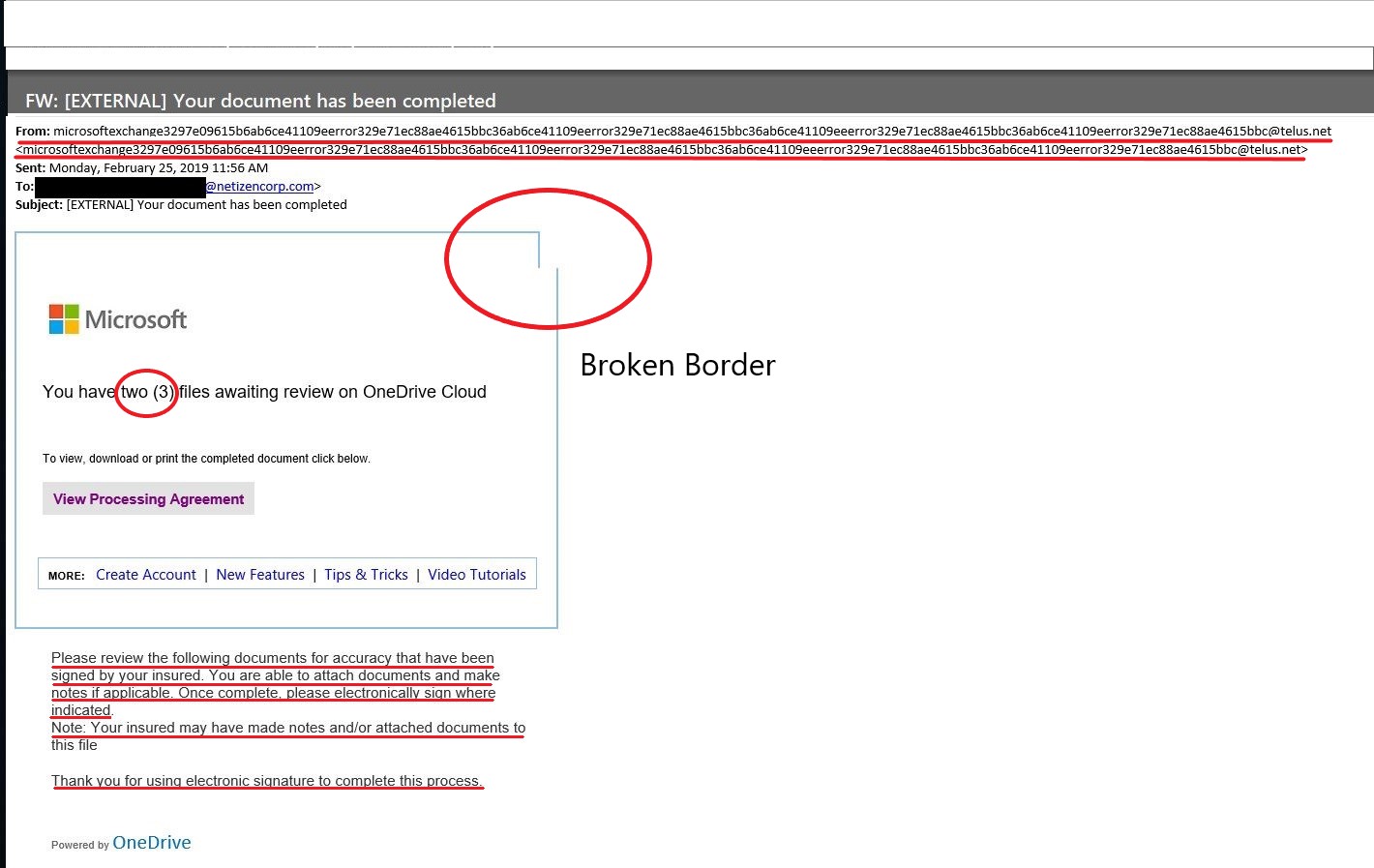
    This week, we are featuring another phishing email that was received in our office. What you see (below) is an attempt by a hacker to collect log-in information from anyone falling for the phish. The perpetrator sent this email to a company-wide distribution list with the hopes of obtaining log-in information from an executive-level employee. Although it might seem tailored to target a specific company or organization, this week’s phish is typical in that it offers something to the recipient that would be a normal function in almost any business. In the body, the email states the purpose of the message is that it is being sent for “your” review and signature. This indicates that the target is a “decision maker” that would presumably have access to a business’ sensitive information. The bait is often a call to act on something by clicking or following a link to a fake log-in page, in this case, “3 files” awaiting “your” review. OneDrive and SharePoint are frequent vehicles for these attacks, because of the number of users of these Microsoft products. An example email follows below:

    Why do cybercriminals love using file-sharing services to propagate an attack? In instances where a cybercriminal uses file-sharing services, a phishing email is sent with a link to a fake sign-in page that would prompt the target to enter their log-in credentials. These credentials are then collected to use that account to target other users in the organization. The good news? There is a trail of clues that you can use to identify this phishing email as a scam. 

    • Unusual email addresses in heading: Notice the length of the email address at the top of the message. 
    • Formatting of the frame surrounding the message is broken.
    • The message in the body text contains errors and doesn’t flow smoothly.

    On its face, this kind of phishing email is easy to spot – particularly if you know what to look for. Yet these kinds of scams are used widely, simply because they do work on individuals who are not educated on social engineering tactics.

    General Recommendations:

    A phishing email will typically direct the user to visit a website where they are asked to update personal information, such as a password, credit card, social security, or bank account numbers. A legitimate company already has this sensitive information and would not ask for it again, especially via email. 

    • Scrutinize your emails before clicking anything. Did you order or ask for anything for which you’re expecting a confirmation? Did the email come from a store you don’t usually order supplies from or a service you don’t use? If so, it’s probably a phishing attempt.
    • Verify that the sender is actually from the company sending the message.
    • Did you receive a message or email from someone you don’t recognize? Are they asking you to sign into a website to give Personally Identifiable Information (PII) such as credit card numbers, social security number, etc. A legitimate company will never ask for PII via instant message or email—this is a huge red flag.
    • Do not give out personal or company information.
    • Review both signature and salutation.
    • Do not click on attachments.
    • Do not click on unrecognized links. If you do proceed, verify that the URL is the correct one for the company/service and it has the proper security in place, such as HTTPS.
    • Be wary of poor spelling, grammar, and formatting. As can be seen with the with this email, there are multiple spelling, grammar, and formatting errors, leading us to believe that the message is illegitimate. If an email is visually unprofessional, the sender is likely not who they say they are.

    Many phishing emails pose a sense of urgency or even aggressiveness to prompt a form of intimidation. Any email requesting immediate action or that is addressing you in a threatening manner should be questionable. Also, beware of messages that seek to tempt users into opening an attachment or visiting a link. For example, an attachment titled “Staff Pay Raises 2018” may seem like something you really want to know about, but it could just be a ploy to plant malware on your system or steal your credentials.

    Cybersecurity Brief

    In this week’s cybersecurity brief: Google Chrome reports a HIGH severity vulnerability, Microsoft Announces End of Support for Windows 7

    Google Chrome Vulnerability

    Security researcher Clement Lecigne of Google’s Threat Analysis Group discovered and reported a HIGH severity vulnerability in Chrome late last month that could allow remote attackers to execute arbitrary code and take full control of the computers. According to Google officials, this zero-day vulnerability (a vulnerability that is publicly unknown and therefore exploited with much greater effect due to non-existing security patches or updates) is actively being exploited in the wild by attackers to target Chrome users. You must update your Google Chrome immediately to the latest version of the web browsing application. The vulnerability, assigned as CVE-2019-5786, affects the web browsing software for all major operating systems including Microsoft Windows, Apple macOS, and Linux. 

    Recommendations:
    Ensure your Google Chrome is up to date immediately. The patched version is 72.0.3626.121. You can check which version you are running by going to Settings>About Chrome.
    To read more about the Google Chrome vulnerability, click here.

    Microsoft Ends Windows 7 Support

    Microsoft has announced that in roughly one year’s time – January 14, 2020 – support for Windows 7 will officially end. That means customers will no longer receive updates or patches, including security fixes after that date. Windows 7 was initially introduced by Microsoft in 2009 and was replaced by Windows 10 in 2015. With Microsoft’s recent reports stating that over half of Microsoft devices run Windows 10, the decision was made to end support for the older Windows version. 

    What does this mean for organizations still using Windows 7?
    There are two ways that Microsoft can still provide security updates and fixes after January 14, 2020. These two ways were designed for business customers and not commercial consumers. Microsoft will allow customers with volume-licensing agreements to purchase Extended Security Updates (ESUs) on a per-device basis with prices increasing yearly. As most devices running Windows 7 did not begin running the operating system until well into the product’s life cycle, this brace period gives businesses a chance to begin phasing out of Windows 7 and migrating to Microsoft 365, as suggested by Microsoft. 

    Organizations still using Windows 7 must take the necessary steps to ensure their system’s security remains up-to-date post January 14th, 2020. 

    To read the original article by ZDNet, click here.

    How Can Netizen Help?

    Netizen ensures that security gets built-in and not bolted-on. Providing advanced solutions to protect critical IT infrastructure such as the popular “CISO-as-a-Service” wherein companies can leverage the expertise of executive-level cybersecurity professionals without having to bear the cost of employing them full time. 

    We also offer compliance support, vulnerability assessments, penetration testing, and more security-related services for businesses of any size and type. 

    Additionally, Netizen offers an automated and affordable assessment tool that continuously scans systems, websites, applications, and networks to uncover issues. Vulnerability data is then securely analyzed and presented through an easy-to-interpret dashboard to yield actionable risk and compliance information for audiences ranging from IT professionals to executive managers.


    Netizen is an ISO 27001:2013 (Information Security Management) certified company. We are a proud Service-Disabled Veteran-Owned Small Business that is recognized by the U.S. Department of Labor for hiring and retention of military veterans. 

  • NETIZEN AUTOSTIG SOFTWARE RECOGNIZED BY FedHealthIT MAGAZINE

    Allentown, PA: Netizen Corporation, an ISO 27001:2013 certified provider of cyber security solutions for defense, government and commercial markets, was recently recognized by FedHealthIT Magazine for its AutoSTIG™ suite of software tools. Named one of the “5 Solutions Disrupting the Federal Health Market,” AutoSTIG™ is an automated tool that validates the secure configuration of servers, network devices, software, and other information technology (IT) systems in accordance with Defense Information Systems Agency (DISA) guidelines.

    Originally developed by Netizen in support of cyber security engineering and validation efforts at the Department of Defense (DoD), AutoSTIG™ reduces the typical security assessment time from over an hour to less than 5 minutes for many IT systems while exporting results into a format usable by existing tracking and reporting tools. AutoSTIG™ is currently being leveraged by customers ranging from the federal government and DoD to Fortune 500 companies around the country to assess and secure their IT infrastructure faster and more effectively than manual methods.

    “We are honored that our AutoSTIG™ software was recognized by this prestigious publication and are immensely proud of the innovations being developed by our team of engineers here at Netizen,” said Michael Hawkins, President and CEO. He added, “We’re excited to also announce that, since this recognition was formally published late last year, we have developed additional AutoSTIG™ functionality supporting Windows 10 and Windows Server 2012 R2 with more are on the way all the time.”

    Netizen is not a “general information technology (IT) services company” but rather a highly specialized cyber security and compliance solutions provider that works in partnership with IT departments, information system owners/developers, and IT Managed Service Providers (MSPs) to ensure appropriate levels of security and compliance controls are implemented and maintained for all types of systems.

    About Netizen Corporation: Named the Lehigh Valley’s “Veteran Owned Business of the Year” and the region’s 7th fastest growing company, Netizen is an Allentown, PA based Veteran-Owned company (SDVOSB) specializing in cyber security and related solutions for commercial and government markets. Netizen was also a recipient of the U.S. Department of Labor Platinum Medallion Award for their commitment to veteran hiring and other accolades, such as FedHealthIT 100 and CDCA Innovation Spotlight awards, for several of their products and services. Their new commercial-focused subsidiary, CyberSecure Solutions, is also trusted to engineer, audit, and maintain cyber security solutions for businesses of nearly every size and type worldwide. Learn more at NetizenCorp.com and goCyberSecure.com.

  • Netizen Cybersecurity Bulletin 20 February 2019

    In This Issue:

    In this week’s issue, you’ll find information regarding the most current critical threats and preventative measures to lessen the chances of a breach.

    • Phish Tale of the Week
    • How Can Netizen help?

    Phish Tale of the Week

    This week we are featuring another phishing email that was received in our office.

    Hackers have been known to send threatening emails to scare users into sending money, most often in bitcoin, to an encrypted address. More recently there has been a spike in what are known as sextortion emails. Sextortion emails begin with an unsolicited message claiming to have photographic or video evidence of the user accessing pornographic material. The user is then blackmailed into sending money, under the fear the hacker will release the photos/videos to the user’s mailing list (including coworkers, relatives, etc.).

    An example email follows below:

    The good news? It’s a scam. There is no video or photograph; the hacker is relying completely on fear and intimidation. Hackers have, at times, progressed in their scare tactics by enclosing legitimate usernames and passwords within the email. It is likely that the hackers have discovered a stockpile of compromised passwords from previous data breaches and are thus utilizing them to make the threat more believable.

    In the above example, the message asks the reader to send a Bitcoin ransom to the hacker’s ‘wallet,’  and in exchange, the hacker promises to delete all incriminating evidence.   On its face, this one is easy to spot – particularly if you haven’t engaged in the activities described within the email. Yet these kinds of scams are used widely, simply because they do work.

    Combating this kind of Phish:

    • Scrutinize your emails. If something does not feel right, it probably isn’t.
    • These emails are designed to convey fear and intimidation. Bottom line: don’t panic. If you receive an email that looks anything like the above, it is a scam. You should contact your supervisor or system administrator.

    General Recommendations:

    A phishing email will typically direct the user to visit a website where they are asked to update personal information, such as a password, credit card, social security, or bank account numbers. A legitimate company already has this sensitive information and would not ask for it again, especially via email.

    • Scrutinize your emails before clicking anything. Did you order or ask for anything for which you’re expecting a confirmation? Did the email come from a store you don’t usually order supplies from or a service you don’t use? If so, it’s probably a phishing attempt.
    • Verify that the sender is actually from the company sending the message.
    • Did you receive a message or email from someone you don’t recognize? Are they asking you to sign into a website to give Personally Identifiable Information (PII) such as credit card numbers, social security number, etc. A legitimate company will never ask for PII via instant message or email—this is a huge red flag.
    • Do not give out personal or company information.
    • Review both signature and salutation.
    • Do not click on attachments.
    • Do not click on unrecognized links. If you do proceed, verify that the URL is the correct one for the company/service and it has the proper security in place, such as HTTPS.
    • Be wary of poor spelling, grammar, and formatting. As can be seen with the with this email, there are multiple spelling, grammar, and formatting errors, leading us to believe that the message is illegitimate. If an email is visually unprofessional, the sender is likely not who they say they are.

    Many phishing emails pose a sense of urgency or even aggressiveness to prompt a form of intimidation. Any email requesting immediate action or that is addressing you in a threatening manner should be questionable. Also, beware of messages that seek to tempt users into opening an attachment or visiting a link. For example, an attachment titled “Staff Pay Raises 2018” may seem like something you really want to know about, but it could just be a ploy to plant malware on your system or steal your credentials.

    How Can Netizen Help?

    Netizen ensures that security gets built-in and not bolted-on. Providing advanced solutions to protect critical IT infrastructure such as the popular “CISO-as-a-Service” wherein companies can leverage the expertise of executive-level cybersecurity professionals without having to bear the cost of employing them full time.

    We also offer compliance support, vulnerability assessments, penetration testing, and more security-related services for businesses of any size and type.

    Additionally, Netizen offers an automated and affordable assessment tool that continuously scans systems, websites, applications, and networks to uncover issues. Vulnerability data is then securely analyzed and presented through an easy-to-interpret dashboard to yield actionable risk and compliance information for audiences ranging from IT professionals to executive managers.


    Netizen is an ISO 27001:2013 (Information Security Management) certified company.

  • Netizen Cybersecurity Bulletin 06 February 2019

    In This Issue:

    In this week’s issue, you’ll find information regarding the most current critical threats and preventative measures to lessen the chances of a breach.

    • Microsoft Exchange Vulnerability
    • 2019 Already Marred by a Slew of Data Breaches
    • Linux Backdoor Trojan Set For Major Attack
    • Linux APT Flaw
    • Phish Tale of the Week
    • How Can Netizen help?

    Microsoft Exchange Vulnerability

    Versions of Microsoft Exchange 2013 and newer are vulnerable to an attack that can give someone administrator rights at potentially 90% of organizations that run Active Directory and Exchange. This attack is made possible by the fact that Exchange has extensive default privileges that can’t be patched. If a malicious actor has a foothold in a Windows network, they can exploit the vulnerability and get domain administrator rights, which are the effectively the keys to the kingdom.

    CERT has released an advisory that identifies the problem as Exchange not authenticating NTLM traffic properly, which is what allows an attacker to give themselves privileges. Exchange 2010 is unaffected due to not using NTLM traffic, which is generally opposite of how things work.

    Recommendations:

    • Remove the unnecessary high privileges that Exchange has on the Domain object
    • Block Exchange servers from making connections to workstations on arbitrary ports.
    • Enable Extended Protection for Authentication on the Exchange endpoints in IIS
    • Remove the registry key which makes relaying back to the Exchange server possible, as discussed in Microsoft’s mitigation for CVE–2018–8518.
    • Enforce SMB signing on Exchange servers to prevent cross-protocol relay attacks to SMB.

    2019 Already Marred by a Slew of Data Breaches

    We are one month into the new year, and so far 2019 has shown no sign of decline in data incidents. Just alone last week companies including Airbus, Discover Financial, IT management giant Rubrik, the City of St. John in New Brunswick, Canada and the State Bank of India all reported exposures.

    Discover Financial has reported a possible merchant data breach that could have compromised user accounts to the State of California Attorney General’s office, in compliance with that state’s data breach rules. “We can confirm this incident did not involve any Discover systems, and we are forwarding this to the appropriate parties for review,” the company said in a media statement issued on Twitter. “We’re aware of a possible merchant data breach & are monitoring accounts. Our members can rest assured they’re never responsible for unauthorized purchases on their Discover card accounts.”

    The incident appears to have taken place on August 13, 2018, but Discover has stated how much personal information was compromised or how many individuals were affected. Those that were affected by the data breach will be getting new cards to replace the compromised cards.

    The next set of data breaches occurred due to misconfigured servers coming from Rubrik, the IT security and cloud data management giant. This breach exposed tens of gigabytes of customer information which was caused by improperly storing the data on an Amazon Elasticsearch database. The server wasn’t properly protected and had no passwords to secure it, leaving it accessible to the whole world. The compromised data dates back to October 2018 and contained the following information:

    • Customer Names
    • Contact Information
    • Contents of customer service emails
    • Customer IT/Cloud setup and configuration information
    • Email signatures with names
    • Job titles
    • Phone numbers

    No comments were every stated by the company.

    The other similar data breach occurred at the State Bank of India, which India’s largest financial institution. This breach exposed millions of customer data containing text messages, account balances, recent transactions, partial bank account numbers, and customers’ phone numbers. This breach was caused by an unsecured server (aka missing a password).

    The final breach occurred in the Canadian city of St. John where the credit card information of 6000 people were being sold on the dark web. This breach was caused by a skimmer being install on the third-party parking system that the city uses. This breach collected data fro roughly 18 months until being discovered.

    Recommendations:

    • For credit/debit cards, always check your bank statements to verify that all purchases made were authorized by you. Should you find a transaction not authorized by you, contact your card company immediately to have the transaction canceled and reissue different cards to replace the old ones.
    • For the server breaches, make sure your systems are configured with a strong password consisting of a minimum of 10 characters with a mix of alphanumeric and special characters; if a particular system does not support ten character passwords, then the maximum number of characters allowed by that system shall be used
    • For the card skimmer, sometimes the skimming devices are placed over the original and doesn’t sit flush with the frame of the device. Give the card slot a hard tug. If the card slot comes off, then you found a skimmer. From there alert the owner of the device and contact local authorities. Also, the same recommendation for the credit/debit cards applies as well.

    Linux Backdoor Trojan Set For Major Attack

    A recent backdoor trojan name “SpeakUp” has been discovered exploiting multiple Linux servers, which run more than 90 percent of the top 1 million domains in the United States. Using a complex set of tools, the trojan is capable of infecting hosts and propagating, which analysts say could indicate that it’s poised for a major cyber offensive on a vast number of infected hosts.

    The research was released by Check Point on Monday at the recent CPX360 event in Las Vegas, detailing that the trojan is being used in a cryptomining campaign that is gaining momentum and has targeted more than 70,000 servers worldwide. The Trojan looks to target on-premises servers as well as cloud-based servers as well.

    The initial infection vector begins with targeting a recently reported vulnerability in ThinkPHP (CVE-2018-20062) and injecting a PHP shell that allows execution of a Perl backdoor. After control of the server is obtained, the Trojan continues to ask the command server for any new tasks, which can include downloading and executing a file from any remote server, or even kill and uninstall the program.

    SpeakUp is capable of propagation as well by brute-forcing administrative panels using pre-defined lists of usernames and passwords, along with scanning of the network environment of the infected server. By scanning for the availability of specific ports on servers that share the same internal and external subnet masks, it can look to infect additional servers on the network.

    “SpeakUp’s obfuscated payloads and propagation technique is beyond any doubt the work of a bigger threat in the making,” according to the analysis. “It is hard to imagine anyone would build such a compound array of payloads just to deploy few miners. The threat actor behind this campaign can at any given time deploy additional payloads, potentially more intrusive and offensive. It has the ability to scan the surrounding network of an infected server and distribute the malware.”

    Linux APT Flaw

    Security research has revealed a critical remote code execution flaw in Linux APT. Vulnerability dubbed CVE-2019-3462 is within the APT package manager; an extremely popular utility and tool when it comes to installation, updates, and upgrades, and the removal of software on many flavors of Linux distributions including Debian and Ubuntu. The issue lies with APT’s failure to sanitize particular parameters during HTTP redirects; this failure opens up the potential for a man-in-the-middle (MiTM) attack in which the attacker can inject malicious content and trick the host system into installing tampered packages.

    HTTP redirects are utilized in APT, specifically the “apt-get” command, to help Linux machines to automatically request packages from proper mirror servers where others may not be available for distribution. In short, if one source fails to respond, the APT will then redirect or respond with another location of the next available source where the client should request the desired package. Not only would the attacker be able to insert themselves in the middle with a malicious mirror and execute arbitrary code, but they could do so with the highest level of privileges (i.e., root). While it has not been confirmed, it is possible that this vulnerability affects all package downloads, whether it be a new package or updating an old one.

    Recommendations:

    APT has since released a patch for the flaw in patch number 1.4.9. So it is imperative that systems be updated as soon as feasible, while also considering some other layers of security:

    • Utilize signature-based verification to protect the integrity of packages.
    • Implement HTTPS to prevent active exploitation (HTTP with SSL/TLS Encryption).

    Phish Tale of the Week

    This week we are featuring a phishing email that was received in our office.  The message asks the reader to download an attachment that appears to be PDF.  As the sender is unknown to the recipient, this was easy to avoid.  However, it is easy to imagine anyone of us busily reviewing our inbox and downloading the file without taking a moment to consider who sent it.  A closer examination of the file revealed it did contain malware.

    The advice here is perhaps the oldest rule: Never download an attachment from an unknown person.

    Recommendations:

    A phishing email will typically direct the user to visit a website where they are asked to update personal information, such as a password, credit card, social security, or bank account numbers. A legitimate company already has this sensitive information and would not ask for it again, especially via email.

    • Scrutinize your emails before clicking anything. Did you order or ask for anything for which you’re expecting a confirmation? Did the email come from a store you don’t usually order supplies from or a service you don’t use? If so, it’s probably a phishing attempt.
    • Verify that the sender is actually from the company sending the message.
    • Did you receive a message or email from someone you don’t recognize? Are they asking you to sign into a website to give Personally Identifiable Information (PII) such as credit card numbers, social security number, etc. A legitimate company will never ask for PII via instant message or email—this is a huge red flag.
    • Do not give out personal or company information.
    • Review both signature and salutation.
    • Do not click on attachments.
    • Do not click on unrecognized links. If you do proceed, verify that the URL is the correct one for the company/service and it has the proper security in place, such as HTTPS.
    • Be wary of poor spelling, grammar, and formatting. As can be seen with the with this email, there are multiple spelling, grammar, and formatting errors, leading us to believe that the message is illegitimate. If an email is visually unprofessional, the sender is likely not who they say they are.

    Many phishing emails pose a sense of urgency or even aggressiveness to prompt a form of intimidation. Any email requesting immediate action or that is addressing you in a threatening manner should be questionable. Also, beware of messages that seek to tempt users into opening an attachment or visiting a link. For example, an attachment titled “Staff Pay Raises 2018” may seem like something you really want to know about, but it could just be a ploy to plant malware on your system or steal your credentials.

    How Can Netizen Help?

    Netizen ensures that security gets built-in and not bolted-on. Providing advanced solutions to protect critical IT infrastructure such as the popular “CISO-as-a-Service” wherein companies can leverage the expertise of executive-level cybersecurity professionals without having to bear the cost of employing them full time.

    We also offer compliance support, vulnerability assessments, penetration testing, and more security-related services for businesses of any size and type.

    Additionally, Netizen offers an automated and affordable assessment tool that continuously scans systems, websites, applications, and networks to uncover issues. Vulnerability data is then securely analyzed and presented through an easy-to-interpret dashboard to yield actionable risk and compliance information for audiences ranging from IT professionals to executive managers.


    Netizen is an ISO 27001:2013 (Information Security Management) certified company.

  • Netizen Cybersecurity Bulletin 23 January 2019

    In This Issue:

    In this week’s issue, you’ll find information regarding the most current critical threats and preventative measures to lessen the chances of a breach.

    • Apple Vishing Scam
    • Banking Trojan Emotet Is Back In A New Form
    • Authentication Flaw Found In Cisco SOHO Switches
    • Linux APT Flaw
    • Phish Tale of the Week
    • How Can Netizen help?

    Apple Vishing Scam

    There is a new vishing (phone phishing) scam that people are encountering that spoofs official Apple Inc phone numbers. Automated calls are going out that look official on people’s phones, displaying Apple’s logo, address, and real phone number, and warning people that there has been a data breach at Apple. The interesting, and scary, part is that the phone call is indistinguishable from legitimate calls to and from Apple in the phone’s recent calls list.

    If someone picks up this scam call, they would hear that multiple servers containing Apple user IDs have been compromised and to call back to a 1-866 number which definitely doesn’t belong to Apple. If the number is called, you would hear an automated system answer telling you that you’ve reached Apple support and your expected wait time. You’d then hear a non-English speaker, likely someone from India, ask you about your call reason.

    This is almost certainly a scheme to get unsuspecting people to divulge their personal and/or financial details, using the frightening tail of your information having been stolen. The fact that iPhones can’t tell the difference between a scammer spoofing Apple’s number and a legitimate one is worrying, as many people might fall prey to this clever tactic.

    Recommendations:

    Knowledge about these types of scams in the first place helps immensely. If you get a seemingly official looking call from a company you know where they are asking for personal and/or financial details, hang up, find the official company number from the company’s website and call them back. Don’t rely on a search engine result to tell you, as scammers have been polluting search results to get their numbers to appear and seem more legitimate.

    Banking Trojan Emotet Is Back In A New

    Companies are on alert as the infamous Emotet Trojan has emerged on the cybersecurity radar ready to cause damage. What is Emotet? It is an advanced, modular banking Trojan that primarily functions as a downloader or dropper of other banking Trojans. This Trojan was first discovered in 2014 and was originally designed to sneak onto you computer and seal sensitive and private information. Later versions of the software saw the addition of spamming and malware delivery services including other banking Trojans.

    How does the Emotet Trojan spread? It is usually spread through SPAM emails using a malicious script, a macro-enabled document file (like a Word attachment), or a malicious link. These emails will look very legit containing familiar branding designed to look like a legitimate email. Emotet may try to persuade users to click the malicious files by using tempting language about “Your Invoice,” “Payment Details,” or possibly an upcoming shipment from well-known parcel companies. Once it is downloaded to a victims computer it turns into an almost worm-like malware and starts spreading on the network and also starts installing other Trojans to the infected machine. It will also ransack your contact lists and send itself to your friends, family, coworkers and clients. Since these emails are coming from your hijacked email account, the emails look less like spam and the recipients, feeling safe, are more inclined to click bad URLs and download infected files. Finally, if a connected network is present, Emotet spreads using a list of common passwords, guessing its way onto other connected systems in a brute-force attack. If the password to the all-important human resources server is simply “password” then it’s likely Emotet will find its way there.

    Why is Emotet coming back? Emotet is coming back by bypassing SPAM email detectors. How it does this is the Trojan is polymorphic. What this means is that every time the Trojan is downloaded it changes itself to evade signature-based detection. Moreover, Emotet knows if it’s running inside a virtual machine (VM) and will lay dormant if it detects a sandbox environment. Emotet also uses C&C (Command & Control) servers to receive updates. This works in the same way as the operating system updates on your PC and can happen seamlessly and without any outward signs. This allows the attackers to install updated versions of the software, install additional malware such as other banking Trojans, or to act as a dumping ground for stolen information such as financial credentials, usernames and passwords, and email addresses.

    Why Should I be Worried? Emotet can attack anyone and has no specific target list. To date, Emotet has hit individuals, companies, and government entities across the United States and Europe, stealing banking logins, financial data, and even Bitcoin wallets. One close and noteworthy Emotet attack occurred on the City of Allentown, PA and required direct help from Microsoft’s incident response team to clean up and reportedly cost the city upwards of $1M to fix. However, on this most recent addition of the virus no activity is currently being detected in Russia which indicates that the attackers are likely not based in Russia.

    Recommendations:

    • Keep your computer/endpoints up-to-date with the latest patches for Microsoft Windows. Emotet may rely on the Windows EternalBlue vulnerability to do its dirty work, so don’t leave that back door open into your network.
    • Don’t download suspicious attachments or click a shady-looking link. Emotet can’t get that initial foothold on your system or network if you avoid those suspect emails. Take the time to educate your users on how to spot mailspam.
    • Educate yourself and your users on creating a strong password. While you’re at it, start using two-factor authentication.
    • You can protect yourself and your users from Emotet with a robust cybersecurity program that includes multi-layered protection.

    Authentication Flaw Found in Cisco SOHO Switches

    A critical and unpatched vulnerability was found in the popular Cisco Small Business Switch software that leaves remote, unauthenticated attackers gaining full administrative control over the device.

    The vulnerability (CVE-2018-15439) which was found to have a Common Vulnerability Scoring System (CVSS) severity score of 9.8, was found due to the default configuration on the devices include a default, privileged admin user account that is used for initial login of the device, and can not be removed. The account may be disabled but only after another user account is created with the same privilege level. Once that additional account is removed, the system automatically re-enables the default privileged account without any form of notification to system administrators.

    As these switches are used to manage a LAN, an exploit means that the remote attacker would be able to gain access to network security functions such as firewalls, or management interfaces for administrating data and wireless connectivity or VOIP network devices.

    Cisco has advised that “Under these circumstances, an attacker can use this account to log into an affected device and execute commands with full admin rights.” adding that “It could allow an unauthenticated, remote attacker to bypass the user-authentication mechanism of the affected device.”

    Currently, no patch that addresses the current vulnerability is available. However, Cisco says a patch is expected to be released the future; for now, users can address the vulnerability by configuring an account using admin as user ID, setting the access privilege to level 15, and defining the password by replacing <strong_password> with a complex password chosen by the user, according to the advisory. By adding this user account, the default privileged account will be disabled.  Make certain to record and secure the password for this Switch device.

    Linux APT Flaw

    Security research has revealed a critical remote code execution flaw in Linux APT. Vulnerability dubbed CVE-2019-3462 is within the APT package manager; an extremely popular utility and tool when it comes to installation, updates, and upgrades, and the removal of software on many flavors of Linux distributions including Debian and Ubuntu. The issue lies with APT’s failure to sanitize particular parameters during HTTP redirects; this failure opens up the potential for a man-in-the-middle (MiTM) attack in which the attacker can inject malicious content and trick the host system into installing tampered packages.

    HTTP redirects are utilized in APT, specifically the “apt-get” command, to help Linux machines to automatically request packages from proper mirror servers where others may not be available for distribution. In short, if one source fails to respond, the APT will then redirect or respond with another location of the next available source where the client should request the desired package. Not only would the attacker be able to insert themselves in the middle with a malicious mirror and execute arbitrary code, but they could do so with the highest level of privileges (i.e., root). While it has not been confirmed, it is possible that this vulnerability affects all package downloads, whether it be a new package or updating an old one.

    Recommendations:

    APT has since released a patch for the flaw in patch number 1.4.9. So it is imperative that systems be updated as soon as feasible, while also considering some other layers of security:

    • Utilize signature-based verification to protect the integrity of packages.
    • Implement HTTPS to prevent active exploitation (HTTP with SSL/TLS Encryption).

    Phish Tale of the Week

    The phishing email this week claims to be a OneDrive email that was sent from a Xerox multi-function printer.  Not only is the sender suspect, but closer examination of the “View Document” link shows an unknown malicious site.

    Recommendations:

    A phishing email will typically direct the user to visit a website where they are asked to update personal information, such as a password, credit card, social security, or bank account numbers. A legitimate company already has this sensitive information and would not ask for it again, especially via email.

    • Scrutinize your emails before clicking anything. Did you order or ask for anything for which you’re expecting a confirmation? Did the email come from a store you don’t usually order supplies from or a service you don’t use? If so, it’s probably a phishing attempt.
    • Verify that the sender is actually from the company sending the message.
    • Did you receive a message or email from someone you don’t recognize? Are they asking you to sign into a website to give Personally Identifiable Information (PII) such as credit card numbers, social security number, etc. A legitimate company will never ask for PII via instant message or email—this is a huge red flag.
    • Do not give out personal or company information.
    • Review both signature and salutation.
    • Do not click on attachments.
    • Do not click on unrecognized links. If you do proceed, verify that the URL is the correct one for the company/service and it has the proper security in place, such as HTTPS.
    • Be wary of poor spelling, grammar, and formatting. As can be seen with the with this email, there are multiple spelling, grammar, and formatting errors, leading us to believe that the message is illegitimate. If an email is visually unprofessional, the sender is likely not who they say they are.

    Many phishing emails pose a sense of urgency or even aggressiveness to prompt a form of intimidation. Any email requesting immediate action or that is addressing you in a threatening manner should be questionable. Also, beware of messages that seek to tempt users into opening an attachment or visiting a link. For example, an attachment titled “Staff Pay Raises 2018” may seem like something you really want to know about, but it could just be a ploy to plant malware on your system or steal your credentials.

    How Can Netizen Help?

    Netizen ensures that security gets built-in and not bolted-on. Providing advanced solutions to protect critical IT infrastructure such as the popular “CISO-as-a-Service” wherein companies can leverage the expertise of executive-level cybersecurity professionals without having to bear the cost of employing them full time.

    We also offer compliance support, vulnerability assessments, penetration testing, and more security-related services for businesses of any size and type.

    Additionally, Netizen offers an automated and affordable assessment tool that continuously scans systems, websites, applications, and networks to uncover issues. Vulnerability data is then securely analyzed and presented through an easy-to-interpret dashboard to yield actionable risk and compliance information for audiences ranging from IT professionals to executive managers.


    Netizen is an ISO 27001:2013 (Information Security Management) certified company.

  • U.S. ARMY AWARDS NETIZEN $4.8M CYBER SECURITY CONTRACT

    Allentown, PA: Netizen Corporation, an ISO 27001:2013 certified provider of cyber security solutions for defense, government and commercial markets, was awarded a $4,800,000 contract with the U.S. Army Corps of Engineers (USACE) Engineer Research and Development Center (ERDC) which began on December 1, 2018. The work under the contract includes National Institute of Standards and Technology (NIST) Risk Management Framework (RMF) Security Control Assessment-Validation (SCA-V) and Cyber Security Engineering services for Department of Defense (DoD) systems and enclaves throughout the United States, Middle East, Europe, and Asia.

    Netizen is working with subcontractors Integration Innovation, Inc. (i3) and COLSA Corporation – both of Huntsville, AL – to ensure that military information technology (IT) infrastructure is secure and protected from a variety of cyber threats while also fully compliant with NIST RMF, the Federal Information Management Security Act (FISMA), and other requirements. This is accomplished by performing extensive security assessments and engineering consultations. This contract is a follow-on to work that Netizen has been successfully performing for the U.S. Army over the last two years.

    “Netizen is renowned for the high level of quality, skill, and expertise that we offer, as this latest contract award demonstrates. As such, our customers can be certain that the service they receive will always be top-tier. Most of them continually renew and expand existing contracts with us specifically to retain the capabilities that our team provides,” said Max Harris, Netizen’s Chief of Business Development. He added Netizen is excited to work with two highly capable and well-respected teaming partner companies, i3 and COLSA, on this contract and each company anticipates hiring several new employees.

    Netizen is not a “general information technology (IT) services company” but rather a highly specialized cyber security and compliance solutions provider that works in partnership with IT departments, information system owners/developers, and IT Managed Service Providers (MSPs) to ensure appropriate levels of security and compliance controls are implemented and maintained for all types of systems.

    About Netizen Corporation: Named the Lehigh Valley’s “Veteran Owned Business of the Year” and 7th fastest growing company, Netizen is an Allentown, PA based Veteran Owned company (SDVOSB) specializing in cyber security and related solutions for commercial and government markets. Netizen was also a recipient of the U.S. Department of Labor Platinum Medallion Award for their commitment to veteran hiring and other accolades for superior contract performance. Their new commercial-focused subsidiary, CyberSecure Solutions, is also trusted to engineer, audit, and maintain cyber security solutions for businesses of nearly every size and type worldwide. Learn more at NetizenCorp.com and goCyberSecure.com.