• Netizen Cybersecurity Bulletin: 5 September 2018 Edition

    In this issue:

    In this week’s issue, you’ll find information regarding the most current critical threats and preventative measures to lessen the chances of a breach.

    • 1/5 SMB Employees Share Passwords
    • 3D Printers a vector for attack
    • CamuBot and Vishing
    • Quick notice: Monero Miner Malware
    • How can Netizen Help?

    1/5 SMB Employees Share Passwords

    It is the consensus of most people that they will not be a target of a cyber attack.  However, small- to mid-size businesses (SMB) are estimated to face nearly 4,000 cyber attacks per day,  and as hackers continue to refine their craft, it’s easy to assume that number will only increase. While larger sized companies have, perhaps, more assets to attack, smaller companies may be a softer target.

    A recent survey of 600 small business executives and employees regarding their cybersecurity habits revealed several concerning points. In particular, small business employees and leaders may be acting negligently in regards to their own security.

    The survey sought to reveal whether employee behavior helped precipitate the increase in cyber attacks. The consequences of cyber attacks can be extreme; the survey found 60% of small businesses that experienced a cyber breach are likely to go out of business within six months.

    Small businesses too often lack the manpower of larger enterprises to handle IT and security, nor do they prioritize security education and best practices.  The lack of a top-down IT security profile for the company often leads to poor cyber hygiene for the rest of the employees in the company. Digging deeper into the survey results, SMB leaders overwhelmingly connect to public WiFi for work 66%, and 44% of SMB employees do as well.  Connecting to a WiFi hotspot in a hotel or at an airport can open your business to cyber threats.

    They do not prioritize security education and best practices: Thirty-five percent of employees and 51 percent of leaders are convinced their business is not a target for cybercriminals, including malware and man-in-the-middle attacks, which can put your corporate and financial data in peril.

    Worst, still: 62% of leaders and managers use their work computer to access social media accounts; only 44% of employees were found to do this.

    Yet the absolute worse revelation from this survey was this: 1 in 5 SMB employees – 22% of leaders and 19% of employees — share their email password with co-workers or assistants.  There are more secure methods to share data that will help prevent unauthorized access.

    A top-down approach to cybersecurity will help prevent poor cyber hygiene from leading to a costly breach.

    Recommendations:

    • Never use public or unsecured wifi without using a Virtual Private Network (VPN)
    • Never share passwords; better to use collaboration software (like Microsoft SharePoint), delegate access and shared storage(such as Office 365)
    • Ensure a comprehensive Acceptable User Policy (AUP) is adopted by all in the company, which details the appropriate use of all corporate data assets.

    3D Printers a vector for attack

    Security research centers have found that over 3,500 instances of OctoPrint, a popular web interface for 3D printers, are publicly exposed to the Web. The software OctoPrint allows users to control and monitor their 3D printers, from starting and stopping print jobs, to embedded webcam access. While not a very serious threat, it still poses several security issues that could later be used as an attack vector. With access to the printer’s code files, the attackers would be able to obtain the print plans needed for an object. This could lead to a leak of valuable trade secrets, or allow modification in order to ruin future printed objects. While rare, but not impossible, an attacker may also able to intentionally start a fire due to the high temperatures created during operation by modifying the printers files.

    Recommendations:

    • Ensure proper access control to devices open to the internet.
    • Utilize network segmentation techniques in order to avoid system hopping.

    CamuBot and Vishing

    A new banking Trojan known as CamuBot strays from the usual tactics that Trojans take and involves a blend of social engineering; in this case, vishing (voice phishing). The malware is disguised as a security application marked with the bank’s logo and brand respective to the target. With a little reconnaissance, the threat actors target a victim that is likely to have login credentials to that bank. The victim installs the Trojan at the instructions of the “bank employee”.

    The attack is carried out under the pretense that the user needs to install the fake security tool to check the validity of the bank’s current security module. The attacker has the user load a web page (designed by the attacker) to show that the user’s software for that particular module is out of date. The user is then tricked into downloading and installing the new “module” for online banking activity with administrator privileges. Thus, the Trojan gains entry. CamuBot can also survive multi-factor authentication (MFA). The Trojan recognizes the MFA challenge from a device that needs to connect to the infected computer of which it can then install the correct drivers. From there, it is a simple matter of asking the victim to share the temporary code with the “operator” over the phone.

    Recommendations:

    We are often trained to be on the lookout for phishing emails, as we should, due to their prevalence and the damage that they can cause. However, the telephone can be equally as dangerous. CamuBot has only been spotted in Brazil, but the United States is no stranger to scams like it.  We recommend the following to help prevent falling prey to vishing:

    • Verify anyone requesting sensitive information to see if they are in fact legitimate.
    • If you believe you are being vished, ask the caller if you can call them back using the number from a card statement or from the back of the credit card.
    • Verify authenticity by asking the caller information only the bank would know (i.e. last transaction, balance on the account, etc.).
    • Most important, employ end user awareness. The more that employees are trained to watch for phishing and vishing attempts, the more likely they are to recognize them. Employees are the first line of defense when it comes to these attacks.

    Quick Notice: Monero Miner Malware

    A new variant of Monero cryptominer malware has been discovered in the wild (technology that has gone beyond a development environment and is now a publicly used tool). Tests from threat actors were found in April of 2018, from which it can be assumed general release of the miner is set to take place.

    These testing variants were last seen in the wild in July of 2018 and are continuing to surface in honeypots with three other variants along with it by the same malicious group. At this time, it is believed it is indeed a threat group manufacturing the variants as opposed to a state-sponsored group.

    Recommendations:

    The major defense at this time is restricting GitHub (a web-based hosting service for coders and developers) to only those who would have a business need for it, and by ensuring the following two vulnerabilities are patched:

    • Oracle WebLogic server vulnerability (CVE-2017-10271)
    • Java deserialization vulnerability in the Adobe ColdFusion platform (CVE-2017-3066).

    How can Netizen help?

    Netizen ensures that security gets built-in and not bolted-on. Providing advanced solutions to protect critical IT infrastructure such as the popular “CISO-as-a-Service” wherein companies can leverage the expertise of executive-level cybersecurity professionals without having to bear the cost of employing them full time.  We also offer compliance support, vulnerability assessments, penetration testing, and more security-related services for businesses of any size and type.

    Additionally, Netizen offers an automated and affordable assessment tool that continuously scans systems, websites, applications, and networks to uncover issues. Vulnerability data is then securely analyzed and presented through an easy-to-interpret dashboard to yield actionable risk and compliance information for audiences ranging from IT professionals to executive managers.

    Netizen is an ISO 27001:2013 (Information Security Management) certified company.

    ISO

  • Netizen Cybersecurity Bulletin: 29 August 2018 Edition

    In this issue:

    In this week’s issue, you’ll find information regarding the most current critical threats and preventative measures to lessen the chances of a breach.

    • DoS Attack Vectors
    • Unpatched Windows Zero-Day Released
    • Attackers Continue to Phish
    • Bonus: How Not to Manage Passwords
    • How can Netizen Help?

    DoS Attack Vectors

    Denial of Service attacks (DoS) are a type of attack in which a hacker/threat actor wants to make a machine, network resource, or service unavailable those that use them. these interruptions can be just a temporary annoyance, or more severely, a permanent reality to internet connected devices. Almost all DoS attacks target infrastructure services as opposed to application services. Denial of Service can take shape in many different ways: volumetric flooding, processing consumption, and RANGE attacks.

    Volumetric Flooding: Attackers can overwhelm applications by flooding them with repeated HTTP/HTTPS requests. In order to achieve this goal an attacker would need to drum up a high enough level of traffic to target a victim with; this is usually done using bots in a botnet or what is known as a “booter service” which is basically DoS attack capabilities on demand.

    Processing Consumption: Attackers can also attack a target’s Central Processing Unit (CPU) and Random Access Memory (RAM) allocations on and Application Programming Interface (API) server instead of the usual method of attacking network bandwidth. For each web request made, like that of JSON requests, the API has to allot a certain amount of CPU/RAM  for processing of which there are limits on concurrent availability. Hash collisions are a popular method of attack for processing consumption.

    RANGE Attacks: Attackers can use and abuse ability to quickly access data for bulk extractions of information. Web scraping campaigns, in which attackers “scrape” for information, can cause a real problem for websites and create denial-of-service conditions. With RANGE attacks, a submitted web request includes a range of data do be extracted. Setting an egregious range can prove overwhelming for a system.

    Recommendations:

    Denial-of-Service attacks are a common issue and is used avidly by threat actors want to disrupt or completely cut off service. We recommend the following to the above listed attacks:

    • Network Controls – this allows for blacklisting of IP addresses and CIDR ranges
    • Rate Controls – which is specific to volumetric flooding attacks as the KSD customer can specify different criteria for thresholds.
    • Slow Posts – Kona Site Defender (KSD) has protections against attacks that try to consume application resources by opening an HTTP connection and then sending data very slowly.
    • DoS Risk Group – many web DoS tools and scripts have tell-tale fingerprints and be easily identified and blocked using WAF protections.
    • Set a max limit on requests to web pages  (JSON, HTTP, etc.)

    Unpatched Windows Zero-Day Released

    Recently a security researcher has publicly disclosed a previously unknown zero-day vulnerability in Microsoft Windows operating systems that allows a user or malicious program to obtain administrator privileges on a targeted computer. The flaw has been confirmed working on fully-patched Windows 10 systems and is currently unaddressed by Microsoft at this time. The vulnerability leverages a Windows protocol called Advanced Local Procedure Call (ALPC) in order to obtain privilege escalation via the Windows task scheduler program.

    This zero-day was released via Twitter by a user who posted a link to a Github page that provided a proof-of-concept exploit to allow the privilege escalation vulnerability. The vulnerability has been verified by several other security researchers as well. Since Microsoft was not notified of this vulnerability, all Windows users are vulnerable to this exploit until a security patch is created and released by Microsoft.

    Recommendations:

    Until this vulnerability is patched by Microsoft, it’s recommended to maintain an increased security posture in regards to scrutinizing suspicious email attachments or websites. Also, it’s recommended to pay particular attention to Windows event logs looking for unexpected privilege escalations.

    Attackers Continue to Phish

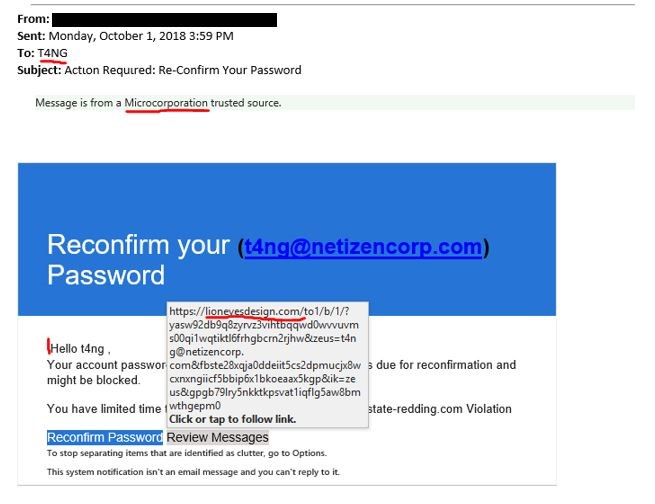
    Phishing continues to be a problem for all businesses and users. Netizen, itself, has seen the increased activity of emails purporting to contain Microsoft Office login screens.  MS Office is frequently used in these attacks, as it is one of the most popular suites in use, which increases the chances of the crooks gaining legitimate login credentials.

    Phish emails often try to scare the user.   This is one of the examples that arrived at our office this week:

    phishingcharlie

    Other attempts sound too good to be true, sometimes suggesting an embedded link will lead to payroll information.

    Everyone should be cautious when clicking on links in emails, and to contact their managers or IT department if they have concerns regarding their account deactivation.

    Bonus: How Not to Manage Passwords

    lockcharlie

    How can Netizen help?

    Netizen ensures that security gets built-in and not bolted-on. Providing advanced solutions to protect critical IT infrastructure such as the popular “CISO-as-a-Service” wherein companies can leverage the expertise of executive-level cybersecurity professionals without having to bear the cost of employing them full time.  We also offer compliance support, vulnerability assessments, penetration testing, and more security-related services for businesses of any size and type.

    Additionally, Netizen offers an automated and affordable assessment tool that continuously scans systems, websites, applications, and networks to uncover issues. Vulnerability data is then securely analyzed and presented through an easy-to-interpret dashboard to yield actionable risk and compliance information for audiences ranging from IT professionals to executive managers.

    Netizen is an ISO 27001:2013 (Information Security Management) certified company.

    ISO

  • Netizen Updates and News

    Today, we at Netizen are announcing several major updates for our customers, employees and the community. They encompass cyber security, customer service, innovation and community involvement.

    First off, Netizen is preparing to release several advanced tools of our own design as Open Source. The first such tool performs the validation and security configuration of virtualization hosts to ensure they are secure and compliant. The next tool to be released is an analytics dashboard that tracks vulnerability data and POA&M milestones across an enterprise. Both will be licensed under the GNU Affero GPL for the general public and available to view, modify and/or download at our GitHub Repository.

    Secondly, Netizen is funding and creating a scholarship program at Lehigh Carbon Community College (LCCC) to provide funds and training opportunities for military veterans seeking to enter into technical degree programs. The field of cyber security has far more job openings than there is qualified talent to fill them and military veterans make ideal employees. We intend to educate and train the next wave of talent in the cyber industry starting with those who have already served our country so honorably.

    Lastly, Netizen has formed an Innovation Group that employees, customers and partners are welcome to participate in. The intent of this group is to talk about and formulate ideas for better ways to do things related to business, technology, management or just about anything else. It will meet monthly to start, and the ideas will be put into a backlog for consideration and implementation. The intent is to develop “best practices, standards and tools” which can be leveraged by anyone.

    About Netizen Corporation:

    Netizen is an ISO 27001:2013 certified, award-winning and veteran-owned business that specializes in cyber security and software assurance for defense, federal civilian government and commercial markets. We develop and leverage innovative solutions to enable a more secure cyberspace for clients in government and commercial markets. Our customers include the U.S. Army, U.S. Navy, Department of Defense, and other large federal agencies as well as Fortune 500 organizations around the world.

  • Netizen Cybersecurity  Bulletin: 22 August 2018 Edition

    In this issue:

    In this week’s issue, you’ll find information regarding the most current critical threats and preventative measures to lessen the chances of a breach.

    • Caller ID Spoofing
    • USBHarpooning and Bad USBs
    • FBI Warns Real Estate Industry is a Target for Cybercrime
    • How can Netizen Help?

    Caller ID Spoofing

    Have you ever received a call where the caller said that you called them when you have not, then your number was most likely spoofed by another person. There are many phone scams that use Caller ID spoofing to hide their identity because Caller ID spoofing makes it impossible to block the number.  Sometimes the numbers are easy to spot, with invalid area codes ‘132’, or numbers with all zeroes.   More and more, however, the fraudsters are getting more devious.

    There are online tools that enable anyone to spoof their outbound Caller ID.  While these services are meant to protect the caller’s number from being displayed and claim they aren’t intended for malicious activities, there’s little to prevent someone from abusing these fee-based services.

    Businesses are often wasting time answering calls from spoofed customers; in June 2018, a business received an estimated 300 phone calls in one hour, overloading the call center and preventing calls from legitimate customers from getting through.

    On the other end of the spectrum, Spoofed Caller IDs have been used to falsely report to police crimes that are occurring in innocent people’s homes, resulting in a waste of law enforcement resources and at least one accidental shooting death.

    Recommendations:

    Fraudulent calls may be reported to the FCC, which will impose a fine of up to $10,000 to anyone illegally spoofing a number. https://www.fcc.gov/consumers/guides/spoofing-and-caller-id

    USBHarpooning and Bad USBs

    It is no secret that USB drives can be turned malicious when in the wrong hands. Attacks could range from planting malware to allowing remote code execution from the attacker themselves. In a strange twist of ingenuity, security experts have discovered and thus created a malicious version of a USB charging cable dubbed USBHarpoon. The controller chip of the drive can be reprogrammed to appear to the victim’s computer as a human interface device (HID); more colloquially known as a peripheral. Peripherals include anything from a keyboard to a network card. Attack vectors could include the issuing of commands to modifying the system’s DNS settings to redirect traffic.

    Now, the attack is only successful when the computer has been unlocked where it can then launch commands that can download and execute a payload; Windows, Mac, and Linux could all be affected. As of right now, the attack is not a hidden process. Upon insertion of the USB, the malicious activity is visible on the screen, however attempts have been made to activate when the user is not around. What makes the USBHarpoon attack so dangerous is that while many people are aware of harmful USB drives, most are trusting of the ubiquitous charging cable.

    Recommendations:

    While USBs can be necessary for business purposes, like anything, steps should be taken to prevent or at least mitigate a breach:

    • If feasible, disallow the use of removeable media. If you have no need for USBs, do not even introduce that attack vector.
    • Be cognizant of your cable manufacturer and seller. Off-brand and foreign sellers have a higher possibility of having malicious cables and drives.
    • If you need to use USBs, ensure that all devices are checked for malware before they are connected to the network—especially if it is new and not trusted.
    • Set limits on allowed USB devices and file types based on the user’s role in the organization.
    • Avoid direct plug-ins. Utilize a USB security system like that of a malware scanning kiosk to securely transfer allowed files.
    • Regularly train employees on the importance of adhering to strict USB security practices and policies.

    FBI Warns Real Estate Industry  is a Target for Cybercrime

    The FBI Internet Crime Complaint Center (IC3) reported that the real estate industry has become especially susceptible to business email compromises (BECs) and email account compromises (EACs).

    The attraction to Real Estate goes beyond the large sums of money involved in such transactions, it also goes to the desire of those involved in the sales of homes to get the transactions done.   Home sales can involve numerous people, all dealing with largely electronic documents containing sensitive information.

    These scams are frequently carried out when a hacker compromises legitimate business e-mail accounts through social engineering or computer intrusion techniques, such as a malicious message containing a link to a rogue website.

    The scam may not always be associated with a request for transfer of funds, as a compromised account can be used to access stored documents (or request new documents) containing Personally Identifiable Information (PII) or Wage and Tax Statement (W-2) forms for employees.

    The FBI reported hackers have used information that is publicly available on real estate listing sites to target victims. This may include homes that are for sale and the progress of the sale such as “under contract” as well as the contact information of the real estate agent.

    FBI  Recommendations:

    Title Companies report establishing new procedures when processing legal documents requiring all changes in payment type and/or location to be verified prior to distributing funds.

    If you discover a fraudulent transfer, time is of the essence. First, contact your financial institution and request a recall of the funds. Different financial institutions have varying policies; it is important to know what assistance your financial institution will provide when attempting to recover funds. Second, contact your local FBI office and report the fraudulent transfer. Law enforcement may be able to assist the financial institution in recovering funds. Finally, regardless of dollar loss, file a complaint with http://www.ic3.gov or, for BEC/EAC victims, bec.ic3.gov. The IC3 will be able to assist both the financial institutions and law enforcement in the recovery efforts.

    How can Netizen help?

    Netizen ensures that security gets built-in and not bolted-on. Providing advanced solutions to protect critical IT infrastructure such as the popular “CISO-as-a-Service” wherein companies can leverage the expertise of executive-level cybersecurity professionals without having to bear the cost of employing them full time.  We also offer compliance support, vulnerability assessments, penetration testing, and more security-related services for businesses of any size and type.

    Additionally, Netizen offers an automated and affordable assessment tool that continuously scans systems, websites, applications, and networks to uncover issues. Vulnerability data is then securely analyzed and presented through an easy-to-interpret dashboard to yield actionable risk and compliance information for audiences ranging from IT professionals to executive managers.

    Netizen is an ISO 27001:2013 (Information Security Management) certified company.

    ISO

  • Netizen Cybersecurity Bulletin: 15 August 2018 Edition

    In this issue:

    In this week’s issue, you’ll find information regarding the most current critical threats and preventative measures to lessen the chances of a breach.

    • KeyPass Ransomware
    • Still Phishing
    • Another Printer Vulnerability
    • How can Netizen Help?

    KeyPass Ransomware

    Not to be confused with the popular password manager KeePass, KeyPass is an extension placed on files of a new variant of ransomware. The KeyPass Trojan propagates itself by way of fake installers, further highlighting the importance that proper cyber awareness and training plays in defense of an organization’s data and assets.

    Upon successful infection, the trojan remains hidden, installing to the local app data folder and then deleting itself from its original location, further manifesting copies to spread through other avenues like command line arguments. KeyPass also utilizes “manual control”, in that its form can be shown after pressing a certain button on the keyboard, indicating that the attackers may wish to use the trojan in a manual attack.

    The manual control technique gives the attackers the ability to customize the encryption process including the key, what is said in the ransom note, victim ID, extension of the encrypted files (.KEYPASS), as well as the list of paths to be excluded. The attackers will also be able to change the price of decryption.

    Recommendations:

    As mentioned above, the best defense is practicing proper cyber hygiene, however, we do have further recommendations:

    • Protect from the KeyPass ransomware, and any ransomware for that matter, by utilizing properly created and tested backups.
    • Install all needed software from trusted sources.
    • Make use of strong passwords for RDP access; greater than 8 characters, camel-case, with numbers and special characters.
    • Develop and execute a plan for an end-user awareness program.
    • Review network drive permissions to minimize the impact a single user can have on operations.
    • Perform routine patching and updating.
    • Utilize trusted and efficient endpoint protection software.

    Still Phishing

    One of the most widespread and simplest forms of attack continues to be a problem in the latter part of 2018—phishing. In particular, attacks have increased substantially in the financial services industry, such as online banking, e-commerce, and payment systems. These attacks include fake shopping sites or banking web pages in an effort to obtain login credentials, emails, phone numbers, credit card information, and PINs. The IT industry has also felt the increase of phishing attacks but are still targeted less than the financial sector.

    Many companies receive phishing emails daily, remaining under constant threat from attackers. Phishing is so popular as people, more often than not, are the largest security vulnerabilities. Attackers often use intimidation, fear, or try to feign a level of trust in an effort to gain access to sensitive company information. For example, by way of social engineering, an attacker could spoof the CEO’s email address and demand all payment information from accounting immediately; many people would not hesitate because who would disobey the CEO?

    Recommendations:

    There are many best practices when it comes to defending against a phishing email of which we have listed below:

    • Scrutinize your emails before clicking anything. Did you order or ask for anything for which you’re expecting a confirmation? Did the email come from a store you don’t usually order supplies from or a service you don’t use? If so, it’s probably a phishing attempt.
    • Verify that the sender is actually from the company sending the message.
    • Did you receive a message or email from someone you don’t recognize? Are they asking you to sign into a website to give Personally Identifiable Information (PII) such as credit card numbers, social security number, etc. A legitimate company will never ask for PII via instant message or email—this is a huge red flag.
    • Do not give out personal or company information.
    • Review both signature and salutation.
    • Do not click on attachments.
    • Many phishing emails pose a sense of urgency or even aggressiveness to prompt a form of intimidation. Any email requesting immediate action or that is addressing you in a threatening manner should be questionable. Also, beware of messages that seek to tempt users into opening an attachment or visiting a link. For example, an attachment titled “Staff Pay Raises 2018” may seem like something you really want to know about, but it could just be a ploy to plant malware on your system or steal your credentials.
    • Be wary of poor spelling, grammar, and formatting. If an email is visually unprofessional, the sender is likely not who they say they are.

    Another Printer Vulnerability

    Fax machines have been a staple in office environments since the late 1980s; you may have one in your office.  In recent years, these devices are combined into a network printer for efficiency.  However, this may be another example of the trade-off of security for convenience.

    Two security researchers at DEF CON 26 recently discovered a pair of vulnerabilities in the fax protocol can transform fax machines into entry points for hackers into corporate networks.  Named “Faxploit,” this attack leverages two buffer overflows in the fax protocol components.  An attacker can send a specifically designed ‘fax’ image containing code that exploits these two vulnerabilities to a fax machine and then gains remote code execution rights over the targeted device.  From that point, the hacker can run his own code and take over the machine, and deploy other tools to infiltrate your network.  Once on the inside, the hacker can begin scanning every device on the network, looking for other weaknesses to exploit.

    Unlike hacks that look to penetrate your company’s firewall from outside your network, this hack comes through the fax phone number you probably list on your business cards and website.  If your fax is combined with a network printer, the attacker gains access to your network through the phone line; a novel approach, if not one that causes a real risk to your network.

    There is no way to scan incoming faxes for this kind of attack. The only way to prevent Faxploit attacks is to apply patches to individual fax machines and all-in-one office printers, which also come with an embedded fax machine.

    At the time of writing, only HP has addressed Faxploit, and has released patches to prevent this attack from gaining access to your network. Other vendors will follow suit, but consideration should be given to creating network segments that would isolate printers from other mission-critical assets.

    Once again, the lesson that cannot be stressed enough is simply this: any connected device needs to be updated and patched.

    How can Netizen help?

    Netizen ensures that security gets built-in and not bolted-on. Providing advanced solutions to protect critical IT infrastructure such as the popular “CISO-as-a-Service” wherein companies can leverage the expertise of executive-level cybersecurity professionals without having to bear the cost of employing them full time.  We also offer compliance support, vulnerability assessments, penetration testing, and more security-related services for businesses of any size and type.

    Additionally, Netizen offers an automated and affordable assessment tool that continuously scans systems, websites, applications, and networks to uncover issues. Vulnerability data is then securely analyzed and presented through an easy-to-interpret dashboard to yield actionable risk and compliance information for audiences ranging from IT professionals to executive managers.

    Netizen is an ISO 27001:2013 (Information Security Management) certified company.

    ISO


  • Netizen Cybersecurity Bulletin: 8 August 2018 Edition

    In this issue:

    In this week’s issue, you’ll find information regarding the most current critical threats and preventative measures to lessen the chances of a breach.

    • Cracking WPA2
    • Popular Social Media Site Hacked by “SMS Intercept”
    • Is your printer spying on you? HP releases important patches.
    • How can Netizen Help?

    Cracking WPA2

    A new method of attack against cracking the famed secure wireless protection protocol has been discovered. This new method simplifies the cracking of WPA/WPA2 passwords on 802.11 networks. In the past an attacker would have to wait for a user to login in an effort to capture a full authentication handshake, whereas with this new method, would only have to obtain a single frame from the router; this can be obtained from the access point (AP) as it is a customary part of the protocol. The tool used to discover this vulnerability is known as Hashcat and will work on nearly all routers operating on 802.11i/p/q/r networks with roaming enabled.

    An attacker would retrieve the Pairwise Master Key Identifier (PMKID), just by simply trying to authenticate and grabbing a single frame, which can then be cracked to retrieve the Pre-Shared Key (PSK) of the wireless network. Something else users should be aware of is that this does not mean cracking the wireless network password is easier. However, the process of acquiring a hash that can be attacked to get to the wireless password is much easier. The default PSK length generated by manufacturers can be cracked in as little as eight days.

    Recommendations:

    It is our recommendation that to protect keys from being simplified and cracked, that users create and implement their own keys rather than using one generated by the manufacturer (router by default). It is especially recommended that this key should be long, complex, and consist of numbers, camel-case lettering, and symbols.

    Popular Social Media Site Hacked by “SMS Intercept”

    The popular social media site Reddit has recently suffered a security breach by hackers bypassing two-factor authentication measures using a technique called SMS intercept. The attackers were able to access all of Reddit’s user data from 2007 and before, most of it including account credentials and email addresses.

    Two-factor authentication, or 2FA as it is often referred to, is an extra layer of security called multi-factor authentication that requires in addition to a password, something that only that person would have on them. This could be either a security token, RFID tag, or the more popular method of using an SMS code sent to a cell phone. Using both of these together makes it much harder for potential hackers to gain access to a users account as it would require the physical access to the physical token.

    Unfortunately, hackers have found that by spoofing a cell phone’s sim card they can claim access to any cell phone number they want. By doing so, they can intercept all SMS messages destined for the target’s phone. Hackers can then use this in order to obtain the necessary SMS codes sent by accounts setup with two-factor authentication to gain unauthorized access.

    Recommendations:

    • Enforce multi-factor authentication whenever possible using physical security tokens rather than SMS codes.
    • Use a password manager to vary passwords used for different sites to minimize risk should one password be compromised.
    • Ensure important database information such as passwords is utilizing encryption-at-rest.

    Is your printer spying on you? HP releases important patches.

    Late last month, HP invited a select group of security researchers to hack their printers, with the rewards ranging from $500 to $10,000 per bug.  HP, who claims to provide “the world’s most secure printing” devices, told the researchers to hone in on firmware-level vulnerabilities in their July 31 Bug Bounty program.

    And the researchers said ‘Challenge accepted!’

    HP has released firmware patches this week that address two nasty security vulnerabilities make hundreds of HP Inkjet printers vulnerable to remote code execution. HP recommended applying firmware update patches “as soon as possible.”

    Many people may think, “What could happen if someone hacked my printer?  Inappropriate print jobs?”  Yes, but that’s a minor risk.  Once the printer’s Operating System is compromised, it can be used as a launch point to scan the LAN for vulnerable PCs. If a vulnerable PC is found and compromised, it could be configured to serve as a proxy within the company firewall.  That’s a big risk.

    HP’s security bulletin lists hundreds of printer models affected. Users can go to https://support.hp.com/us-en/drivers/printers and enter printer model names to determine whether there are patches available for your device.   If HP rushed these updates less than a week after their Bug Bounty program began, it’s likely they will provide more patches soon.

    Other printer manufacturers offer similar lookups.  Like any connected device, printers need to have their operating system/firmware updated routinely as well.  Make sure your systems are updated appropriately.

    How can Netizen help?

    Netizen ensures that security gets built-in and not bolted-on. Providing advanced solutions to protect critical IT infrastructure such as the popular “CISO-as-a-Service” wherein companies can leverage the expertise of executive-level cybersecurity professionals without having to bear the cost of employing them full time.  We also offer compliance support, vulnerability assessments, penetration testing, and more security-related services for businesses of any size and type.

    Additionally, Netizen offers an automated and affordable assessment tool that continuously scans systems, websites, applications, and networks to uncover issues. Vulnerability data is then securely analyzed and presented through an easy-to-interpret dashboard to yield actionable risk and compliance information for audiences ranging from IT professionals to executive managers.

    Netizen is an ISO 27001:2013 (Information Security Management) certified company.

    ISO

  • Allentown, PA: Netizen Corporation, an ISO 27001:2013 certified and award-winning provider of cyber security and related solutions for defense, government and commercial markets, has been named by the Greater Lehigh Valley Chamber of Commerce as the area’s “Veteran-Owned Business of the Year” for 2018. This inaugural award will be presented on Thursday, September 13th at the “Doing Business with the PA National Guard” event hosted by the Chamber. Netizen has been verified as a Service Disabled Veteran Owned Business (SDVOSB) by the Department of Veterans Affairs and the Commonwealth of Pennsylvania. Furthermore, over 60% of Netizen’s employees are military veterans representing every branch of service.

    “It is an honor to be recognized as the area’s Veteran Owned Business of the Year because Netizen truly espouses the military values of dedication to duty, honor, integrity, and attention to detail which has contributed to our astounding growth rate. We also have a high level of camaraderie within our team that has made us a great place to work, learn, and grow a career while also winning awards and recognition from customers for the superior service we provide,” said Rocco Zegalia, a U.S. Air Force veteran and Netizen’s Vice President of Sales and Marketing. He added that both of Netizen’s owners, Michael Hawkins (Chief Executive Officer) and Max Harris (Chief of Business Development), are veterans of the U.S. Army.

    Netizen is not a “general information technology (IT) services company” but rather a highly specialized cyber security solutions provider that works in partnership with IT departments, information system owners/developers, and IT Managed Service Providers (MSPs) to ensure appropriate levels of security and compliance controls are implemented and maintained. Netizen has been awarded over $15,000,000 (fifteen million dollars) in new contracts to provide cyber security and related solutions to the federal government, Department of Defense (DoD), and commercial organizations over the past two years. They also provide these solutions to state and municipal governments and businesses ranging from local manufacturing, finance and health care organizations to Fortune 500 entities.

    About Netizen Corporation: Named the Lehigh Valley’s “Emerging Business of the Year” and a recipient of multiple Department of Defense (DoD) awards for superior performance, Netizen is an Allentown, PA based Veteran-Owned company (SDVOSB) specializing in cyber security solutions for defense, commercial and government markets. Their new commercial-focused subsidiary, CyberSecure Solutions, is also trusted to engineer, implement, audit and maintain cyber security solutions for businesses worldwide. Learn more at NetizenCorp.com and goCyberSecure.com.
    POINT OF CONTACT:

    Rocco Zegalia
    VP of Sales and Marketing
    1-800-450-1773 ext. 717
    rzegalia@netizencorp.com

     #####

  • Netizen Cybersecurity Bulletin: 1 August 2018 Edition

    In this issue:

    In this week’s issue, you’ll find information regarding the most current critical threats and preventative measures to lessen the chances of a breach.

    • Fake Websites Pushing Adware
    • Ransomware Net Attackers Over $6 Million
    • Mid-Summer/Back-to-School Security Tips
    • How can Netizen Help?

    Fake Websites Pushing Adware

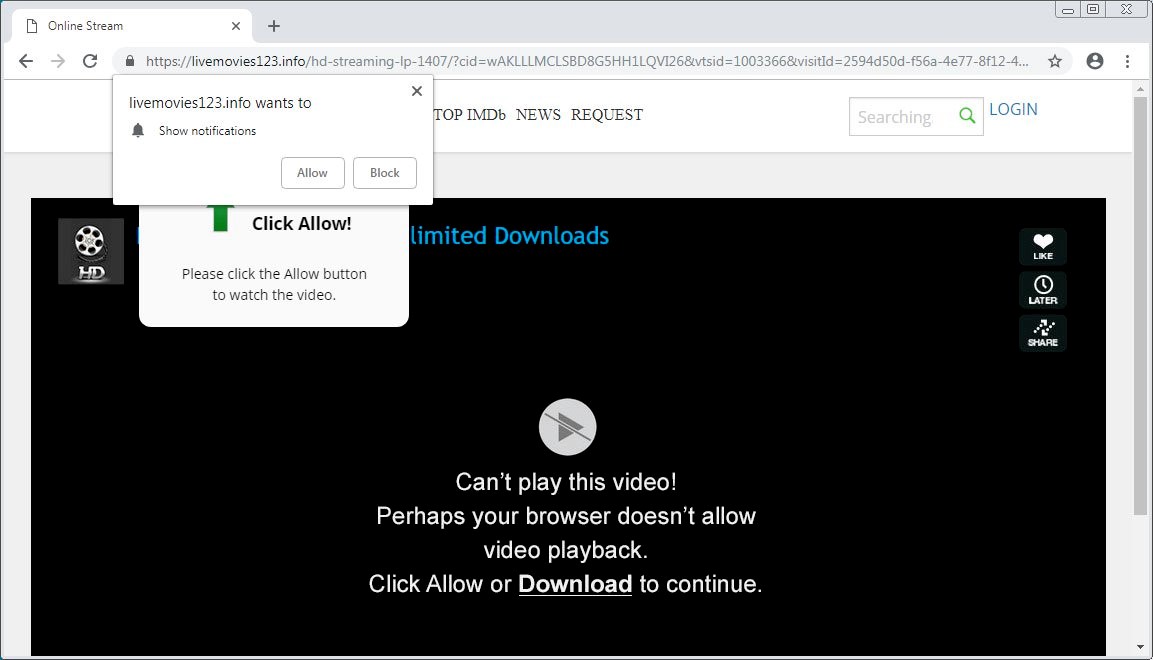
    Fake websites are no stranger to a threat actor’s toolkit. Feigning legitimacy and earning user’s trust makes it all the more easy to steal sensitive and important information. These sites, in particular, are pushing Adware. Adware is a type of malware that automatically displays advertisements whenever a user is online. This can prove detrimental to computer performance as it puts stress on the central processing unit (CPU) constantly running these ads.

    The sites that are being spoofed are Keepass, 7Zip, and Audacity just to name a few. Applications downloaded from any of these sites also downloads InstallCore (the source of the adware). On top of the ads being annoying, the advertisements showing up could be malicious in and of themselves; installing cryptocurrency miners, viruses, trojans, etc.  Being that these are ads, the motive is profit driven.

    Recommendations:

    Staying vigilant and watching where you browse is always a best practice. We recommend avoiding the following websites:

    • unetbootin.org
    • unetbootin.net
    • notepad2.com
    • keepass.com

    These are only the English speaking sites afflicted; there are many others from European countries that are malicious as well.

    Another good practice is if you are going to download from any site (yes, even if they are a reputable one), to scan the files with up to date antivirus software. You can also upload files to VirusTotal as well which is known for detecting threats.

    Ransomware Net Attackers Over $6 Million

    Threats of ransomware are still prevalent to this day, and continue to command a multi-million dollar black market business for criminals. A prominent ransomware variant called SamSam has been found to have extorted over 233 victims for a total of over $6 million dollars. Researchers have found that the Bitcoin addresses owned by the attackers of this ransomware variant still continue to net around $300,000 per month. The addresses are spread across 130 unique addresses which have received ransom payments from victims.

    The SamSam ransomware is known to be spread by specifically selecting targets and infecting the systems manually. The attack is usually carried out by using brute-force attacks or use of stolen credentials gained from the dark web in order to compromise a system through remote desktop. The ransomware is then deployed throughout the network by exploiting vulnerabilities of other systems. This entire process is manual and does not rely on any worm or virus capabilities to spread itself through the network.

    Ransomware is used to encrypt the system’s data, in which the attackers can demand a huge ransom payment in excess of $50,000 worth of Bitcoin for the decryption keys to the data. Some variants ensure that the most valuable data is encrypted first, then moves on to the rest of the system.

    Recommendations:

    • Keep up-to-date backups and ensure a consistent backup schedule.
    • Enforce multi-factor authentication whenever possible.
    • Allow access to the Windows Remote Desktop Protocol only to those who need it.
    • Monitor the integrity of files on your servers.

    Mid-Summer/Back-To-School Security Tips

    As we enter August, many people are thinking of Back-To-School.  Whether you’re planning a vacation or planning for your child’s dorm room, you mustn’t let your guard down regarding security.

    Recommendations:

    The Cloud is safe, right?

    The Cloud is as safe as anyone’s hard drive, which means you need to take steps to keep your data safe. Cloud data is stored on large servers, and no matter how much physical security the server room has, it can be defeated instantly if your personal device isn’t secure. Keep your laptops and mobile devices updated to the latest Operating System patches, and only download apps from the approved App Stores (i.e., Google Play, iTunes) to help prevent being infected by malware, which could access your cloud data.

    Also, do not forget your anti-virus.  Too many people put off updating their anti-virus which leaves them vulnerable to new attacks.  Regardless, hackers are creating new attacks every day, so you need a firewall, antispyware, antiphishing and other security tools.

    Consider: If you use your devices to conduct financial business, shouldn’t your devices be as secure as possible?

    The Password is…

    Everyone knows you’re supposed to use strong passwords, and yet every year there are lists of the most popular passwords include ‘123456’, ‘123456789’, ‘qwerty’, ‘letmein’ and even ‘starwars.’  Every online account you have should have a strong, long password made of a combination of symbols, letters, and numbers. Very important: Use a different password for each account.

    A good, strong password is at least 8-12 characters in length. It is also made up of both upper case and lower-case letters, symbols and numbers. Example: “yCvc8m!v&Xb3”. However, a phrase will do too. Such as iLike1ceCream!

    Using two-factor authentication on every account – particularly your financial accounts – will ensure your data stays secure. This way, even if your password gets into the wrong hands, the hacker can’t get in unless they also have access to your smartphone.  By the way – your smartphone has a PIN, too, right?  Preferably one that is longer than 4 digits.

    My New Device is Safe, Right?

    Many believe a new device, right from the manufacturer, is perfectly safe. This isn’t true. Androids and Macs need antivirus just like PCs need antivirus. And right out of the box, all devices operating systems, browsers and software should be updated.

    Further, that connected TV, Smart Speaker, Refrigerator, or any other Internet of Things (IoT) device is not guaranteed secure. Always isolate IoT devices on your wifi network to a separate or guest network.  Remember the adage: ‘The Sin IoT stands for Security.’

    How can Netizen help?

    Netizen ensures that security gets built-in and not bolted-on. Providing advanced solutions to protect critical IT infrastructure such as the popular “CISO-as-a-Service” wherein companies can leverage the expertise of executive-level cybersecurity professionals without having to bear the cost of employing them full time.  We also offer compliance support, vulnerability assessments, penetration testing, and more security-related services for businesses of any size and type.

    Additionally, Netizen offers an automated and affordable assessment tool that continuously scans systems, websites, applications, and networks to uncover issues. Vulnerability data is then securely analyzed and presented through an easy-to-interpret dashboard to yield actionable risk and compliance information for audiences ranging from IT professionals to executive managers.

    Netizen is an ISO 27001:2013 (Information Security Management) certified company.

    ISO

  • Netizen Cybersecurity Bulletin: 25 July 2018 Edition

    In this issue:

    In this week’s issue, you’ll find information regarding the most current critical threats and preventative measures to lessen the chances of a breach.

    • Is Your Bluetooth Device Secure?
    • Malware Hidden in Images
    • A Banking Trojan is reborn.
    • How can Netizen Help?

    Is Your Bluetooth Device Secure?

    This week there was a security bulletin announcing a vulnerability in Bluetooth devices.  Should an adversary be in the right place at the right time, it is possible for that person to intercept the communication between you and your cell phone, laptop, media player, heart-rate monitor, mice or keyboard.   (Carnegie Mellon’s CERT Bulletin: https://www.kb.cert.org/vuls/id/304725 )

    Interfering with your media player seems harmless enough, but this Man in The Middle (MiTM) attack could capture keyboard data and reveal any passwords you type.  The interference would occur when the devices are about to pair with each other, at which time the attacker would be able to read and write data.
    The Bluetooth protocol was designed to make the pairing of devices effortlessly, which unintentionally raises the potential for abuse such as the security bulleting describes.  Fortunately, any such attack as this requires the attacker to be in close proximity to you and your devices, which limits the potential impact overall.   Furthermore, this particular attack has to happen as the devices connect, meaning if you pair your earpiece with your smartphone in your home, you are safe as you leave your home (unless a family member is trying to exploit the vulnerability).

    The Good News; Despite this bulletin being released this week, the vendors have already addressed the issue.  According to Carnegie Mellon, the Bluetooth code from Apple, Microsoft, and Android is either already updated or was never affected by this vulnerability.

    Recommendations

    • If you are using an Android device, be certain your phone vendor or mobile carrier has pushed the patches from the Android Open Source Project to your handset.
    • Best Practice: if you are not using Bluetooth, you should turn it off on your devices.  This will conserve your battery, and avoid broadcasting your Bluetooth hardware address, which makes it less likely an adversary could track you.

    Malware Hidden in Images

    Threat actors are now lacing vulnerable images with malware. These images are being uploaded on trusted GoogleUserContent sites including several blogs, and even the famous Google+. This is making websites stealthily malicious while remaining undetected. The malware uses Exchangeable Image File Format (EXIF) to hide, and it hides well as images are rarely ever scanned for malware.

    Within the embedded images are scripts made by the threat actors that can upload a predefined web shell, arbitrary files, defacement pages, and backdoors just to name a few. More importantly, the exploitation of a site would allow the attacker to siphon important information, like that of email addresses. Unfortunately, Google inadvertently exacerbates the problem, as Google sites and their known affiliates are unequivocally trusted.

    Threat actors will either utilize their own images or gain access to popular ones that are “weaponized” and publicly distributed on trusted sites. They will sit, wait, and if any user happens to download the malicious image, the attacker will be notified, and the user can then be compromised.

    Recommendations

    Until Google develops better anti-malware techniques, especially in areas of content analysis, the best defense is vigilance and prevention. We recommend:

    • Keep up-to-date with security patches
    • Utilize strong passwords
    • Utilize application firewalls
    • Monitor the integrity of files on your servers
    • Trust no file or image. Do not download from unknown sources, sites, or senders.

    A Banking Trojan is Reborn.

    Recently a new variant of an old-time banking trojan called Kronos is making rounds across networks and targeting victims in Germany, Japan, and Poland. The new variant dubbed Osiris has been upgraded to include new command-and-control features that work with anonymized networks such as Tor.

    Kronos was originally discovered in 2014 where it was found to be capable of stealing credentials and using web injection techniques on banking websites. Along with these capabilities it included a rootkit to help avoid detection and removal. Kronos eventually faded away about two years later in 2016.

    Now, the new variant is starting to make waves by being distributed by phishing techniques, which include email attachments of Word documents. Additional attacks observed included JavaScript redirections on malicious sites to an exploit kit, capable of downloading additional files needed to activate Osiris on the victim’s computer.

    Recommendations

    • Ensure Anti-Virus and Malware software is up to date.
    • Ensure Operating System and Applications software are running on the latest update patches.
    • Be vigilant during web browsing in order to avoid clicking on malicious links.
    • Continue to stay informed of new phishing techniques to avoid opening malicious attachments.
    • Do not download files from unknown sources, sites, or senders.

    How can Netizen help?

    Netizen ensures that security gets built-in and not bolted-on. Providing advanced solutions to protect critical IT infrastructure such as the popular “CISO-as-a-Service” wherein companies can leverage the expertise of executive-level cybersecurity professionals without having to bear the cost of employing them full time.  We also offer compliance support, vulnerability assessments, penetration testing, and more security-related services for businesses of any size and type.

    Additionally, Netizen offers an automated and affordable assessment tool that continuously scans systems, websites, applications, and networks to uncover issues. Vulnerability data is then securely analyzed and presented through an easy-to-interpret dashboard to yield actionable risk and compliance information for audiences ranging from IT professionals to executive managers.

    Netizen is an ISO 27001:2013 (Information Security Management) certified company.

    ISO

  • Netizen Cybersecurity Bulletin: 18 July 2018 Edition

    In this issue:

    In this week’s issue, you’ll find information regarding the most current critical threats and preventative measures to lessen the chances of a breach.

    • Business Email Compromise Costs $12B – FBI
    • Sextortion Scam
    • More Secure Wireless
    • How can Netizen Help?

    Business Email Compromise Costs $12B – FBI

    The FBI’s latest warning reports the losses due to scams against business email accounts have risen 135% from December 2016 to May 2018.

    New FBI data shows that business email compromise (BEC) and email account compromise (EAC) scam losses worldwide spiked 136% from December 2016 to May 2018.

    The FBI tracks these attacks as either Business Email Compromise (BEC) or Email Account Compromise (EAC), and reports there were 78,617 BEC/EAC incidents reported between October 2013 and May 2018, resulting in $12 billion in losses. Of those incidents, 41,058 were in the US, resulting in $2.9 billion in losses. China and Hong Kong banks led the locations for receipt of fraudulent funds, while the UK, Mexico, and Turkey are emerging regions, the FBI report shows.

    In its public service announcement, the FBI warns that the scams are evolving: “The scam may not always be associated with a request for transfer of funds. A variation of the scam involves compromising legitimate business e-mail accounts and requesting Personally Identifiable Information (PII) or Wage and Tax Statement (W-2) forms for employees.”

    The real estate industry is the new hot target: from 2015 to 2017, there was an increase of 1,100% of BEC/EAC victims in that sector.  However, no industry is immune to these scams.

    Be cautious of any financial communication that is exclusively e-mail based and establish a secondary means of communication for verification purposes.

    Employees should be wary of unsubstantiated phone conversations. The FBI reports victims have reported receiving phone calls from BEC/EAC actors requesting personal information for verification purposes. Some victims report they were unable to distinguish the fraudulent phone conversation from legitimate conversations. One way to defend against this fraudulent activity is to establish code phrases that would only be known to the two legitimate parties.

    Recommendations

    If you discover a fraudulent transfer, move fast.

    • First, contact your financial institution and request a recall of the funds. Different financial institutions have varying policies; it is important to know what assistance your financial institution will provide when attempting to recover funds.
    • Contact your local FBI office and report the fraudulent transfer. Law enforcement may be able to assist the financial institution in recovering funds.

    Sextortion Scam

    Hackers have been known to send threatening emails to scare users into sending money, most often in bitcoin, to an encrypted address. More recently there has been a spike in what are known as sextortion emails. Sextortion emails begin with an unsolicited message claiming to have photographic or video evidence of the user accessing pornographic material. The user is then blackmailed into sending money, lest the hacker release the photos/videos to the user’s mailing list (including coworkers, relatives, etc.).

    The good news? It’s a scam. There is no video or photograph; the hacker is relying completely on fear and intimidation. Hackers have progressed in their scare tactics by enclosing legitimate usernames and password within the email. Reports have found that these passwords provided are in fact legitimate, they have been used before, but often these passwords were upwards of ten years old. It is likely that the hackers have discovered a stockpile of compromised passwords from previous data breaches and are thus utilizing them to make the threat more believable.

    An example email follows below:

    I am aware, xxxxxx, is your password. You do not know me and you’re most likely thinking why you’re getting this e-mail, correct?

    Well, I actually installed a malware on the adult video clips (porno) web-site and do you know what, you visited this site to experience fun (you know what I mean).

    While you were watching videos, your internet browser started operating as a RDP (Remote Desktop) that has a key logger which provided me with access to your display screen and web camera. Immediately after that, my software obtained your complete contacts from your Messenger, social networks, as well as email.

    What exactly did I do?

    I made a double-screen video. 1st part displays the video you were watching (you have ã good taste hahah), and 2nd part displays the recording of your web cam.

    exactly what should you do?

    Well, in my opinion, $2900 is a fair price for our little secret. You’ll make the payment by Bitcoin (if you do not know this, search “how to buy bitcoin” in Google).
    BTC Address: 1AioWDqwmRY8Ad7Vb6nSHtFcTqfW2Xj
    (It is cAsE sensitive, so copy and paste it)

    Note:
    You now have one day to make the payment. (I have a specific pixel in this mail, and at this moment I know that you have read through this é mail). If I don’t receive the BitCoins, I will, no doubt send out your video recording to all of your contacts including close relatives, colleagues, and so on.

    However, if I do get paid, I’ll erase the video immediately. If you really want evidence, reply with “Yes!” and I will certainly send out your video recording to your 10 friends. This is a non-negotiable offer, therefore please don’t waste my time and yours by replying to this email.

    Recommendations

    • Scrutinize your emails. If something does not feel right, it probably isn’t.
    • Again, these emails convey fear and intimidation. Bottom line, don’t panic. If you receive an email that looks anything like the above, it is a scam. You should contact your supervisor or system administrator.

    More Secure Wireless on the Way

    The Wi-Fi Alliance has recently announced that the Wi-Fi Certified WPA3 protocol will be making it’s way into devices later this year. This new protocol is set to replace the decade old WPA2, by bringing more robust authentication, and increased encryption strength for more sensitive businesses.

    This new way of securely connecting to wireless also brings with it replacements for WPA2’s flaws which include last year’s discovery that a victim’s device could be tricked into reusing an already in use key, along with replacing the flawed Wi-Fi Protected Setup (WPS) which is vulnerable to brute-force attacks.

    WPA3 will come in both a personal and enterprise mode, capable of being resistant to dictionary and password-guessing attacks, with enterprise allowing for up to 192-bit encryption for secure data transmission.

    This new protocol will take time to become fully adopted into new wireless networking devices, but nonetheless it is something that should be planned for upgrading to in the future.

    Recommendations

    • Continue to ensure you are using WPA2 encryption on your wireless device with a strong passphrase, and be sure to disable WPS as well.
    • Ensure your wireless router or access point is not using default passwords.
    • Change the default SSID Name, but ensure to not use any personally identifiable information.
    • Enable the wireless MAC filter in order to bolster security, and deter attackers.

    How Can Netizen Help?

    Netizen ensures that security gets built-in and not bolted-on. Providing advanced solutions to protect critical IT infrastructure such as the popular “CISO-as-a-Service” wherein companies can leverage the expertise of executive-level cybersecurity professionals without having to bear the cost of employing them full time.  We also offer compliance support, vulnerability assessments, penetration testing, and more security-related services for businesses of any size and type.

    Additionally, Netizen offers an automated and affordable assessment tool that continuously scans systems, websites, applications, and networks to uncover issues. Vulnerability data is then securely analyzed and presented through an easy-to-interpret dashboard to yield actionable risk and compliance information for audiences ranging from IT professionals to executive managers.

    Netizen is an ISO 27001:2013 (Information Security Management) certified company.

    ISO