Netizen Blog and News

The Netizen team sharing expertise, insights and useful information in cybersecurity, compliance, and software assurance.

  • NETIZEN AWARDED U.S. NAVY SEAPORT NextGen (NxG) CONTRACT WITH $52.5B CEILING VALUE

    Allentown, PA: Netizen Corporation, an ISO 27001:2013 certified Service Disabled Veteran-Owned provider of cyber security and related solutions for defense, government and commercial markets, has been awarded the U.S. Navy’s SeaPort Next Generation (NxG) contract. SeaPort NxG is the Navy’s primary contract vehicle and advanced electronic platform for acquiring support services in functional areas including Engineering, Information Technology (IT), Cyber Security, and Program Management.

    The SeaPort NxG contract has a ceiling value of $52,500,000,000 ($52.5 billion dollars) and will serve as a primary avenue through which the Navy procures a wide variety of IT, cyber security, professional services, and engineering solutions over the next 10 years. Contracts such as these provide streamlined access to fulfill customer requirements with more limited competition through a select pre-qualified pool of vendors chosen by the government. A key requirement for earning this contract was demonstrated successful experience supporting technical U.S. Navy programs, which Netizen has and continues to perform at various locations around the country.

    “We are very proud to have been awarded this crucial contract vehicle which will provide the primary means of access to future U.S. Navy work for us. Netizen currently provides advanced, well-regarded support for Navy organizations to aid in achieving their individual missions and protecting critical defense assets and infrastructure. We intend to continue expanding upon that work by leveraging this contract and our reputation as a premier supplier of cyber security, NIST RMF, and related products, services and solutions,” said Max Harris, Netizen’s Chief of Business Development.

    Netizen is not a “general information technology (IT) services company” but rather a highly specialized cyber security and compliance solutions provider that works in partnership with IT departments, information system owners/developers, and IT Managed Service Providers (MSPs) to ensure appropriate levels of security and compliance controls are implemented and maintained for all types of systems.

    About Netizen Corporation: Named the Lehigh Valley’s “Veteran Owned Business of the Year” and the region’s 7th fastest growing company, Netizen is an Allentown, PA based Veteran-Owned company (SDVOSB) specializing in cyber security and related solutions for commercial and government markets. Netizen was also a recipient of the U.S. Department of Labor Platinum Medallion Award for their commitment to veteran hiring and other accolades, such as FedHealthIT 100 and CDCA Innovation Spotlight awards, for several of their products and services. Their new commercial-focused subsidiary, CyberSecure Solutions, is also trusted to engineer, audit, and maintain cyber security solutions for businesses of nearly every size and type worldwide. Learn more at NetizenCorp.com and goCyberSecure.com.

  • Netizen Cybersecurity Bulletin 12 December 2018

    In This Issue:

    In this week’s issue, you’ll find information regarding the most current critical threats and preventative measures to lessen the chances of a breach.

    • Kubernetes Vulnerability
    • phpMyAdmin Critical Software Update
    • Phish Tale of the Week
    • How can Netizen help?

    Kubernetes Vulnerability

    Kubernetes, a Linux container orchestrator, has revealed a flaw in their code that allows privilege escalation for both authorized & unauthorized users. What started out as a bug report on Github quickly turned into a realization by the developers of the implications of said bug.

    Something that increases the severity of this vulnerability is the scope of it. It has existed in every version of Kubernetes since v1.0. Fortunately, the Kubernetes team has released patches for the vulnerability. The next question is how quickly will enterprise users patch their own installations.

    RECOMMENDATIONS
    If your organization uses Kubernetes, make sure to update to any deployed instances to versions 1.10.11, 1.11.5, 1.12.3 and 1.13.0-rc1. If your organization is unable to update, mitigation steps have been published here: https://github.com/kubernetes/kubernetes/issues/71411

    phpMyAdmin Critical Software Update

    One of the most popular MySQL database management systems has issued a new patch, updating to version 4.8.4 solving numerous important vulnerabilities. phpMyAdmin is an open-source (free) administration tool offering a graphical user interface via a browser for MySQL; which in turn is an open-source relational database management system. phpMyAdmin is so popular that many web hosting services preinstall the software within their control panels to assist admins in managing their databases for websites, of which big sites like WordPress are included. While there were some smaller bugs there are three main critical vulnerabilities patched:

    • Local file inclusion (CVE-2018-19968) — phpMyAdmin versions from at least 4.0 through 4.8.3 includes a local file inclusion flaw that could allow a remote attacker to read sensitive contents from local files on the server through its transformation feature.
    • Cross-Site Request Forgery (CSRF)/XSRF (CVE-2018-19969) — phpMyAdmin versions 4.7.0 through 4.7.6 and 4.8.0 through 4.8.3 includes a CSRF/XSRF flaw, which if exploited, could allow attackers to “perform harmful SQL operations such as renaming databases, creating new tables/routines, deleting designer pages, adding/deleting users, updating user passwords, killing SQL processes” just by convincing victims into opening specially crafted links.
    • Cross-site scripting (XSS) (CVE-2018-19970) — The software also includes a cross-site scripting vulnerability in its navigation tree, which impacts versions from at least 4.0 through 4.8.3, using which an attacker can inject malicious code into the dashboard through a specially-crafted database/table name.

    RECOMMENDATIONS

    The most obvious recommendation we can make is that if you are using phpMyAdmin, you need to update it to the most current version (4.8.4). While the solution is simple, it serves as an important reminder to keep systems patched and updated regularly. If a patch is forgotten or brushed aside and not deemed dire enough to deal with then you could be leaving your organization open to attack; it may take 3 months or 3 years, but it only takes one breach to cost the company dearly—both in finances and reputation.

    Phish Tale of the Week


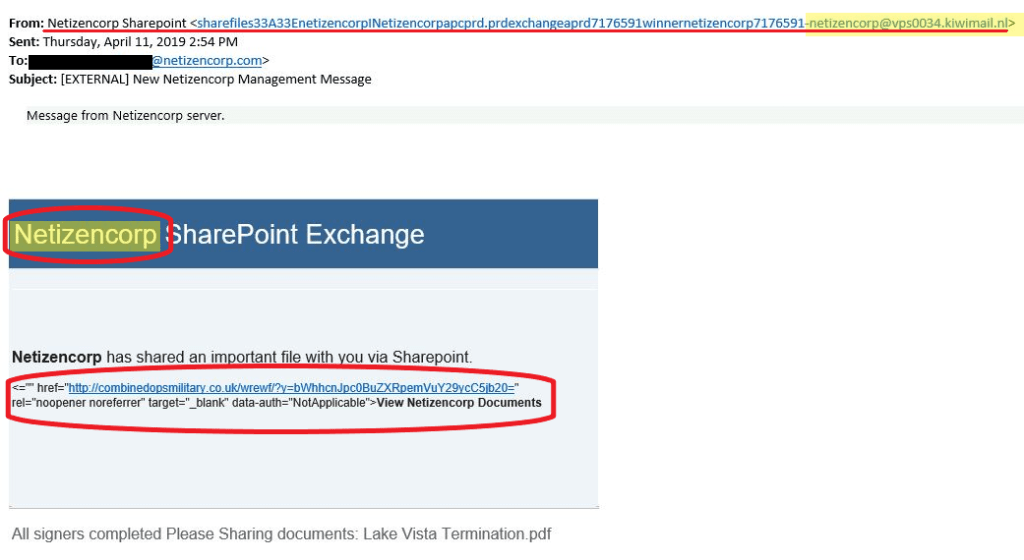
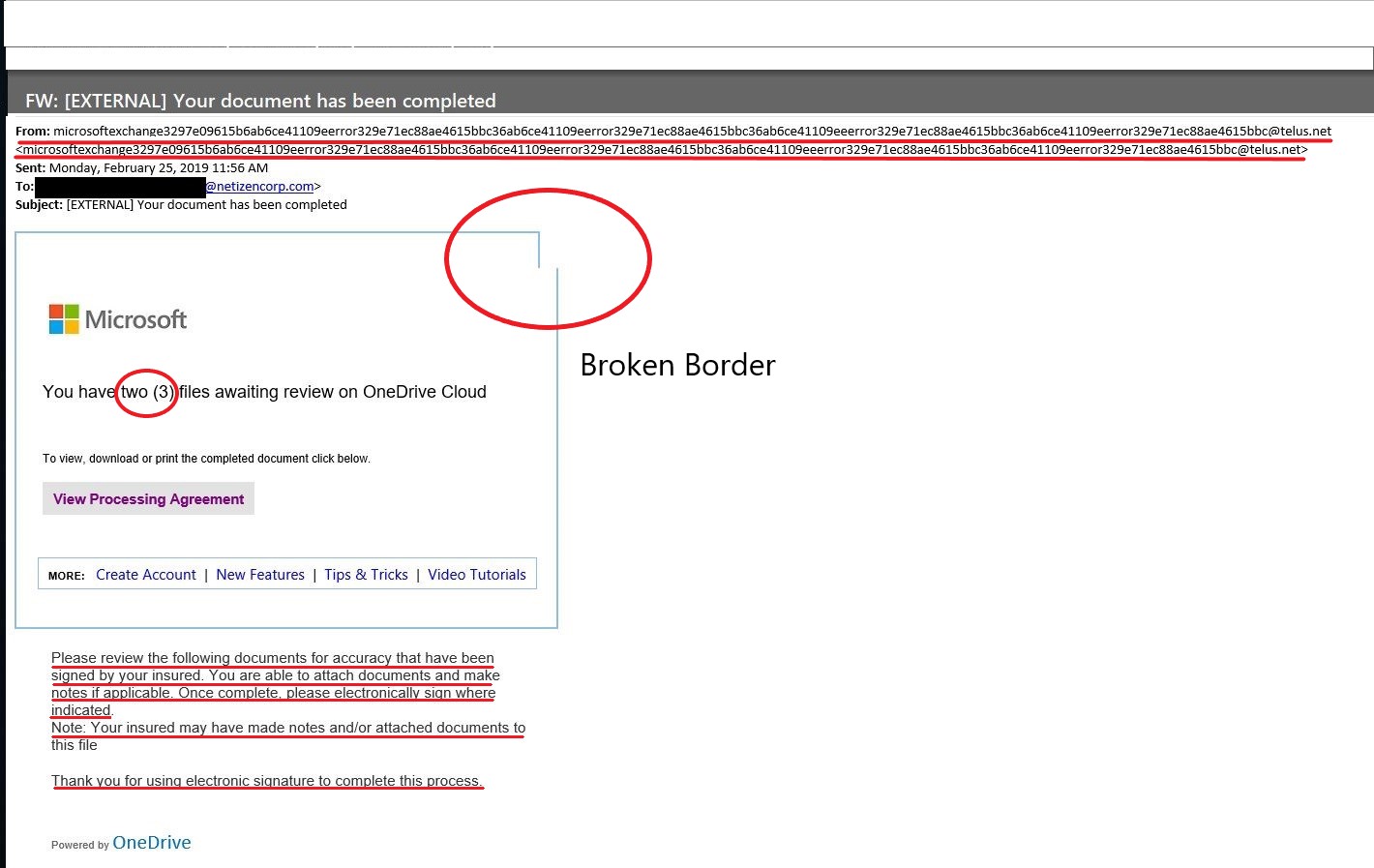
    Netizen captures many phishes each month, which we feature here. This week one of our users was being spammed by an agent claiming to be from the Department of Veteran Affairs. This email was sent to the user numerous times.The email was unsolicited, claiming that a payment was received that was never even made; it was vague,and an untitled document was attached as well.

    RECOMMENDATIONS:

    A phishing email will typically direct the user to visit a website where they are asked to update personal information, such as a password, credit card, social security, or bank account numbers. A legitimate company already has this sensitive information and would not ask for it again, especially via email.

    • Scrutinize your emails before clicking anything. Did you order or ask for anything for which you’re expecting a confirmation? Did the email come from a store you don’t usually order supplies from or a service you don’t use? If so, it’s probably a phishing attempt.
    • Verify that the sender is actually from the company sending the message.
    • Did you receive a message or email from someone you don’t recognize? Are they asking you to sign into a website to give Personally Identifiable Information (PII) such as credit card numbers, social security number, etc. A legitimate company will never ask for PII via instant message or email—this is a huge red flag.
    • Do not give out personal or company information.
    • Review both signature and salutation.
    • Do not click on attachments.
    • Do not click on unrecognized links. If you do proceed, verify that the URL is the correct one for the company/service and it has the proper security in place, such as HTTPS.
    • Be wary of poor spelling, grammar, and formatting. As can be seen with the with this email, there are multiple spelling, grammar, and formatting errors, leading us to believe that the message is illegitimate. If an email is visually unprofessional, the sender is likely not who they say they are.

    Many phishing emails pose a sense of urgency or even aggressiveness to prompt a form of intimidation. Any email requesting immediate action or that is addressing you in a threatening manner should be questionable. Also, beware of messages that seek to tempt users into opening an attachment or visiting a link. For example, an attachment titled “Staff Pay Raises 2018” may seem like something you really want to know about, but it could just be a ploy to plant malware on your system or steal your credentials.

    How Can Netizen Help?

    Netizen ensures that security gets built-in and not bolted-on. Providing advanced solutions to protect critical IT infrastructure such as the popular “CISO-as-a-Service” wherein companies can leverage the expertise of executive-level cybersecurity professionals without having to bear the cost of employing them full time.

    We also offer compliance support, vulnerability assessments, penetration testing, and more security-related services for businesses of any size and type.

    Additionally, Netizen offers an automated and affordable assessment tool that continuously scans systems, websites, applications, and networks to uncover issues. Vulnerability data is then securely analyzed and presented through an easy-to-interpret dashboard to yield actionable risk and compliance information for audiences ranging from IT professionals to executive managers.


    Netizen is an ISO 27001:2013 (Information Security Management) certified company.

  • NETIZEN WINS CHARLESTON DEFENSE SUMMIT INNOVATION SPOTLIGHT AWARD FOR CYBERSECURE PLATFORM

    Allentown, PA: Netizen Corporation, an ISO 27001:2013 certified provider of cyber security and related solutions for defense, government and commercial markets was recognized as the Innovation Spotlight Award winner at the Charleston Defense Contractors Association (CDCA) Defense Summit on December 5th and 6th for their CyberSecure Dashboard software product.

    The CyberSecure Dashboard is designed to allow senior-level staff to view and track cyber risk, compliance, and vulnerability information across an entire enterprise in order to enable better governance and management of an organization’s cyber security stance. Also proposed was an innovative way to address gaps in medical device cyber security by leveraging the product as well. The CyberSecure Dashboard collects risk and vulnerability data from a variety of sources and tools, then aggregates it into a simplified cyber reporting and intelligence platform for users ranging from entry-level technicians to executive leaders. Risks and vulnerabilities can be tracked to resolution and automatically validated when a fix or change is implemented for a given system.

    “We are very proud that our CyberSecure Dashboard, already in use by commercial customers both large and small around the country to manage the compliance and security of their technology environments, was recognized for its innovative nature. It goes to show that our team, which includes Jon Berns, the lead engineer, and Max Harris, the product manager, are experts at identifying and solving major problems encountered by customers,” said Michael Hawkins, Netizen’s Chief Executive Officer.

    Netizen is not a “general information technology (IT) services company” but rather a highly specialized cyber security and compliance solutions provider that works in partnership with IT departments, information system owners/developers, and IT Managed Service Providers (MSPs) to ensure appropriate levels of security and compliance controls are implemented and maintained for all types of systems.

    About Netizen Corporation: Named the Lehigh Valley’s “Emerging Business of the Year”, “Veteran Owned Business of the Year”, and 7th fastest growing company, Netizen is an Allentown, PA based Veteran-Owned company (SDVOSB) specializing in cyber security and related solutions for commercial and government markets. Netizen was also a recipient of the U.S. Department of Labor Platinum Medallion Award for their commitment to veteran hiring and other accolades for superior contract performance. Their new commercial-focused subsidiary, CyberSecure Solutions, is also trusted to engineer, audit, and maintain cyber security solutions for businesses of nearly every size and type worldwide. Learn more at NetizenCorp.com and goCyberSecure.com.

  • Netizen Cybersecurity Bulletin 5 December 2018

    In This Issue:

    In this week’s issue, you’ll find information regarding the most current critical threats and preventative measures to lessen the chances of a breach.

    • Massive Starwood Hotels breach affects 500 million guests
    • Zoom Flaw Open to Conference Hijacking
    • Q: What Happened to Quora? A: Data Breach Affecting 100 million users
    • 1-800-Flowers Victim of Latest Payment Breach
    • Phish Tale of the Week
    • How can Netizen help?

    Massive Starwood Hotels breach affects 500 million guests

    Starwood Hotels (a Marriott subsidiary) has revealed that guests have had their personal information exposed in a breach started in 2014 until this past September. According to their statement:

    For approximately 327 million of these guests, the information includes some combination of name, mailing address, phone number, email address, passport number, Starwood Preferred Guest (“SPG”) account information, date of birth, gender, arrival and departure information, reservation date, and communication preferences.  For some, the information also includes payment card numbers and payment card expiration dates, but the payment card numbers were encrypted using Advanced Encryption Standard encryption (AES-128).  There are two components needed to decrypt the payment card numbers, and at this point, Marriott has not been able to rule out the possibility that both were taken.  For the remaining guests, the information was limited to name and sometimes other data such as mailing address, email address, or other information.

    What remains unknown is the identity of the perpetrators and if any guests’ records have been sold or used by any other malicious actors.

    The larger problem is that the amount of information available for many guests gives the potential to use to great harm elsewhere, like with creating new lines of credit, or gives insight into the traveling habits of global or business leaders.

    RECOMMENDATIONS:

    Monitor your credit report and look for any suspicious activity. Credit card industry experts recommend freezing your credit so that, if your info was stolen, criminals are unable to open new lines of credit in your name. If you do decide to freeze your credit, you must contact the three major credit bureaus individually. Marriott has sent emails to those affected and has provided guests free enrollment in WebWatcher for a year, they have set up a website for affected guests here: https://answers.kroll.com/.

    Zoom Flaw Open to Conference Hijacking

    The popular desktop conferencing software, Zoom, contains a serious vulnerability that could allow a remoter attacker to hijack screen controls and perform actions like kicking attendees out of meetings. In this fashion Zoom could be exploited in three scenarios: More unlikely a current Zoom attendee could cause the exploit, an attacker could take advantage of the vulnerability if on the Local Area Network (LAN), or an attacker, in theory, could remotely attack over Wide Area Network (WAN) could hijack an ongoing Zoom meeting.

    The vulnerability itself derives from a flaw within Zoom’s internal messaging pump, a feature that Zoom uses to wait for and send messages in the program. The pump dispatches both client User Datagram Protocol (UDP) and server Transmission Control Protocol (TCP) messages to the same message handler. Given that this process operates in this way, an attacker can potentially create and send a UDP message which would then be interpreted as a known and trusted TCP message used by authorized Zoom servers. Malicious actions caused by the attacker can include hijacking screen controls when a desktop is shared, spoof chat messages impersonating attendees, or kicking and locking out attendees from the conference call.

    RECOMMENDATIONS:

    Impacted Systems:

    • Zoom 4.1.33259.0925 for macOS and Windows 10
    • Zoom 2.4.129780.0915 for Ubuntu

    This also affects both one-on-one (P2P) meetings as well as group meetings streamed through Zoom servers.

    Zoom has since patched this issue with Windows and MacOS. However, the problem persists with Ubuntu systems and Zoom is currently working on an update. If for some reason patches cannot be applied, we recommend using other avenues of web conferencing like that of WebEx or Skype.

    Q: What Happened to Quora?
    A: Data Breach That Affected 100 million users

    The question and answer website Quora announced on Monday that as many as 100 million of its users had their data breached by a malicious third party.

    CEO Adam D’Angelo reported the breach in a company blog posting, noting that data that was mainly exposed consists of data that users have publicly shared.  Such data includes email address, questions, answers, comments, up-votes, and down-votes.

    Of some concern is that users encrypted password hashes were breached.  Encrypted password hashes are the result of unique algorithmic calculations performed on the password you enter, resulting in a string, or hash. Complex hashes are safe from decoding but can be replicated when the input values are the same; this is how your password is used to gain access to Quora.

    RECOMMENDATIONS:

    • While it is highly unlikely any users’ password hashes can be cracked, using different passwords for different sites is your best defense against breaches such as this one.
    • Quora users should change their login password to strengthen their security.

    1-800-Flowers Victim of Latest Payment Breach

    Canadian online flower shop, 1-800-Flowers, has been a recent victim of a payment breach from what researches say dates back over four years.

    The site’s operating company recently filed a notice with the attorney general’s office in California in compliance with the state’s data breach notification requirements. This comes after the security team found suspicious behavior back in October, and found there had been unauthorized access to payment card data used to make purchases on the Canadian website. This information includes First and last name, payment card number, expiration date, and card security codes.

    The company believes that the data exposure had lasted from middle August 2014 until mid-September of this year. There is little information in regards to how the information was being leaked, but researches think that it was a card-skimming malware installed on a misconfigured website which would account for the long window of the breach.

    There is also little notice on how many were impacted from this breach, but based on the filings in California which requires notification if over 500 or more are affected, there is a significant amount found to have been breached. A Canadian newspaper has reported that over 75,000 Canadian orders have been involved in the breach. A spokesman for the company has said the issue has affected “a small number of orders.” as the US website was not affected.

    Phish Tale of the Week


    Netizen captures many phishes each month, which we feature here. This week one of our users has received several emails suggesting that an audio message was left in the user’s voicemail, prompting the recipient to click on a file download titled “VoiceMessage.wav”. This email was spammed to the user numerous times. Given the repeated emails as well as the unprofessional appearance, the fact that it is unsolicited, while also containing a top-level domain from Japan (.jp) leads us to believe without a doubt that this is a phishing attempt. It can also be seen that the .wav file is actually a link to a website.

    RECOMMENDATIONS:

    A phishing email will typically direct the user to visit a website where they are asked to update personal information, such as a password, credit card, social security, or bank account numbers. A legitimate company already has this sensitive information and would not ask for it again, especially via email.

    • Scrutinize your emails before clicking anything. Did you order or ask for anything for which you’re expecting a confirmation? Did the email come from a store you don’t usually order supplies from or a service you don’t use? If so, it’s probably a phishing attempt.
    • Verify that the sender is actually from the company sending the message.
    • Did you receive a message or email from someone you don’t recognize? Are they asking you to sign into a website to give Personally Identifiable Information (PII) such as credit card numbers, social security number, etc. A legitimate company will never ask for PII via instant message or email—this is a huge red flag.
    • Do not give out personal or company information.
    • Review both signature and salutation.
    • Do not click on attachments.
    • Do not click on unrecognized links. If you do proceed, verify that the URL is the correct one for the company/service and it has the proper security in place, such as HTTPS.
    • Be wary of poor spelling, grammar, and formatting. As can be seen with the with this email, there are multiple spelling, grammar, and formatting errors, leading us to believe that the message is illegitimate. If an email is visually unprofessional, the sender is likely not who they say they are.

    Many phishing emails pose a sense of urgency or even aggressiveness to prompt a form of intimidation. Any email requesting immediate action or that is addressing you in a threatening manner should be questionable. Also, beware of messages that seek to tempt users into opening an attachment or visiting a link. For example, an attachment titled “Staff Pay Raises 2018” may seem like something you really want to know about, but it could just be a ploy to plant malware on your system or steal your credentials.

    How Can Netizen Help?

    Netizen ensures that security gets built-in and not bolted-on. Providing advanced solutions to protect critical IT infrastructure such as the popular “CISO-as-a-Service” wherein companies can leverage the expertise of executive-level cybersecurity professionals without having to bear the cost of employing them full time.

    We also offer compliance support, vulnerability assessments, penetration testing, and more security-related services for businesses of any size and type.

    Additionally, Netizen offers an automated and affordable assessment tool that continuously scans systems, websites, applications, and networks to uncover issues. Vulnerability data is then securely analyzed and presented through an easy-to-interpret dashboard to yield actionable risk and compliance information for audiences ranging from IT professionals to executive managers.


    Netizen is an ISO 27001:2013 (Information Security Management) certified company.

  • Netizen ALERT: Marriott Breached

    Marriott has today revealed that its Starwood guest reservation database has been subject to unauthorized access “since 2014”. The scope of the data breach is huge, covering nearly five years and approximately 500 million guests.

    The company has created a website to deal with the breach at info.starwoodhotels.com (note that at the time of writing it redirects to answers.kroll.com).

    Who’s affected?

    The company warns that if you made a reservation at one of its Starwood brands in the last five years then you are at risk: If you made a reservation on or before September 10, 2018 at a Starwood property, information you provided may have been involved.

    Netizen Recommends: If you have stayed at Marriott properties since 2014, you should update the password you use on the reservation webstie and the email account you use to access that Marriott website. It is possible that the credit card you have used with  Mariott have been exposed, so you should consider contacting your card issuer to request a non-emergency card reissue.

    Details can be found here.


  • Netizen Cybersecurity Bulletin 28 November 2018

    In This Issue:

    In this week’s issue, you’ll find information regarding the most current critical threats and preventative measures to lessen the chances of a breach.

    • Enterprise Facing Higher Cryptojacking & Mobile Malware Threats
    • Insecure Printers
    • Hackers Target Music Lovers
    • Malvertising Campaign Hits Over 300 Million
    • Phish Tale of the Week
    • How can Netizen help?

    Enterprise Facing Higher Cryptojacking & Mobile Malware Threats

    Fortinet released its Q3 “Quarterly Threat Landscape Report”, and in it, they detailed an uptick in malware, exploits, and threats. From July – September unique malware threats increased by 43% and the number of malware families grew by almost 32%.

    Cryptojacking, malware that surreptitiously mines cryptocurrency on infected computers, is a serious growing threat. The cryptojacking malware itself doesn’t necessarily harm your computer, but what it often does is bring down your antimalware software and create holes in your firewall, which makes your system vulnerable to more serious threats.

    Mobile malware is another rising threat that many people don’t think about as being a risk. But our phones are computers just like the PCs we do our daily work on and can be exploited. Android leads the pack with infections due to being more popular worldwide and more open than iOS, allowing users to install applications from outside of the Google Play Store. Some of these apps coming from 3rd party android app stores are actually trojans that can steal your information and use your phone as a zombie in a botnet.

    RECOMMENDATIONS:

    Ensure that your systems are up to date on any patches and that your firewall and antivirus are current. Make sure that, if you own an Android phone, you do not install any apps from outside of the Google Play Store.

    Insecure Printers

    While the issue has become more pronounced over the years, the vulnerabilities of printers are still very underestimated and often not taken into account. The problem with printers is that many IT professionals see them as low risk, if not a trusted and reliable device. Often people do not think of printers as what they are—endpoints. If is connected to the network and can be accessed, it has the potential of being a vulnerability. A lot of the common issues with printers are that they are not adequately and routinely patched.

    As time and technology progress, printers are becoming more and more multi-faceted, more internet-aware; creating new opportunities for cloud services and other advanced services like that of remote management by third-party service providers. Printer vulnerabilities are plentiful and include but are not limited to:

    • Device misconfiguration
    • Print job manipulation
    • Unauthorized access to print data
    • Man-in-the-middle attacks in the cloud

    RECOMMENDATIONS:

    Printers are widely vulnerable due to the fact that patching and updating may not always be such a simple task and it is one that leading printer companies are trying to perfect. Despite some challenges like that of firmware upgrades, we recommend:

    • Data encryption rules
    • Replace outdated printers with newer more secure models
    • Enforce routine and regular patches as you would any server or PC
    • Take advantage of any built-in management to properly secure for remote access

    Hackers Target Music Lovers

    Spotify user, beware: a phishing campaign is targeting you in the hopes of collecting your user credentials.

    Bogus but well-crafted emails have been spotted, aimed at Spotify customers. The emails attempt to dupe users into clicking on a phishing link that would redirect them to a deceptive website. Once at the site, users were prompted to enter their username and password, which will be reported to the adversaries who have crafted the scheme.

    This wouldn’t matter too much if users didn’t reuse their passwords on other online accounts.   Readers of this blog have been warned before never to reuse your password, but as we are gaining new readers each month, it makes sense to repeat this tip.

    Also, when attackers have the passwords in plaintext, as it was captured in the above example, they are often able to discern key information about the user from their password.   While many people use common word and number combinations like ‘password123’, many people use their pets’ name. Seeing a password like Tigger90 might lead an attacker to guess the victim has a cat, and they were born in 1990.  Social Engineering is a powerful skill and one that can be leveraged to hack other accounts, even if the password wasn’t reused.

    RECOMMENDATIONS:

    • Check the suspected email, and ensure the return address headers and other pertinent information are spelled correctly, and accurately point to the correct domain.  In the above example, the correct domain is ‘spotify.com’, and not something like ‘spotify.comz.ga’
    • Check any links in the email aren’t misdirecting you.  Hover over any URL and check the preview (usually shown at the bottom of the browser window) to ensure the target is the correct, as above.

    • If you aren’t certain, open a new window and go to the specific site by typing the URL or using your bookmarks. After you log in, check for new messages.

    • Make an effort to use a password manager. Password Managers store your login credentials securely and allow complex and long passwords to be used, which prevents any hacker from building a profile from you should the passwords become revealed.
    • Whether us you use Spotify or not, this method of attack can be aimed at any online service: social media, banking, or email.   These tips can protect all of your accounts from this kind of attack.

    Malvertising Campaign Hits over 300 Million

    A recent malvertising campaign that targeted iOS devices and hijacked over 300 million browser sessions in as little as 48 hours.

    Researchers found that the campaign started around November 12 and that the malicious actor behind the campaign is still active to this day. The goal of the malvertising campaign is to inject malicious code into legitimate online ads and webpages. This allowed for a redirection to a malicious page when the ads are clicked by unsuspecting users. In the case of this recent campaign, it redirected users to adult content and gift card scams.

    The malicious pages that users are redirected to attempt to further phish visitor data.  The attackers are hoping to commit further affiliate marketing fraud or steal personal identification data such as email, physical address, revenue information, purchase history, and more.

    RECOMMENDATIONS:

    • Be vigilant when browsing webpages, if it sounds too good to be true it is most likely malicious in nature.
    • Use a browser extension that blocks advertisements on all websites, and whitelist or disable for known or regularly visited websites.

    Phish Tale of the Week

    Netizen captures many phishes each month, which we feature here. This week we have received several emails from users whose Dropbox and email accounts have been compromised, prompting the recipient to click on a file download titled “Business-plan.pdf”. This email was sent to everyone in the compromised accounts’ contact lists, along with the file linking to the official Dropbox website giving the phish a more valid appearance.

    The best way to protect yourself from even relatively sophisticated phishing emails such as this is, especially when you get an email from a contact that you haven’t heard from in a long time, to make sure you contact the person asking for clarification on what this is and why it is being sent to you. If their emails are vague and urge you to just view the file, you should automatically be very suspicious and report this to your IT department.

    RECOMMENDATIONS:

    A phishing email will typically direct the user to visit a website where they are asked to update personal information, such as a password, credit card, social security, or bank account numbers. A legitimate company already has this sensitive information and would not ask for it again, especially via email.

    • Scrutinize your emails before clicking anything. Did you order or ask for anything for which you’re expecting a confirmation? Did the email come from a store you don’t usually order supplies from or a service you don’t use? If so, it’s probably a phishing attempt.
    • Verify that the sender is actually from the company sending the message.
    • Did you receive a message or email from someone you don’t recognize? Are they asking you to sign into a website to give Personally Identifiable Information (PII) such as credit card numbers, social security number, etc. A legitimate company will never ask for PII via instant message or email—this is a huge red flag.
    • Do not give out personal or company information.
    • Review both signature and salutation.
    • Do not click on attachments.
    • Do not click on unrecognized links. If you do proceed, verify that the URL is the correct one for the company/service and it has the proper security in place, such as HTTPS.
    • Be wary of poor spelling, grammar, and formatting. As can be seen with the with this email, there are multiple spelling, grammar, and formatting errors, leading us to believe that the message is illegitimate. If an email is visually unprofessional, the sender is likely not who they say they are.

    Many phishing emails pose a sense of urgency or even aggressiveness to prompt a form of intimidation. Any email requesting immediate action or that is addressing you in a threatening manner should be questionable. Also, beware of messages that seek to tempt users into opening an attachment or visiting a link. For example, an attachment titled “Staff Pay Raises 2018” may seem like something you really want to know about, but it could just be a ploy to plant malware on your system or steal your credentials.

    How Can Netizen Help?

    Netizen ensures that security gets built-in and not bolted-on. Providing advanced solutions to protect critical IT infrastructure such as the popular “CISO-as-a-Service” wherein companies can leverage the expertise of executive-level cybersecurity professionals without having to bear the cost of employing them full time.

    We also offer compliance support, vulnerability assessments, penetration testing, and more security-related services for businesses of any size and type.

    Additionally, Netizen offers an automated and affordable assessment tool that continuously scans systems, websites, applications, and networks to uncover issues. Vulnerability data is then securely analyzed and presented through an easy-to-interpret dashboard to yield actionable risk and compliance information for audiences ranging from IT professionals to executive managers.


    Netizen is an ISO 27001:2013 (Information Security Management) certified company.

  • Netizen Cybersecurity Bulletin 21 November 2018

    In This Issue:

    In this week’s issue, you’ll find information regarding the most current critical threats and preventative measures to lessen the chances of a breach.

    • Do Your Holiday Tech Gifts Include Privacy?  Mozilla Has The Details.
    • Malware Spreads Through ISO Files
    • New Bluetooth Car Hack
    • Cryptojacking Hits Make-A-Wish Foundation Website
    • Phish Tale of the Week
    • How can Netizen help?

    Do Your Holiday Tech Gifts Include Privacy? Mozilla Has The Details

    The Mozilla Foundation introduced *Privacy Not Included buyers guide to tech products last year, and has released their 2018 edition in time for the holidays.  Best known for the Firefox browser, the nonprofit organization has expanded the campaign to help consumers buy safe, securely connected toys and mobile devices.

    Working together with a global consumer advocacy group, Consumers International, and the not for profit Internet Society, the guide provides reviews of 70 products – from connected teddy bears and smart speakers to game consoles and smart home gadgets – and ranks them with a “creepy” rating scale.

    The 2017 inaugural shoppers guide revealed a strong consumer interest in the privacy and security of connecting toys and home products, including from the manufacturers of these devices.  The interactive guide allows consumers to review the 70 pre-screened products and read the details of the product’s characteristics.  Consumers can then rate the products using a Creep-O-Meter scale, which scores from not creepy to super creepy and then indicate their likelihood of buying the product.  While this seems counterintuitive, consider that Amazon’s Alexa is voted as one of the creepiest products, yet has sold over 40 million units.

    Mozilla set their bar for bare minimum standards quite low, and will reject toys and devices that fall short in these areas:

    • Communications are not encrypted – Prevents eavesdropping
    • No Security Updates – There must be a mechanism for the manufacturer to patch vulnerabilities
    • Allows Weak Passwords – Products whose passwords are password or have them printed on the box.
    • Poor Vendor Contact Information – Vendors who wouldn’t respond to privacy inquiries
    • Privacy Details Indecipherable – Details so full of jargon, the average person couldn’t be certain what they meant, or how much of their data is being collected and sold.

    Mozilla’s goal is to help foster consumer awareness, making people think about their own security when buying or using the latest connected devices.   While it is unlikely a WiFi lightbulb can lead to a consumer’s home being breached, educating people on the importance of cybersecurity can lead to greater attention paid to the other devices in their homes and offices, like routers and laptops.

    Find their list of gift-giving devices here: https://foundation.mozilla.org/en/privacynotincluded/

    RECOMMENDATIONS:

    • Always change the default login credentials. Not only the password but the username whenever possible.  Consider: a hacker already has half of the username+password combination if you use the default ADMIN.  Make the password difficult to guess.
    • Always segment your IoT devices to a wifi network separate from your primary (Home) network. Often this is as easy as using the GUEST wifi on your router.  If your router lacks the ability to have 2 or more segments, it’s probably time to upgrade.
    • Businesses should ensure the use of IoT devices comply with the corporate Acceptable Use Policy (AUP).
    • Make a calendar reminder to check your devices for firmware updates. While not all IoT devices update their firmware, make certain to install the patches to help stay ahead of vulnerabilities.
    • Evaluate whether you really need those devices in your home or office.  For example: do you really need a web-enabled toaster?

    Malware Spreads Through ISO Files

    It is no secret that threat actors spend much of their time concocting potent phishing emails to steal user credentials, among other highly sensitive personal information. Phishing emails are also infamous for containing malware that users may inadvertently download; many times, these attachments are of familiar file extensions like that of: .exe, .doc, .pdf, .zip, however, there has been a sharp rise in malware-laden ISO (.iso) files. An ISO file is a disk image of an optical disc in that it contains everything an actual physical disk would, including the optical disc file system.

    So, the question begs, why use ISO files if they are less familiar with a wider audience? Well, as it turns out many email gateway scanners do not scan ISO file attachments properly. ISO files tend to be of larger sizes (although they don’t have to be) making them more difficult to efficiently scan correctly. Furthermore, ISO files are much easier to open these days, when previously a user would need third-party software to open the attachment; modern operating systems like that of Windows 8 and 10 possess a native ISO mounting tool. This stealthy ease of access increases the chances of a user opening the file and infecting their system.

    RECOMMENDATIONS:

    Users should follow the phishing prevention recommendations at the end of this bulletin, but these basics should still be followed: be wary of unsolicited emails, do not click any links or open attachments unless you are completely confident in their validity and or they have been verified, and always protect yourself with reliable antivirus software.

    New Bluetooth Car Hack

    There is a new attack centered around infotainment systems that are ubiquitous in cars today. It is called CarsBlues, and it has grave implications for the privacy of anyone who’s rented, leased or shared a car and connected their phone via Bluetooth.

    Researchers at Privacy4Cars have stated that this vulnerability potentially affects tens of millions of vehicles worldwide. The most troubling aspect is that this attack can be carried out within a few minutes using inexpensive and easily obtainable hardware and doesn’t require a high degree of technical knowledge.

    RECOMMENDATIONS:

    If you ever have a car temporarily or sell yours and it has one of these infotainment systems, make sure you erase any and all personal info on them to maximize your privacy.

    Cryptojacking Hits Make-A-Wish Foundation Website

    The Make-A-Wish Foundation’s international website has been recently stealing CPU-cycles from visitors to mine for cryptocurrency. Researchers had discovered that the website was taken advantage of using an unpatched Drupal vulnerability on which the website is hosted. Embedded in the site was a script that used the computing power of site visitors in order to mine cryptocurrency right into the cybercriminals pockets.

    The CoinIMP miner is a JavaScript that when embedded into a website allows for mining of a cryptocurrency called Monero using the CPU power of the visitor’s computer, tablet or phone. Attackers were able to leverage an unpatched Drupal instance in order to execute a remote-code execution bug, and inject the JavaScript file into the website. It’s been estimated that more than 115,000 sites have still not patched this vulnerability, even though the patch has been available since March.

    Phish Tale of the Week

    Netizen captures many phishes each month, which we feature here.  This week we have not received anything interesting, but it is still important to heed the following recommendations.

    RECOMMENDATIONS:

    A phishing email will typically direct the user to visit a website where they are asked to update personal information, such as a password, credit card, social security, or bank account numbers. A legitimate company already has this sensitive information and would not ask for it again, especially via email.

    • Scrutinize your emails before clicking anything. Did you order or ask for anything for which you’re expecting a confirmation? Did the email come from a store you don’t usually order supplies from or a service you don’t use? If so, it’s probably a phishing attempt.
    • Verify that the sender is actually from the company sending the message.
    • Did you receive a message or email from someone you don’t recognize? Are they asking you to sign into a website to give Personally Identifiable Information (PII) such as credit card numbers, social security number, etc. A legitimate company will never ask for PII via instant message or email—this is a huge red flag.
    • Do not give out personal or company information.
    • Review both signature and salutation.
    • Do not click on attachments.
    • Do not click on unrecognized links. If you do proceed, verify that the URL is the correct one for the company/service and it has the proper security in place, such as HTTPS.
    • Be wary of poor spelling, grammar, and formatting. As can be seen with the with this email, there are multiple spelling, grammar, and formatting errors, leading us to believe that the message is illegitimate. If an email is visually unprofessional, the sender is likely not who they say they are.

    Many phishing emails pose a sense of urgency or even aggressiveness to prompt a form of intimidation. Any email requesting immediate action or that is addressing you in a threatening manner should be questionable. Also, beware of messages that seek to tempt users into opening an attachment or visiting a link. For example, an attachment titled “Staff Pay Raises 2018” may seem like something you really want to know about, but it could just be a ploy to plant malware on your system or steal your credentials.

    How Can Netizen Help?

    Netizen ensures that security gets built-in and not bolted-on. Providing advanced solutions to protect critical IT infrastructure such as the popular “CISO-as-a-Service” wherein companies can leverage the expertise of executive-level cybersecurity professionals without having to bear the cost of employing them full time.

    We also offer compliance support, vulnerability assessments, penetration testing, and more security-related services for businesses of any size and type.

    Additionally, Netizen offers an automated and affordable assessment tool that continuously scans systems, websites, applications, and networks to uncover issues. Vulnerability data is then securely analyzed and presented through an easy-to-interpret dashboard to yield actionable risk and compliance information for audiences ranging from IT professionals to executive managers.


    Netizen is an ISO 27001:2013 (Information Security Management) certified company.

  • Netizen Cybersecurity Bulletin: 14 November 2018

    In This Issue:

    In this week’s issue, you’ll find information regarding the most current critical threats and preventative measures to lessen the chances of a breach.

    • Planning Holiday Travel? Check Your Rewards Account
    • WooCommerce WordPress Plugin Vulnerability
    • 2018 To Be 2nd In Breaches
    • Multiple Critical Cisco Vulnerabilities
    • Phish Tale of the Week
    • How can Netizen help?

    Planning Holiday Travel?  Check Your Rewards Account

    Summer is in our rear-view mirror, but the year-end holiday season is fast approaching.  Make sure you remain cyber-aware as you plan sightseeing or to visit relatives.

    Last month, Radisson Rewards, part of the Radisson Hotel Group, announced a data security incident that affected some of its Rewards members. There was no reported financial data exposed, but there were leaks of customer names, email addresses, phone numbers, their employer’s name, and frequent flyer numbers the member may have had on file.

    As far as data breaches go, this one was fairly minor. However, the data exposed could be used in phishing campaigns designed to target users with specific information.

    Consider: had your data been leaked in the Radisson exposure noted above, you could receive an email with a subject line including your employer’s name, perhaps mentioning a discount on travel because of a corporate deal.  A text message could be sent to your mobile phone, indicating it is from your HR office, asking to call to confirm your data.

    These were just two examples of how some innocuous data from a travel rewards site could be weaponized against you.  Everyone needs to be on guard at all times, and question suspicious requests for personal or credit card information.

    WooCommerce WordPress Plugin Vulnerability

    The popular WooCommerce WordPress plugin that makes up around 35% of e-stores online has been found to contain a new vulnerability that could compromise your online store.

    The vulnerability allows for malicious or compromised privileged user to gain full control over any unpatched websites. Because of the way that WordPress handles user privileges, and a WooCommerce file deletion vulnerability can allow an account with a “Shop Manager” role to reset the administrator’s account password and take control of the website.

    The fix for this vulnerability has been acknowledged and fixed in versions 3.4.6 and above, and it is highly advised to update both WordPress and Woocommerce plugins as soon as possible.

    2018 To Be 2nd In Breaches

    2018 has not been kind to the data of organizations across the world. Between Jan 1st and Sept 30th, there were 3,767 breaches that exposed 3.6 billion records. The good news is that the reported number of data breaches is down 8% and the amount of actual records exposed is down 49% compared to the same time frame last year.

    Seven of the largest breaches this year exposed over 100 million records, and the ten most significant breaches accounted for more than 80% of all records compromised. The most notable companies that suffered data breaches this year were Facebook, Under Armor, Ticketfly, and Hudson’s Bay Company.

    That there were less overall breaches and records compromised this year does not necessarily mean the problem is improving. One thing that has not happened so far this year is that there are no events comparable to WannaCry and Petya/NotPetya, which were each catastrophic events. It’s also likely that attackers have focused on crypto-mining as a source of revenue more this year compared to 2017.

    Insiders were behind the largest proportion of data breaches so far this year, accounting for almost 36% of the breaches. At least 30 of 51 breaches involving intellectual property came from within organizations.

    That insiders were responsible for the most significant amount of compromised data does not mean outsider threats can be forgotten about. Outside hackers still accounted for the largest number of security incidents in most organizations.

    All this information should remind you of the importance of training of staff to recognize both insider threats and minimal practices to lower the chances of an outside actor gaining unauthorized access to your data.

    Multiple Critical Cisco Vulnerabilities

    More critical Cisco vulnerabilities have been discovered, each affecting different products. The threats posed by these weaknesses range from remote attack to the execution of arbitrary commands or bypassing user authentication. While most of the vulnerabilities did have a medium severity rating, three, in particular, were of a critical nature. The following is an overview of the items affected:

    Cisco Unity Express (CUE)

    An arbitrary code execution flaw in the CUE can allow attackers remote access with root level privileges due to insecure deserialization of user-supplied content by the affected software. The vulnerability (CVE-2018-15381) affects releases prior to the 9.0.6 patch.

    Cisco Stealthwatch Management Console (SMC) Authentication Bypass

    This particular vulnerability is the result of an insecure system configuration. An attacker would be able to send a modified HTTP request to an application. A successful exploit would grant unauthenticated access, giving elevated privileges within the SMC. Vulnerability CVE-2018-15394 affects the SMC release 6.10.2 and earlier; the fix lies in patch 6.10.3.

    Awaiting Patches for Cisco Small Business Switches

    The vulnerabilities within the current patch level of these switches exist under certain circumstances, where the affected software enables a privileged user account without notifying system administrators of the change. An attacker would be able to login and execute commands with full admins rights and do so quietly. While there is no patch currently for this vulnerability, there is a workaround offered by Cisco:
    Add at least one user account with access privilege set to level 15 in the device configuration. By adding this user account, the default privileged account will be disabled.

    While these vulnerabilities were relevant to only Cisco systems/devices, it is an important reminder to ensure that all devices on your network be routinely patched and upgraded as an unpatched system can lead to some serious openings that could have been prevented by an otherwise simple and quick fix.

    Phish Tale of the Week


    Netizen captures many phishes each month, which we feature here.  This week we have received an unsolicited email asking us to download and view a pdf.

    Recommendations:

    A phishing email will typically direct the user to visit a website where they are asked to update personal information, such as a password, credit card, social security, or bank account numbers. A legitimate company already has this sensitive information and would not ask for it again, especially via email.

    • Scrutinize your emails before clicking anything. Did you order or ask for anything for which you’re expecting a confirmation? Did the email come from a store you don’t usually order supplies from or a service you don’t use? If so, it’s probably a phishing attempt.
    • Verify that the sender is actually from the company sending the message.
    • Did you receive a message or email from someone you don’t recognize? Are they asking you to sign into a website to give Personally Identifiable Information (PII) such as credit card numbers, social security number, etc. A legitimate company will never ask for PII via instant message or email—this is a huge red flag.
    • Do not give out personal or company information.
    • Review both signature and salutation.
    • Do not click on attachments.
    • Do not click on unrecognized links. If you do proceed, verify that the URL is the correct one for the company/service and it has the proper security in place, such as HTTPS.
    • Be wary of poor spelling, grammar, and formatting. As can be seen with the with this email, there are multiple spelling, grammar, and formatting errors, leading us to believe that the message is illegitimate. If an email is visually unprofessional, the sender is likely not who they say they are.

    Many phishing emails pose a sense of urgency or even aggressiveness to prompt a form of intimidation. Any email requesting immediate action or that is addressing you in a threatening manner should be questionable. Also, beware of messages that seek to tempt users into opening an attachment or visiting a link. For example, an attachment titled “Staff Pay Raises 2018” may seem like something you really want to know about, but it could just be a ploy to plant malware on your system or steal your credentials.

    How Can Netizen Help?

    Netizen ensures that security gets built-in and not bolted-on. Providing advanced solutions to protect critical IT infrastructure such as the popular “CISO-as-a-Service” wherein companies can leverage the expertise of executive-level cybersecurity professionals without having to bear the cost of employing them full time.

    We also offer compliance support, vulnerability assessments, penetration testing, and more security-related services for businesses of any size and type.

    Additionally, Netizen offers an automated and affordable assessment tool that continuously scans systems, websites, applications, and networks to uncover issues. Vulnerability data is then securely analyzed and presented through an easy-to-interpret dashboard to yield actionable risk and compliance information for audiences ranging from IT professionals to executive managers.
    Netizen is an ISO 27001:2013 (Information Security Management) certified company.

  • Netizen Cybersecurity Bulletin: 7 November 2018

    In this issue:

    In this week’s issue, you’ll find information regarding the most current critical threats and preventative measures to lessen the chances of a breach.

    • How Secure Is Your Mobile Device?
    • Apache Struts Vulnerability
    • Self-Encrypting SSD Flaws
    • Phish Tale of the Week
    • How can Netizen help?

    How Secure is your Mobile Device?

    Smartphones are ubiquitous, in everyone’s hands wherever we go.  Whether in the Boardroom, the coffee shop or at entertainment events, we rely on our phones to process and store reams of personal digital data.  We check our bank balances, send personal or corporate emails, carry entire photo albums around, and diaries of our lives.  CNBC has estimated that there will be more than 6 billion smartphone users in the world by 2020.

    It’s easy to forget that your mobile phone is essentially a pocket-sized computer and that, just as with any device that can connect to the Internet, mobile phones are at risk of a cyber attack.
    Fortunately, the risk of mobile malware is still relatively uncommon.  However, the risk to those devices keeps growing.  And as the advisories are always looking to cash-in on sources of data (i.e., money) reside, they are looking towards mobile devices. Securing your mobile phone should be a top priority, both for personal and business use.

    Mobile Malware

    • Mobile spyware: Spyware on a mobile device is not unlike that on a desktop. It can infiltrate seemingly benign programs and secretly monitor your activity, record your location, and steal sensitive passwords. Frequently, users grant an app permission to access this information when the app is installed.  The classic example: does that Flashlight app need access to contact list?
    • Mobile banking Trojans: Mobile banking malware masquerade as a legitimate banking app to lure users into installing it, only to steal their credentials.
    • SMS malware: This form of malware will send costly text messages, often without the user noticing until they receive a huge bill at the end of the month.

    How Your Mobile Phone Can Get Infected

    The easiest way to infect your device is by downloading a malicious app. Hackers also exploit known vulnerabilities in an operating system, which is why you must keep your device up-to-date with the latest software patches.

    Another way you might expose yourself to an attack is by connecting to a public WiFi hotspot. As public WiFi is usually unencrypted, attackers can intercept the data stream between the user and the access point.

    Which is vulnerable, Android vs. iOS?

    Short answer: Both!

    Google’s Android holds dominance in the smartphone market but has a reported 19 million malware programs developed especially for that platform. A big reason for this is that multiple hardware vendors have varying methods of delivering Android updates, leaving the rest vulnerable.

    On the other hand, Nevertheless, iOS is not entirely failsafe. The XCodeGhost attack that occurred in China in 2015 compromised more than 39 apps, including older versions of the popular WeChat app.

    Earlier this week a friend showed me their Apple iPhone and demonstrated how by going to vote411.com they were being redirected a site that presented a false-positive virus alert.

    While both Android and iOS platforms provide a “wall-garden” approach – requiring users to access apps from app stores controlled by Google and Apple, respectively – many users choose to jailbreak or root/enable unknown sources their devices, allowing the user to download apps from any website.  While this makes apps available to the user that is not in the App store, the risks of installing infected software outweighs any benefits of that greater selection.

    Tips for Securing Your Mobile Phone
    Of course, the most effective way to protect your phone from malware is to take preventative steps to reduce the likelihood of contracting an infection in the first place.

    • Be wary of public WiFi hotspots.  Use a VPN whenever you are uncertain how secure the hotspot may be.
    • Do not jailbreak or root your device Don’t defeat the built-in security provided by the smartphone vendors.
    • Update your operating system Check for updates and ensure you have installed them
    • Review your access permissions Often when consumers download new apps they don’t take the time to read the Terms & Conditions or consider what data they are allowing the app to access.

    Keep cybersecurity in mind whenever you reach for your smartphone; your entire digital life will appreciate it!

    Apache Struts Vulnerability

    The Apache Software Foundation has released an advisory that the latest version of the Commons FileUpload Library is vulnerable to a two-year-old remote code execution flaw and that users must update their projects manually.

    The bug found in the Common FileUpload Library is a known vulnerability (CVE-2016-1000031) that allows for remote code execution when using the open source framework, which is facilitated towards developing web applications in the Java programming language.

    The vulnerability works by allowing an attacker to exploit a Java Object that can copy or write files on a server using the library. This can allow an attacker to take control of the affected system that is using the built-in file upload system of Struts 2.

    It is highly recommended that any versions of Apache Struts at 2.3.36 or prior be updated immediately to the released version of the Commons FileUpload Library 1.3.3.

    This vulnerability is similar to another critical remote execution vulnerability within the Apache Struts framework that led to the massive 2017 Equifax breach that led to the compromise of over 140 million Americans’ data.

    Self-Encrypting SSD Flaws

    Multiple critical vulnerabilities have been discovered in some popular self-encrypting Solid State Drives (SSD) that may allow an attacker to decrypt disk encryption, accessing protected data without even knowing the password for the disk. Successfully exploited models include:

    Crucial: MX100, MX200, MX300
    Samsung: 840 EVO, 850 EVO, T3 Portable, T5 Portable

    The vulnerability is due to improper implementations of Advanced Technology Attachment (ATA) security and Trusting Computer Group (TCG) Opal, which are two specifications for the implementation of encryption with SSDs that utilize hardware-based encryption. Given that there is no cryptographic link between the SSD password and the data encryption key (DEK) an attacker could exploit and unlock these drives with any password by modifying the password validation touring in Random Access Memory (RAM) through a JTAG debugging interface.

    Recommendations
    BitLocker may not be the answer to encrypting your drive as well. Windows’ native BitLocker encryption method uses hardware-based encryption instead of software-based algorithms. Not all is lost, as you can force BitLocker to use software-based encryption in the following manner:

    • Open the Local Group Policy Editor by entering “gpedit.msc” in the Run dialog.
    • Head on to “Computer Configuration\Administrative Templates\Windows Components\BitLocker Drive Encryption.”
    • Double-click the “Configure use of hardware-based encryption for fixed data drives” option in the right panel.
    • Select the “Disabled” option there and click “OK” to save the new setting.
    • Once suspend the BitLocker protection and re-enable it to make the changes in effect.

    Other open-source resources exist too, such as VeraCrypt, which can encrypt your hard-drive just fine. VeraCrypt uses TrueCrypt software and is able to handle the encryption process on its own without relying on the SSD.

    Since the discovery of the vulnerabilities, Crucial has released firmware patches for the affected drives, while Samsung has done the same for their T3 and T5 portable drives. For the EVO drives, it is recommended to install encryption software that is compatible with your system.

    Phish Tale of the Week

    Netizen captures many phishes each month, which we feature here.  This week we have received an unsolicited email alerting us of a fax that has never occurred nor was asked for. The unprofessional look, such as with the formatting and long “From” and “To” fields are a giveaway as well.

    Recommendations:

    A phishing email will typically direct the user to visit a website where they are asked to update personal information, such as a password, credit card, social security, or bank account numbers. A legitimate company already has this sensitive information and would not ask for it again, especially via email.

    • Scrutinize your emails before clicking anything. Did you order or ask for anything for which you’re expecting a confirmation? Did the email come from a store you don’t usually order supplies from or a service you don’t use? If so, it’s probably a phishing attempt.
    • Verify that the sender is actually from the company sending the message.
    • Did you receive a message or email from someone you don’t recognize? Are they asking you to sign into a website to give Personally Identifiable Information (PII) such as credit card numbers, social security number, etc. A legitimate company will never ask for PII via instant message or email—this is a huge red flag.
    • Do not give out personal or company information.
    • Review both signature and salutation.
    • Do not click on attachments.
    • Do not click on unrecognized links. If you do proceed, verify that the URL is the correct one for the company/service and it has the proper security in place, such as HTTPS.
    • Be wary of poor spelling, grammar, and formatting. As can be seen with the with this email, there are multiple spelling, grammar, and formatting errors, leading us to believe that the message is illegitimate. If an email is visually unprofessional, the sender is likely not who they say they are.

    Many phishing emails pose a sense of urgency or even aggressiveness to prompt a form of intimidation. Any email requesting immediate action or that is addressing you in a threatening manner should be questionable. Also, beware of messages that seek to tempt users into opening an attachment or visiting a link. For example, an attachment titled “Staff Pay Raises 2018” may seem like something you really want to know about, but it could just be a ploy to plant malware on your system or steal your credentials.

    How Can Netizen Help?

    Netizen ensures that security gets built-in and not bolted-on. Providing advanced solutions to protect critical IT infrastructure such as the popular “CISO-as-a-Service” wherein companies can leverage the expertise of executive-level cybersecurity professionals without having to bear the cost of employing them full time.

    We also offer compliance support, vulnerability assessments, penetration testing, and more security-related services for businesses of any size and type.

    Additionally, Netizen offers an automated and affordable assessment tool that continuously scans systems, websites, applications, and networks to uncover issues. Vulnerability data is then securely analyzed and presented through an easy-to-interpret dashboard to yield actionable risk and compliance information for audiences ranging from IT professionals to executive managers.


    Netizen is an ISO 27001:2013 (Information Security Management) certified company.

  • Netizen Cybersecurity Bulletin: 31 October 2018 Edition

    In this issue:

    In this week’s issue, you’ll find information regarding the most current critical threats and preventative measures to lessen the chances of a breach.

    • Protecting Yourself from Ransomware
    • Password Security
    • Tackling the Phishing Epidemic
    • Phish Tale of the Week
    • How can Netizen Help?

    Protecting Yourself from Ransomware

    Ransomware cost the world more than $5 billion in 2017 and is predicted to cost more than $8 billion in 2018. Previously ransomware was more indiscriminate, and many average people suffered from the effects. However, after 2014, malicious actors began to employ ransomware in a more targeted way, increasingly focusing on businesses and governments.

    Just this past spring, the city of Atlanta, Erie County Medical Center in Buffalo, NY and the Colorado DOT were hit by ransomware and the total cost, which includes rebuilding IT infrastructure, was nearly $30 million. This underscores the importance of good security policies and practices to prevent these attacks from happening in the first place.

    There are three key, and basic approaches that will help you prevent this from happening.
    • Cyber Hygiene & User Training
      • Cyber hygiene starts with enforcing proper password policies, which include regular password changes, ample minimum length and special characters.
      • Public facing servers must have passwords.
      • Phishing training is a must to ensure employees don’t click on suspicious links in emails or download files.
    • Best Practices
      • Keeping all machines used within your organization current with patches and updates is critical.
      • Using appropriately configured firewalls with unnecessary ports blocked.
      • Ensuring your IT professionals that set up your systems are either also trained in best security practices or have very good communication with your security team.
    • Testing Disaster Recovery Plans
      • Simply implementing Disaster Recovery plans is not enough. They must be tested in training scenarios.
      • Using cloud infrastructure for backups helps add layers of recoverability.
    Nothing is 100% foolproof, but by employing these three approaches, you make your organization much less likely to suffer from a ransomware attack.

    Password Security

    A weak password is something all cybercriminals love. When you try to secure your account with a password that is easily broken via a brute-force attack, it is only a matter of time until a criminal finds out and exploits it.
    A good password policy, in personal lives and in organizations, will help keep yourself or your organization from being the low hanging fruit. The following guidelines will go to great lengths to keeping your account(s) from being hacked due to a weak password:
    • Never use personal information; like names, addresses, phone numbers or birthdays.
    • Do not use a single real word. Also, intersperse special characters within your password.
    • Make your password long. A minimum of 10 characters, recommended that they be 16 or more.
    • Never use the same password on more than one site. If one site becomes compromised and that password is revealed it will be tested on other sites.
    • Use a password generator like 1Pass, KeePass or LastPass. They can generate a completely random password of any length for you and remember them for each site you use them on.
    • If a password generator isn’t an option for you, in order to help with password memorability, put 4 or more random common words of 4+ characters together; like “correcthorsebatt$erystaple”
    • Never write your password down on a sticky note which you then keep on or around your workspace.
    • For your most important assets, use two-factor authentication. If possible, use an authenticator app or a physical USB token.
    Employing these practices will help you remain far more secure on the internet than the average user.

    Tackling the Phishing Epidemic

    In 2017, phishing was behind 93% of all data breaches.

    What makes phishing so effective is that it goes after the weakest link in any given company’s security: the human being. Even when employees receive training concerning phishing, cyber criminals are using increasingly advanced tools that make phishing emails look more convincing as time passes.

    Many people are becoming complacent about phishing due to the number of consistent warnings, which makes the situation more dangerous. The criminals behind phishing attacks are steadily getting more convincing with their methods, so it is important to remember to be suspicious of emails you aren’t expecting that are asking you to click on a link or download something.

    Cybercriminals are making their phishing attacks more focused, targeting organizations with large amounts of consumer data and are stealing the organization’s credentials to further their nefarious activities.

    Despite all this, there are several things you can do to mitigate the risk as best as possible:

    • Use multi-factor authentication, neutering the power a criminal has if they do manage to get a username and password.
    • Train the staff. Make sure they are informed how to recognize phishing and have phishing drills to test your peoples’ awareness.
    • Use a reputable email scanner.

    Phish Tale of the Week

    Netizen captures many phishes each month, which we feature here.  This week we haven’t found anything new or unique to share.  Remember these tips to stay safe:

    Recommendations:

    A phishing email will typically direct the user to visit a website where they are asked to update personal information, such as a password, credit card, social security, or bank account numbers. A legitimate company already has this sensitive information and would not ask for it again, especially via email.

    • Scrutinize your emails before clicking anything. Did you order or ask for anything for which you’re expecting a confirmation? Did the email come from a store you don’t usually order supplies from or a service you don’t use? If so, it’s probably a phishing attempt.
    • Verify that the sender is actually from the company sending the message.
    • Did you receive a message or email from someone you don’t recognize? Are they asking you to sign into a website to give Personally Identifiable Information (PII) such as credit card numbers, social security number, etc. A legitimate company will never ask for PII via instant message or email—this is a huge red flag.
    • Do not give out personal or company information.
    • Review both signature and salutation.
    • Do not click on attachments.
    • Do not click on unrecognized links. If you do proceed, verify that the URL is the correct one for the company/service and it has the proper security in place, such as HTTPS.
    • Be wary of poor spelling, grammar, and formatting. As can be seen with the with this email, there are multiple spelling, grammar, and formatting errors, leading us to believe that the message is illegitimate. If an email is visually unprofessional, the sender is likely not who they say they are.

    Many phishing emails pose a sense of urgency or even aggressiveness to prompt a form of intimidation. Any email requesting immediate action or that is addressing you in a threatening manner should be questionable. Also, beware of messages that seek to tempt users into opening an attachment or visiting a link. For example, an attachment titled “Staff Pay Raises 2018” may seem like something you really want to know about, but it could just be a ploy to plant malware on your system or steal your credentials.

    How Can Netizen Help?

    Netizen ensures that security gets built-in and not bolted-on. Providing advanced solutions to protect critical IT infrastructure such as the popular “CISO-as-a-Service” wherein companies can leverage the expertise of executive-level cybersecurity professionals without having to bear the cost of employing them full time.

    We also offer compliance support, vulnerability assessments, penetration testing, and more security-related services for businesses of any size and type.

    Additionally, Netizen offers an automated and affordable assessment tool that continuously scans systems, websites, applications, and networks to uncover issues. Vulnerability data is then securely analyzed and presented through an easy-to-interpret dashboard to yield actionable risk and compliance information for audiences ranging from IT professionals to executive managers.


    Netizen is an ISO 27001:2013 (Information Security Management) certified company.