Netizen is an award-winning ISO 27001:2013 and ISO 9001:2015 certified Service Disabled Veteran Owned (SDVOSB) company specializing in cybersecurity with offices and locations around the country. Our work is truly global as we support customers all across the U.S., Europe, Middle East, and Asia. We are America’s fastest growing cybersecurity company in 2019 and a national “Best Workplace” according to Inc. Magazine. We also received the Department of Labor HireVETS Platinum Medallion for our veteran-focused hiring, training, and retention programs in addition to numerous other accolades.
Allentown, PA: Netizen Corporation, a specialized provider of cybersecurity and related solutions for defense, government and commercial markets, was recently certified as ISO 9001:2015 compliant on August 23rd by Intertek, a reputable assurance, inspection, product testing, and certification company. The ISO 9001 standard is defined as the international guideline which specifies detailed requirements for a robust formal quality management system. Organizations that can adhere to this standard demonstrate an ability to consistently provide products and services that meet or exceed customer, industry, and regulatory requirements.
Another certification that Netizen currently possesses is ISO 27001:2013 for its advanced Information Security Management programs. The scope of each ISO certification includes the provisioning of cybersecurity products and services for customers worldwide. Netizen originally earned the ISO 27001 certification in 2018 and recently passed its annual audit to validate the company’s adherence to that standard.
“We are already renowned for the high level of quality, skill, and expertise that we offer customers and, now that our quality assurance processes are formally validated as adhering to strict international standards and guidelines, our customers can be certain that the products and services they receive from us will always be top-tier,” said Michael Hawkins, Netizen’s Founder and Chief Executive Officer.
About Netizen Corporation:
Netizen, America’s fastest-growing cybersecurity company and 47th fastest-growing private company in the country according to the Inc. 5000 list of the nation’s most successful businesses, is a highly specialized cybersecurity and compliance solutions provider that works with IT departments, information system owners/developers, defense contractors, and federal government agencies to ensure appropriate levels of security and compliance controls are implemented and maintained for all types of systems. They also develop innovative cybersecurity software products that include the award-winning Overwatch Governance Suite and open source AutoSTIG tools.
The company, a certified Service Disabled Veteran Owned Business (SDVOSB), was founded in late 2013 and is headquartered in Allentown, PA with satellite offices in Arlington, VA, and Charleston, SC as well as field locations in areas including Orlando, FL, and Huntsville, AL. They have been named one of the nation’s Best Workplaces by Inc. Magazine and are a recipient of other notable awards including the U.S. Department of Labor HIRE Vets Platinum Medallion, Lehigh Valley Veteran-Owned Business of the Year, and Charleston Defense Summit Innovation Spotlight. Their commercial-focused subsidiary, CyberSecure Solutions, is also trusted to engineer, audit, and maintain cybersecurity solutions for businesses of nearly every size and type worldwide. Learn more at Netizen.net.
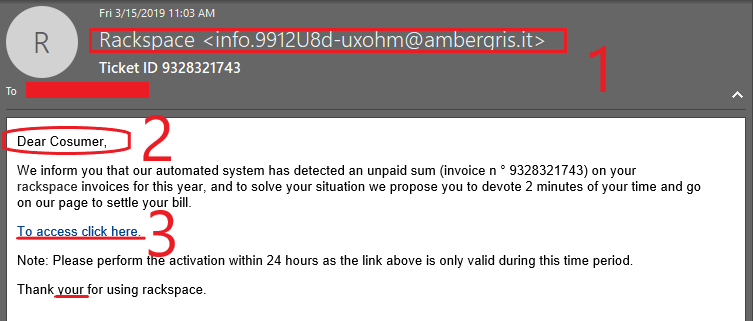
Phishing is a type of online scam where criminals send an email that appears to be from a legitimate source such as a company or a doctor’s office and ask you to provide sensitive information. This is usually done by including a link that will appear to take you to the company’s website to fill in your information or an attachment that downloads malware onto your system. The website is usually an elaborate duplicate of a trusted website designed to collect any information you provide and send it to the malicious actors behind the scam. Phishing attempts usually carry a sense of urgency and the message attempts to persuade the victim to act quickly without rational decisions. The following is an example of a phishing email that was received in our office.
Take a look below:
The phishing email claims to be an outstanding invoice that is due to be paid by the company. However, there are some suspicious factors that show the email to be fake and possibly a phishing attempt.
Some tell-tale signs that raise suspicions:
The phishing email comes from a suspicious address that was not recognized by the recipient.
Authentic automated emails do not typically have grammar and spelling issues.
The recipient’s name was not addressed by the sender, seeming unprofessional.
The link seems very suspicious and attempts to download a file onto the target’s device once clicked. The file is almost certainly containing malicious code.
General Recommendations:
A phishing email will typically direct the user to visit a website where they are asked to update personal information, such as a password, credit card, social security, or bank account information. A legitimate company already has this sensitive information and would not ask for it again, especially via email.
Scrutinize your emails before clicking anything. Did you order, or ask for, anything for which you’re expecting a confirmation? Did the email come from a store you don’t usually order supplies from or a service you don’t use? If so, it’s probably a phishing attempt.
Verify that the sender is actually from the company sending the message.
Did you receive a message or email from someone you don’t recognize? Are they asking you to sign into a website to give Personally Identifiable Information (PII) such as credit card numbers, social security number, etc. A legitimate company will never ask for PII via instant message or email—this is a huge red flag.
Do not give out personal or company information.
Review both signature and salutation.
Do not click on attachments.
Do not click on unrecognized links. If you do proceed, verify that the URL is the correct one for the company/service and it has the proper security in place, such as HTTPS.
Be wary of poor spelling, grammar, and formatting. As can be seen with the with this email, there are multiple spelling, grammar, and formatting errors, leading us to believe that the message is illegitimate. If an email is visually unprofessional, the sender is likely not who they say they are.
Many phishing emails pose a sense of urgency or even aggressiveness to prompt a form of intimidation. Any email requesting immediate action or that is addressing you in a threatening manner should be questionable. Also, beware of messages that seek to tempt users into opening an attachment or visiting a link. For example, an attachment titled “Staff Pay Raises 2019” may seem like something you really want to know about, but it could just be a ploy to plant malware on your system or steal your credentials.
Cybersecurity Brief
In this week’s Cybersecurity Brief: Google Discovers Mass iPhone Hacking Attacks, Hacking Group Targets Vulnerable WordPress Plugins
Google Discovers Mass iPhone Hacking
Google recently discovered hackers have been compromising websites with exploits aimed at iPhone users for approximately three years. The exploits place a monitoring implant on iPhones that don’t require user interaction upon visiting a compromised site. “There was no target discrimination;” Ian Beer, a researcher with Google’s Project Zero said “simply visiting the hacked site was enough for the exploit server to attack your device, and if it was successful, install a monitoring implant. We estimate that these sites receive thousands of visitors per week.” Researchers identified 14 vulnerabilities that impact iOS 10 through iOS 12.
The implant steals files and uploads real-time location information and can access photos, contacts, GPS data, credentials, certificates, access tokens, and unencrypted messages. Once a compromised phone is rebooted, however, the implant won’t run again until the device is re-exploited through visiting a compromised site. That said, things could still get a bit tricky once a phone is implanted as Beer notes, “Given the breadth of information stolen, the attackers may nevertheless be able to maintain persistent access to various accounts and services by using the stolen authentication tokens from the keychain, even after they lose access to the device.” Once your data has been compromised, it about mitigating any potential damages.
General Recommendations: To avoid future incidents, update your devices frequently, be careful of opening messages from people you don’t know, and be sure to closely monitor your accounts after any data breach.
A hacker group is exploiting vulnerabilities in more than 10 WordPress plugins to create rogue admin accounts on WordPress sites across the internet. The hacking group exploited the vulnerabilities in older plugins used in WordPress to create a backdoor on the vulnerable sites. The attacks are an escalation part of a hacking campaign that started last month. During previous attacks, the hackers exploited vulnerabilities in the same plugins to plant malicious code on the hacked sites. The purpose of the code was to show popup ads or to redirect incoming traffic to other websites. However, the hacking group began shifting its focus onto WordPress Users and Site Admins. The malicious code was altered to begin testing new website visitors for administrative privileges. Basically, the malicious code waited for site owners to access their websites and used their access to create a new user account with the admin account named wpservices, using the email address of wpservices@yandex.com, and password of w0rdpr3ss.
These attacks are targeting older vulnerabilities in the following plugins:
Bold Page Builder
Blog Designer
Live Chat with Facebook Messenger
Yuzo Related Posts
Visual CSS Style Editor
WP Live Chat Support
Form Lightbox
Hybrid Composer
All former NicDark plugins (nd-booking, nd-travel, nd-learning, et. al.)
General Recommendations: Site administrators are advised to update their website plugins and patch all security updates if they are using one of the previously mentioned plugins. Additionally, check the Admin usernames registered on their sites and removing any usernames that are not authorized by your organization.
No business or organization is invulnerable to a cyberattack, as these incidents prove. Business and safety operations can be heavily impacted and result in the loss of millions of dollars. To better protect your business or organization, take a proactive stance about cybersecurity.
CyberSecure Solutions ensures that security gets built-in and not bolted-on. Providing advanced solutions to protect critical IT infrastructure such as the popular “Virtual CISO service,” wherein companies can leverage the expertise of executive-level cybersecurity professionals without having to bear the cost of employing them full time.
We also offer compliance support, vulnerability assessments, penetration testing, and more security-related services for businesses of any size and type.
Additionally, CyberSecure offers an automated and affordable assessment tool that continuously scans systems, websites, applications, and networks to uncover issues. Vulnerability data is then securely analyzed and presented through an easy-to-interpret dashboard to yield actionable risk and compliance information for audiences ranging from IT professionals to executive managers. To schedule a LIVE demo of the Overwatch Governance Suite, click here.
CyberSecure Solutions is the commercial brand of Netizen Corporation, an ISO 27001:2013 (Information Security Management) certified company. We are a proud Service-Disabled Veteran-Owned Small Business that is recognized by the U.S. Department of Labor for hiring and retention of military veterans.
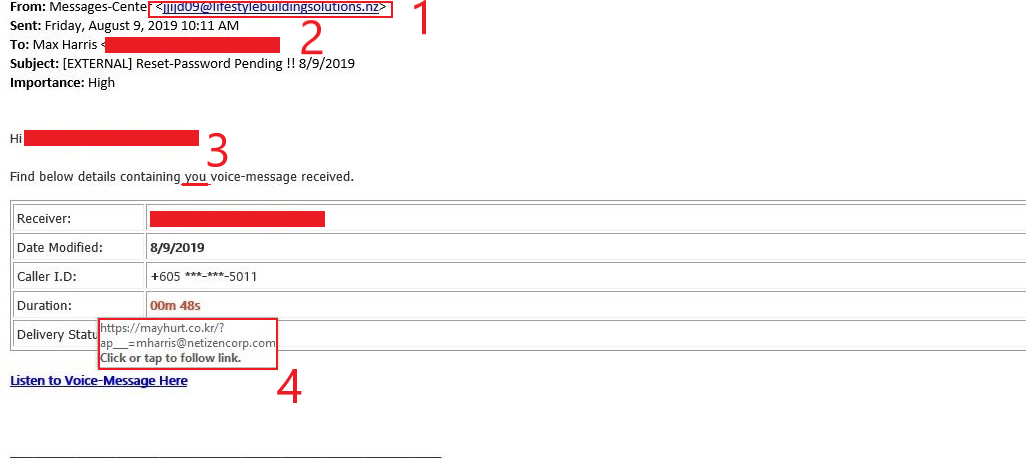
Phishing attempts are often carried out with the purpose of tricking the target into downloading or accidentally running a malicious script on their devices. This example of a phishing attempt that was received in our office poses as a voice-message with a high importance tag. The urgent message, coupled with obscure details, can appeal to the victim’s curiosity and cause them to click on the infected link.
Take a look below:
Some tell-tale signs that raise suspicions:
The phishing email comes from a suspicious address that was not recognized by the recipient.
The recipient’s name was not addressed by the sender, seeming unprofessional.
Authentic automated emails do not typically have grammar and spelling issues.
The link seems very suspicious and attempts to download a file onto the target’s device once clicked. The file is almost certainly containing malicious code.
General Recommendations:
A phishing email will typically direct the user to visit a website where they are asked to update personal information, such as a password, credit card, social security, or bank account information. A legitimate company already has this sensitive information and would not ask for it again, especially via email.
Scrutinize your emails before clicking anything. Did you order, or ask for, anything for which you’re expecting a confirmation? Did the email come from a store you don’t usually order supplies from or a service you don’t use? If so, it’s probably a phishing attempt.
Verify that the sender is actually from the company sending the message.
Did you receive a message or email from someone you don’t recognize? Are they asking you to sign into a website to give Personally Identifiable Information (PII) such as credit card numbers, social security number, etc. A legitimate company will never ask for PII via instant message or email—this is a huge red flag.
Do not give out personal or company information.
Review both signature and salutation.
Do not click on attachments.
Do not click on unrecognized links. If you do proceed, verify that the URL is the correct one for the company/service and it has the proper security in place, such as HTTPS.
Be wary of poor spelling, grammar, and formatting. As can be seen with the with this email, there are multiple spelling, grammar, and formatting errors, leading us to believe that the message is illegitimate. If an email is visually unprofessional, the sender is likely not who they say they are.
Many phishing emails pose a sense of urgency or even aggressiveness to prompt a form of intimidation. Any email requesting immediate action or that is addressing you in a threatening manner should be questionable. Also, beware of messages that seek to tempt users into opening an attachment or visiting a link. For example, an attachment titled “Staff Pay Raises 2019” may seem like something you really want to know about, but it could just be a ploy to plant malware on your system or steal your credentials.
Cybersecurity Brief
In this week’s Cybersecurity Brief: Towns Across Texas Targeted in ‘Coordinated’ Ransomware Attack, European Central Bank Suffers Data Breach
Texas Municipalities Targeted in ‘Coordinated’ Ransomware Attack
Texas State Capitol building in Austin, Texas. This week, state officials confirmed that 23 municipalities have been infiltrated and ransom demanded.
Texas is the latest state to be hit with a cyberattack, with state officials confirming this week that computer systems in 23 municipalities have been infiltrated by hackers demanding a ransom. The Texas Department of Information Resources (DIR) issued a statewide alert on Aug. 16 warning towns and cities across the state about the attack campaign. “The attack hit Friday morning and appears to be the work of a single threat actor,” the DIR said in a statement on Aug. 17. Later that day, Texas government officials activated a multi-organizational task force, including the Department of Information Resources (DIR), the Texas A&M University System’s Security Operations Center (SOC), the Texas Department of Public Safety, and emergency and military responders. The response to the attack was deliberate and required immediate action due to the nature of the attack, which seems to have been a rare coordinated attack on a government entity.
The hacker seems to have been able to infiltrate the network environment of these municipalities through a coordinated phishing email attack sent to the employees of these entities. The coordinated attack against Texas’ local governments represents, arguably, the most brazen ransomware operation to date. While ransomware attacks are becoming more targeted, a single coordinated attack against a state is rare. Sometimes, local governments see no other option to restoring their crippled networks than paying the ransom demanded by hackers. In Lake City, Fla., a town of about 12,000 residents, officials paid $460,000 in the form of bitcoin, the preferred payment method among cyber attackers. State authorities have not yet disclosed where exactly the attacks were based or how many computers have been swept up in the breach, meaning it is not yet known what services or data might have been compromised.
The European Central Bank (ECB) has confirmed that it has suffered a breach that involved attackers injecting malware and led to a potential loss of data. The website for the Banks’ Integrated Reporting Dictionary provides information to those preparing regulatory and statistical reports. BIRD began in 2015 and was a joint project by the Eurosystem of eurozone central banks and the banking industry. In a statement published August 15, the ECB confirmed that “unauthorized parties” had succeeded in breaching the security of its Banks’ Integrated Reporting Dictionary (BIRD) website. The site, hosted by an external provider, appears to have been attacked in December 2018, according to a Reuters report. The breach was discovered months later as routine maintenance work was being undertaken. Information that could have been stolen in the potential breach includes email addresses, names, and titles. It is important to note, however, that the affected site was isolated from the ECB’s internal systems, which minimizes the threat to only the BIRD site.
In an official statement, the ECB said they are contacting people whose data may have been affected. Central banks from Malaysia to Ecuador have been targeted by hackers in recent years. One of the world’s biggest ever cyber heists took place in 2016 when fraudsters stole $81 million from the central bank of Bangladesh’s account at the New York Fed using fraudulent orders on the SWIFT payments system. For months, the hackers had been lying undetected on the European Central Bank’s BIRD website and could have gone undetected for even longer. Without the proper threat detection measures, the damage done could have been much worse.
No business or organization is invulnerable to a cyberattack, as these incidents prove. Business and safety operations can be heavily impacted and result in the loss of millions of dollars. To better protect your business or organization, take a proactive stance about cybersecurity.
CyberSecure Solutions ensures that security gets built-in and not bolted-on. Providing advanced solutions to protect critical IT infrastructure such as the popular “Virtual CISO service,” wherein companies can leverage the expertise of executive-level cybersecurity professionals without having to bear the cost of employing them full time.
We also offer compliance support, vulnerability assessments, penetration testing, and more security-related services for businesses of any size and type.
Additionally, CyberSecure offers an automated and affordable assessment tool that continuously scans systems, websites, applications, and networks to uncover issues. Vulnerability data is then securely analyzed and presented through an easy-to-interpret dashboard to yield actionable risk and compliance information for audiences ranging from IT professionals to executive managers. To schedule a LIVE demo of the Overwatch Governance Suite, click here.
CyberSecure Solutions is the commercial brand of Netizen Corporation, an ISO 27001:2013 (Information Security Management) certified company. We are a proud Service-Disabled Veteran-Owned Small Business that is recognized by the U.S. Department of Labor for hiring and retention of military veterans.
Allentown, PA: Netizen Corporation, an ISO 27001:2013 certified provider of cyber security and related solutions for defense, government, and commercial markets, was ranked by Inc. Magazine as one of the top 50 fastest growing companies in the United States. Netizen placed 47th overall on the Inc. 5000 list of the nation’s fastest-growing businesses. They are the nation’s fastest growing cyber security company, the 2nd fastest growing company in all of Pennsylvania, and one of the fastest growing Veteran-Owned companies in the entire country with three-year revenue growth of over 5,638%. This is also the highest ranking and fastest growth that a company based in the Lehigh Valley region of Pennsylvania has ever achieved on the Inc. 5000 list, according to published records from the official program website.
The list represents a unique look at the most successful companies within the American economy’s most dynamic segment— its independent small and midsized businesses. Companies such as Microsoft, Dell, Pandora, LinkedIn, Yelp, Zillow, and many other well-known names gained their first national exposure as honorees of the Inc. 5000.
“Along with a spate of other recent accolades, being ranked in the highest tiers of the Inc. 5000, Inc. 500, and Vet50 lists is perhaps the truest testament to the capabilities of our world-class team,” said Michael Hawkins, Netizen’s President and CEO. He added, “I attribute much of this success, and our being the nation’s fastest growing cyber security company, to our process-focused, employee-centric, and innovation-nurturing corporate culture which provides unmatched career growth opportunities for ambitious professionals and superior products and services for customers.”
Max Harris, Netizen’s Chief Business Development Officer and a company principal, said, “Building long-term relationships has been another key driver in the company’s growth. Nurturing these relationships with current and potential customers as well as partner companies by sharing advice, innovation, and insights without any expectation of an immediate return allows us to set the standard for excellence for the markets we operate in and stand apart from any competitors.” He added that Netizen wishes to thank all its customers and partners, especially those who have been working with the company since its earliest days, for helping contribute to the company’s success.
Company representatives and ownership will be attending the Inc. 5000 Conference & Gala this October 10th through 12th in Phoenix, Arizona. As an Inc. 500 awardee, which is reserved for the top tier of companies on the Inc. 5000 list, Netizen will be profiled at the Gala and featured in the September 2019 issue of Inc. Magazine.
About Netizen Corporation:
Netizen is a highly specialized cyber security and compliance solutions provider that works with IT departments, information system owners/developers, defense contractors, and federal government agencies to ensure appropriate levels of security and compliance controls are implemented and maintained for all types of systems. They also develop innovative cyber security software products that include the award-winning Overwatch Governance Suite and open source AutoSTIG tools.
Netizen, a certified Service Disabled Veteran Owned Business (SDVOSB), was founded in late 2013 and is headquartered in Allentown, PA with satellite offices in Arlington, VA and Charleston, SC as well as field locations in areas including Orlando, FL and Huntsville, AL. The company has also been named one of the nation’s Best Workplaces by Inc. Magazine and is a recipient of other notable awards including the U.S. Department of Labor HIRE Vets Platinum Medallion, Lehigh Valley Veteran-Owned Business of the Year, and Charleston Defense Summit Innovation Spotlight. Their commercial-focused subsidiary, CyberSecure Solutions, is also trusted to engineer, audit, and maintain cyber security solutions for businesses of nearly every size and type worldwide. Learn more at NetizenCorp.com and goCyberSecure.com.
FOR IMMEDIATE RELEASE: POINT OF CONTACT:
August 14, 2019 Rocco Zegalia, VP of Sales and Marketing
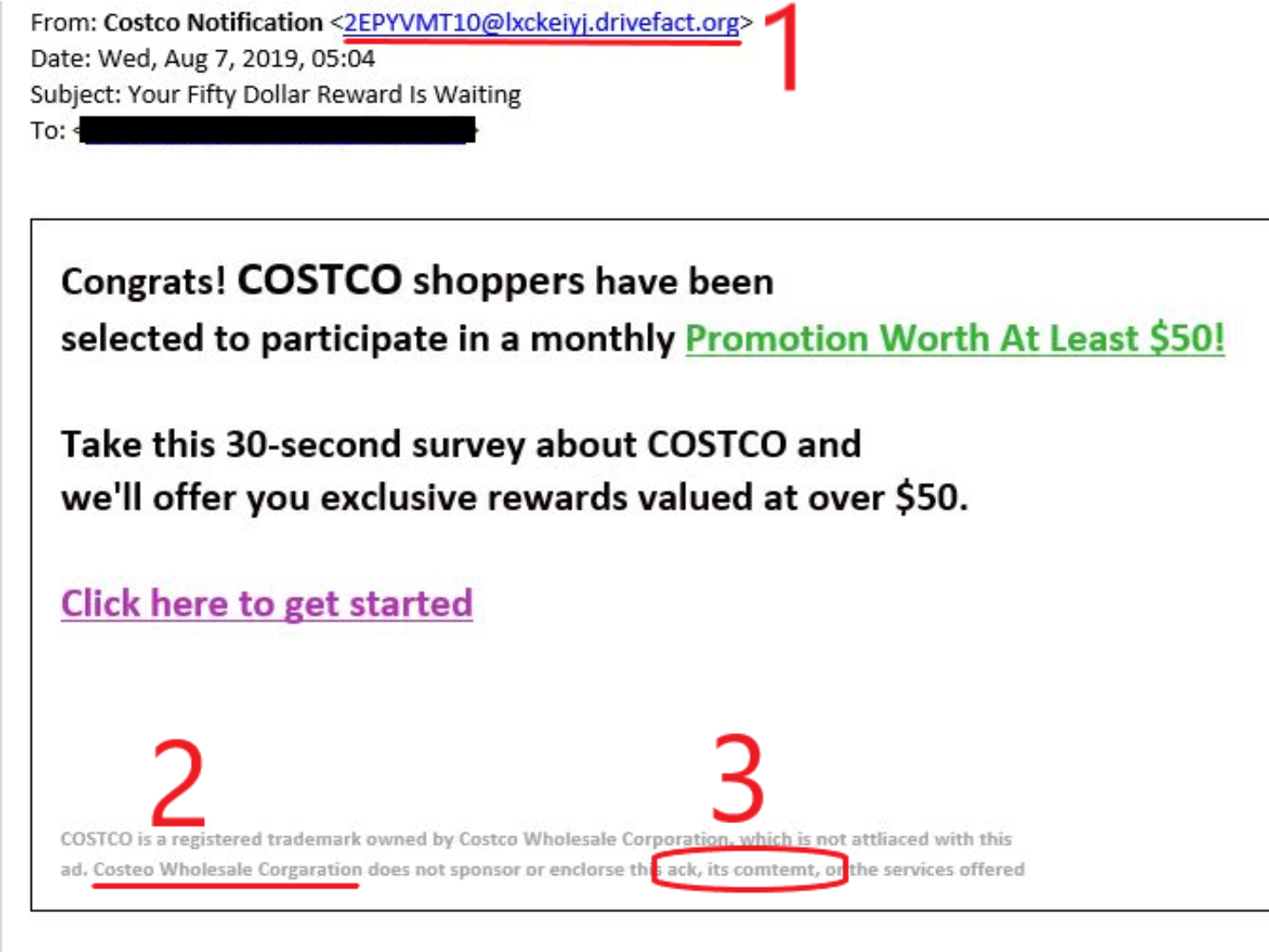
For this week’s Phish Tale of the Week, we’re taking a look at the phishing email that was sent to our HQ office that claims to be a promotional advertisement for Costco Wholesale. The message was quickly flagged by our scanners and reported as a phishing attempt.
Take a look below:
Some tell-tale signs that raise suspicions:
The first sign shows a “From” email address that clearly does not belong to Costco.
There are numerous examples where there are grammar and spelling errors.
Another tell-tale sign shows us a lack of branding on the email and nothing referring to a Costco website.
General Recommendations:
A phishing email will typically direct the user to visit a website where they are asked to update personal information, such as a password, credit card, social security, or bank account information. A legitimate company already has this sensitive information and would not ask for it again, especially via email.
Scrutinize your emails before clicking anything. Did you order, or ask for, anything for which you’re expecting a confirmation? Did the email come from a store you don’t usually order supplies from or a service you don’t use? If so, it’s probably a phishing attempt.
Verify that the sender is actually from the company sending the message.
Did you receive a message or email from someone you don’t recognize? Are they asking you to sign into a website to give Personally Identifiable Information (PII) such as credit card numbers, social security number, etc. A legitimate company will never ask for PII via instant message or email—this is a huge red flag.
Do not give out personal or company information.
Review both signature and salutation.
Do not click on attachments.
Do not click on unrecognized links. If you do proceed, verify that the URL is the correct one for the company/service and it has the proper security in place, such as HTTPS.
Be wary of poor spelling, grammar, and formatting. As can be seen with the with this email, there are multiple spelling, grammar, and formatting errors, leading us to believe that the message is illegitimate. If an email is visually unprofessional, the sender is likely not who they say they are.
Many phishing emails pose a sense of urgency or even aggressiveness to prompt a form of intimidation. Any email requesting immediate action or that is addressing you in a threatening manner should be questionable. Also, beware of messages that seek to tempt users into opening an attachment or visiting a link. For example, an attachment titled “Staff Pay Raises 2019” may seem like something you really want to know about, but it could just be a ploy to plant malware on your system or steal your credentials.
Cybersecurity Brief
In this week’s Cybersecurity Brief: Destructive Cyber-attacks are on the Rise, U.S. Utilities are Being Targeted by State-Sponsored Hackers
Destructive Cyber-attacks are on the Rise
In recent years, the amount of cyber attacks that have targeted state and local governments, municipalities, school districts and federal institutions has been steadily increasing. These attacks are usually carried out with the intent to cause severe damage and destruction to critical files and data, rendering the organization completely exposed. These attacks are categorized as Destructive Malware attacks. A new study by IBM’s X-Force Incident Response and Intelligence Services shows that these attacks have not only been on the rise, but are also being conducted by cyber-criminals and not exclusively by state-sponsored hackers (more on state-sponsored hacking later in the bulletin). The popularity of these attacks has been increasing in part due to the high paying ransoms that these affected companies are dishing out to resolve the issues and unlock their files from ransomware.
By the numbers, these attacks have increased by nearly 200% percent, according to IBM’s study. The analysis paints a bleak picture that highlights just how destructive these attacks are. For one, these destructive attacks are costing multinational companies $239 million on average. As a point of comparison, this is 61 times more costly than the average cost of a data breach ($3.92 million). Even more, these attacks can take up to 500 hours to be remediated, given that the organization has an incident response plan (IRP) and an in-house Security Operations Center (SOC). For those victims that lack the resources, it can take much longer to get back up and running, often incurring extra costs to hire a third-party company to aid in the remediation. These attacks do not seem to be slowing down and organizations that fail to be prepared might find themselves the next victim.
To read more about the IBM X-Force Study, click here.
U.S. Utilities Hit with Malware Attacks
You might have heard of the existence of nation-state hackers and their deployment by various countries looking to expose the secrets of other nations, often attacking business or state government organizations. Their activities are usually hidden and well-covered, often being part of a “hacker army”. Recent events like the suspected Russian hacking into U.S. Political elections have brought these hackers to light. Nation state hackers often operate without any consequences from their home country and usually have close links to the military, intelligence or state controlled apparatus of their country, and a high degree of technical expertise.
Recent attacks targeting U.S. utilities again seem to be the work of nation-state hackers looking to gain valuable data or information. These attacks were carried out via phishing emails and tricked employees of these organizations into clicking on an attached Word document that infected their computers with a remote access Trojan and command-and-control proxy. The RAT and proxy appear to originate with a nation-state actor rather than a financially motivated criminal organization. Researchers at ProofPoint found that the LookBack malware and many of the macros used in the campaign look very similar to tools used in a 2018 campaign against Japanese businesses. LookBack malware is a remote access Trojan written in C++ that relies on a proxy communication tool to relay data from the infected host to a command and control IP. Its capabilities include an enumeration of services; viewing of process, system, and file data; deleting files; executing commands; taking screenshots; moving and clicking the mouse; rebooting the machine and deleting itself from an infected host.
The Big Picture:
No business or organization is invulnerable to a cyberattack, as these incidents prove. Business and safety operations can be heavily impacted and result in the loss of millions of dollars. To better protect your business or organization, take a proactive stance about cybersecurity.
For more on nation-state hackers, click here. To read more about the attacks, click here.
CyberSecure Solutions ensures that security gets built-in and not bolted-on. Providing advanced solutions to protect critical IT infrastructure such as the popular “Virtual CISO service,” wherein companies can leverage the expertise of executive-level cybersecurity professionals without having to bear the cost of employing them full time.
We also offer compliance support, vulnerability assessments, penetration testing, and more security-related services for businesses of any size and type.
Additionally, CyberSecure offers an automated and affordable assessment tool that continuously scans systems, websites, applications, and networks to uncover issues. Vulnerability data is then securely analyzed and presented through an easy-to-interpret dashboard to yield actionable risk and compliance information for audiences ranging from IT professionals to executive managers. To schedule a LIVE demo of the Overwatch Governance Suite, click here.
CyberSecure Solutions is the commercial brand of Netizen Corporation, an ISO 27001:2013 (Information Security Management) certified company. We are a proud Service-Disabled Veteran-Owned Small Business that is recognized by the U.S. Department of Labor for hiring and retention of military veterans.
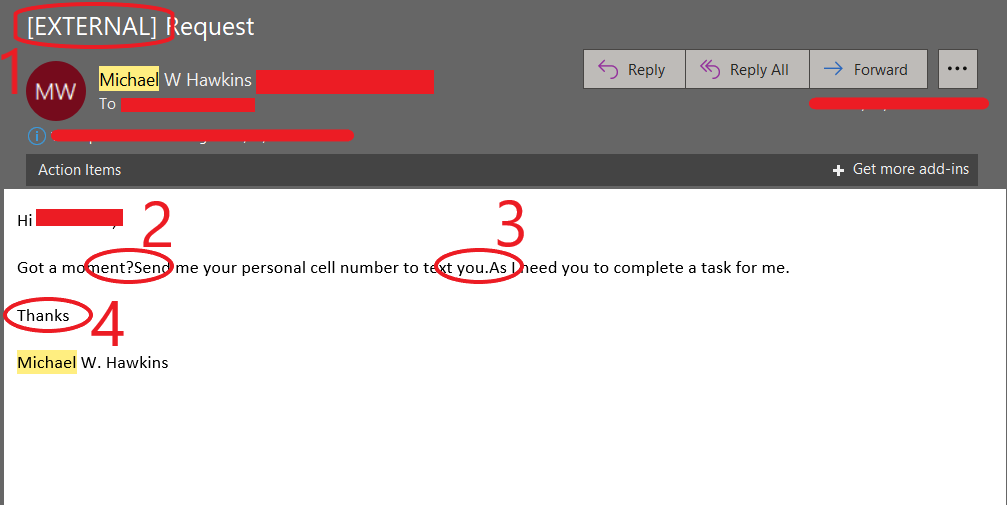
As is typical for most businesses, our HQ Office inbox receives the occasional phishing email attempting to trick an employee into sending the perpetrator some sort of payment or money order. In this case, the perpetrator was impersonating CyberSecure Solutions CEO, Michael W. Hawkins. Fortunately, Netizen and CyberSecure Solutions staff are regularly trained in email phishing and social engineering awareness. The attempt pictured below can be deconstructed and analyzed to point out the obvious, and not so obvious, details that prove this email to be fraudulent.
Take a look below:
Some tell-tale signs that raise suspicions:
The first detail shows that this email is being sent from an EXTERNAL account outside of the Netizen/CyberSecure environment.
Second, we can see multiple text and grammar errors, such as examples 2 and 3.
Example 4 shows an unprofessional signature to the email, which does not match the standard company signature.
General Recommendations:
A phishing email will typically direct the user to visit a website where they are asked to update personal information, such as a password, credit card, social security, or bank account information. A legitimate company already has this sensitive information and would not ask for it again, especially via email.
Scrutinize your emails before clicking anything. Did you order, or ask for, anything for which you’re expecting a confirmation? Did the email come from a store you don’t usually order supplies from or a service you don’t use? If so, it’s probably a phishing attempt.
Verify that the sender is actually from the company sending the message.
Did you receive a message or email from someone you don’t recognize? Are they asking you to sign into a website to give Personally Identifiable Information (PII) such as credit card numbers, social security number, etc. A legitimate company will never ask for PII via instant message or email—this is a huge red flag.
Do not give out personal or company information.
Review both signature and salutation.
Do not click on attachments.
Do not click on unrecognized links. If you do proceed, verify that the URL is the correct one for the company/service and it has the proper security in place, such as HTTPS.
Be wary of poor spelling, grammar, and formatting. As can be seen with the with this email, there are multiple spelling, grammar, and formatting errors, leading us to believe that the message is illegitimate. If an email is visually unprofessional, the sender is likely not who they say they are.
Many phishing emails pose a sense of urgency or even aggressiveness to prompt a form of intimidation. Any email requesting immediate action or that is addressing you in a threatening manner should be questionable. Also, beware of messages that seek to tempt users into opening an attachment or visiting a link. For example, an attachment titled “Staff Pay Raises 2019” may seem like something you really want to know about, but it could just be a ploy to plant malware on your system or steal your credentials.
Cybersecurity Brief
In this week’s Cybersecurity Brief: Sprint Customer Data Breached via Samsung Website Flaw, Critical Flaw Found in VLC Media Player
Sprint Customer Data Exposed
Sprint informed its customers that a major security breach took place on June 22. Hackers used an undefined vulnerability on a promotional Samsung website to obtain Sprint customer information. The amount of accounts breached has not been disclosed yet, but Sprint stated that among the exposed data was customers’ cellphone numbers, addresses, device types, device ID’s account numbers, and first and last names. The company promptly secured the vulnerability, changing the PINs for accounts that may have been compromised, and informed its customers of the event as well as recommendations to change their account passwords to avoid any possible exploits. Those affected have also been notified to place fraud alerts on their credit reports, monitor their credit changes and file a report of any suspected cases of identity theft.
Experts warn any victims of the breach to follow the recommended actions take this breach seriously. “Regardless of the number of individuals affected, the type of information hackers had access to leaves Sprint customers vulnerable to identity theft and fraudulent activity,” Bitglass Chief Technology Officer Anurag Kahol said. “When armed with payment card information and personally identifiable information (PII), malicious parties can engage in highly targeted phishing attacks, make fraudulent purchases, sell said data on the dark web for a quick profit, and much more.”
VLC Media Player is a free and open-source, cross-platform multimedia player and framework that plays most multimedia files as well as DVDs, Audio CDs, VCDs, and various streaming protocols. The tool is a very popular program that operates on Windows, Linux, Mac OS X, Unix, iOS, and Android systems. However, with its popularity and cross-platform capabilities, the program has caused concern for users after news broke that the VLC Media Player might be leaving PCs vulnerable to being hacked remotely.
Identified as CVE-2019-13615, the vulnerability in the hugely popular VLC Media Player (v 3.0.7.1) was recently discovered by Germany’s national Computer Emergency Response Team (CERT Bund). CERT Bund also stated that the affected systems are Windows, Linux or Unix machines, leaving machines operating on Mac OSX secure. Apparently, the flaw has left billions of computers exposed to Remote Code Execution (RCE) where hackers can get unauthorized access to install and execute malicious code and modify files/data on target machines and cause disruption through denial-of-service attacks (a cyber-attack in which the perpetrator seeks to make a machine or network resource unavailable to its intended users by temporarily or indefinitely disrupting services of a host connected to the Internet). The good news is that there are no examples of this vulnerability being exploited in the wild, although many users have begun uninstalling the VLC Media Player as a safety measure.
Recommendations: Until further notice from VLC or VideoLAN, halt usage of the program and instead use an alternative option like Windows Media Player. Monitor the situation and wait for the company to release a patched update for the program before resuming using the tool.
No business or organization is invulnerable to a cyberattack, as these incidents prove. Business and safety operations can be heavily impacted and result in the loss of millions of dollars. To better protect your business or organization, take a proactive stance about cybersecurity.
How Can CyberSecure Solutions Help?
CyberSecure Solutions ensures that security gets built-in and not bolted-on. Providing advanced solutions to protect critical IT infrastructure such as the popular “CISO-as-a-Service,” wherein companies can leverage the expertise of executive-level cybersecurity professionals without having to bear the cost of employing them full time.
We also offer compliance support, vulnerability assessments, penetration testing, and more security-related services for businesses of any size and type.
Additionally, CyberSecure offers an automated and affordable assessment tool that continuously scans systems, websites, applications, and networks to uncover issues. Vulnerability data is then securely analyzed and presented through an easy-to-interpret dashboard to yield actionable risk and compliance information for audiences ranging from IT professionals to executive managers. To schedule a LIVE demo of the Overwatch Governance Suite, click here.
CyberSecure Solutions is the commercial brand of Netizen Corporation, an ISO 27001:2013 (Information Security Management) certified company. We are a proud Service-Disabled Veteran-Owned Small Business that is recognized by the U.S. Department of Labor for hiring and retention of military veterans.
Critical Warning Issued for Samsung Cellphone Update App
How Can Netizen Help?
Phish Tale of the Week
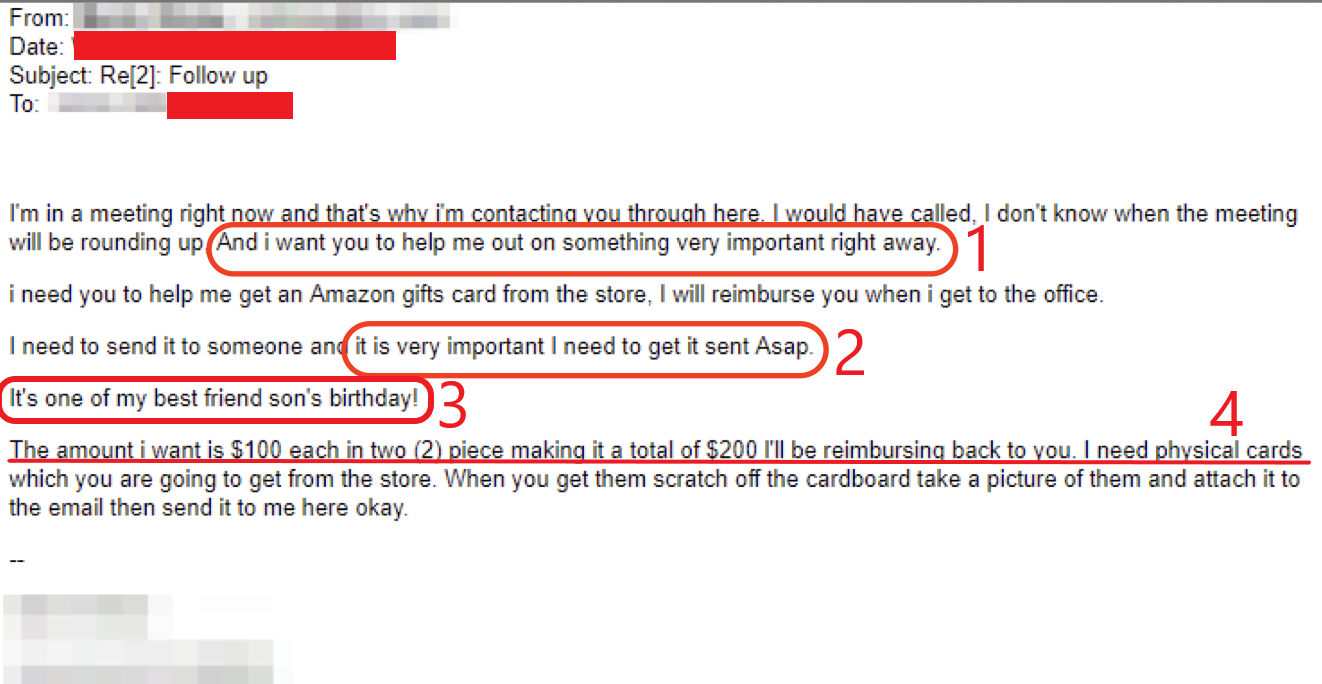
Phishing attempts are often carried out with urgent messages that are meant to provoke the victim to act without rationally thinking about the contents of the email. In this instance, an employee received an email message from their boss asking them to buy Amazon gift cards for his best friend’s son’s birthday.
Take a look below:
The first tell-tale sign is the “boss” emailing the employee for a personal favor, and asking for it urgently.
A second attempt at urging the victim to act quickly and ignore rational thinking.
Improper grammar is used throughout the email, including the highlighted line.
A very shady way of loading money onto a gift card is being requested, further raising suspicions.
General Recommendations:
A phishing email will typically direct the user to visit a website where they are asked to update personal information, such as a password, credit card, social security, or bank account information. A legitimate company already has this sensitive information and would not ask for it again, especially via email.
Scrutinize your emails before clicking anything. Did you order, or ask for, anything for which you’re expecting a confirmation? Did the email come from a store you don’t usually order supplies from or a service you don’t use? If so, it’s probably a phishing attempt.
Verify that the sender is actually from the company sending the message.
Did you receive a message or email from someone you don’t recognize? Are they asking you to sign into a website to give Personally Identifiable Information (PII) such as credit card numbers, social security number, etc. A legitimate company will never ask for PII via instant message or email—this is a huge red flag.
Do not give out personal or company information.
Review both signature and salutation.
Do not click on attachments.
Do not click on unrecognized links. If you do proceed, verify that the URL is the correct one for the company/service and it has the proper security in place, such as HTTPS.
Be wary of poor spelling, grammar, and formatting. As can be seen with the with this email, there are multiple spelling, grammar, and formatting errors, leading us to believe that the message is illegitimate. If an email is visually unprofessional, the sender is likely not who they say they are.
Many phishing emails pose a sense of urgency or even aggressiveness to prompt a form of intimidation. Any email requesting immediate action or that is addressing you in a threatening manner should be questionable. Also, beware of messages that seek to tempt users into opening an attachment or visiting a link. For example, an attachment titled “Staff Pay Raises 2019” may seem like something you really want to know about, but it could just be a ploy to plant malware on your system or steal your credentials.
Cybersecurity Brief
In this week’s Cybersecurity Brief: Microsoft’s BlueKeep Vulnerability Proved Exploitable, Critical Warning for Scam Samsung Update App
Microsoft’s BlueKeep Proves Vulnerable
Late last month, Microsoft’s Security Response Team (MSRC) issued a warning to organizations to update and install patches to BlueKeep (CVE-2019-0708), a critical remote code execution vulnerability it patched in early June. The flaw, which affects older versions of Windows and is found in Remote Desktop Protocol (RDP), allows attackers to execute code remotely on a machine without the need to log in. The flaw requires no user interaction, a feature that’s caused concern for future malware which can be developed to exploit the bug and spread the malware across other vulnerable machines. Initially, when the patch was released on May 14, Microsoft had not seen the BlueKeep bug exploited in the wild. However, Microsoft acknowledged that it is “highly likely” that this bug can be exploited by malicious actors and cybercriminals.
Now, almost two months later, BlueKeep discoverer and security researcher Kevin Beaumont stated that there are over a million systems on the internet with RDP exposed publicly and, to underscore the importance of applying Microsoft’s patch as soon as possible, Sophos also released a proof of concept video showing BlueKeep being exploited. This dashed the hope that the difficulty in executing the code would slowdown potential exploitation by criminals. The good news is that there is no evidence of BlueKeep being exploited in the wild.
To read more about the BlueKeep vulnerability, click here.
Critical Warning Issued for Samsung Cellphone App
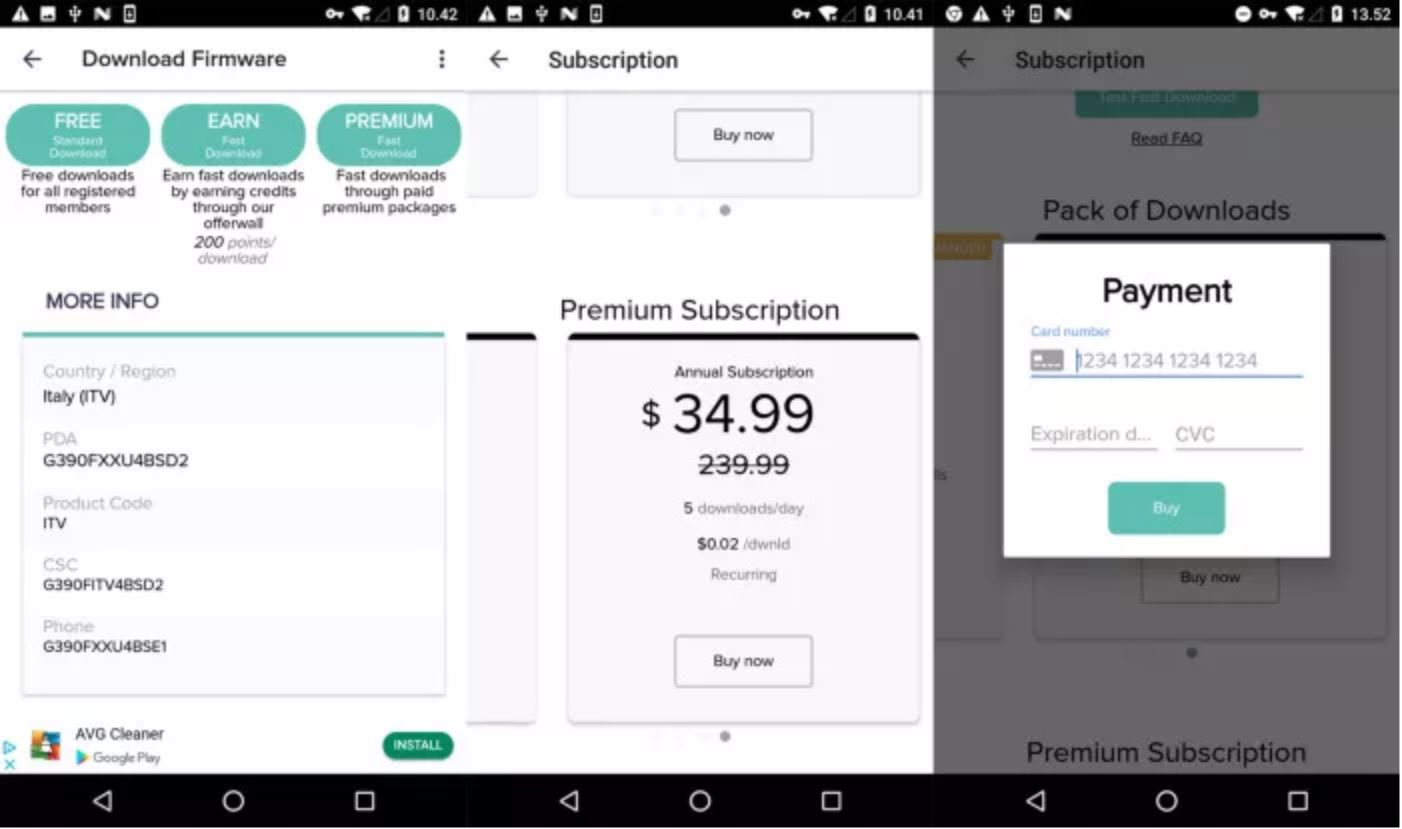
Installing a firmware/update-manager for your phone helps to ensure your phone is secure. However, for 10 million Samsung smartphone users, this has become the complete opposite. Aleksejs Kuprins, a malware analyst at CSIS Security Group, revealed how an app called “Updates for Samsung” has been installed by over 10 million users directly from the Google Play Store. The app promises free firmware updates but redirects users to an ad-filled website and asks for money to install the updates. This $34.99/year service, which is supposed to be free, doesn’t use the Google Play Store to manage the subscription. Instead, it uses a separate payment processing system to pay the fee. The download speed is also restricted to 56 Kbps and asks users pay more money for faster speeds or premium packages. Kuprins also noted that free downloads almost always failed to complete. Overall, the app is not doing what it’s advertising to do.
So, what should you do? If you have this app installed, it’s recommended to remove it from your phone as well as dispute any transactions if you paid for the service. Additional advice would be not to download apps like this going forward. Instead, follow Samsung’s procedures for downloading updates, which appear as a notification and walk you through the simple, speedy, and secure process for updating your phone. If you want to check on the status of your device’s firmware, simply navigate to the “Software Update” option in the settings menu and select “Download and install” to check if you are running the latest updates; if not, then the download will start and the update will be completed in a few minutes. By following these recommendations, the updates are guaranteed to come directly from the vendor and are always free.
The Big Picture:
No business or organization is invulnerable to a cyberattack, as these incidents prove. Business and safety operations can be heavily impacted and result in the loss of millions of dollars. To better protect your business or organization, take a proactive stance about cybersecurity.
How Can Netizen Help?
Netizen ensures that security gets built-in and not bolted-on. Providing advanced solutions to protect critical IT infrastructure such as the popular “CISO-as-a-Service” wherein companies can leverage the expertise of executive-level cybersecurity professionals without having to bear the cost of employing them full time.
We also offer compliance support, vulnerability assessments, penetration testing, and more security-related services for businesses of any size and type.
Additionally, Netizen offers an automated and affordable assessment tool that continuously scans systems, websites, applications, and networks to uncover issues. Vulnerability data is then securely analyzed and presented through an easy-to-interpret dashboard to yield actionable risk and compliance information for audiences ranging from IT professionals to executive managers.
Netizen is an ISO 27001:2013 (Information Security Management) certified company. We are a proud Service-Disabled Veteran-Owned Small Business that is recognized by the U.S. Department of Labor for hiring and retention of military veterans.
Vulnerability in TP-Link’s Wi-Fi Extenders Could Allow Remote Control to Attackers
Latest Phishing Scam Impersonates Apple Support
How Can Netizen Help?
Phish Tale of the Week
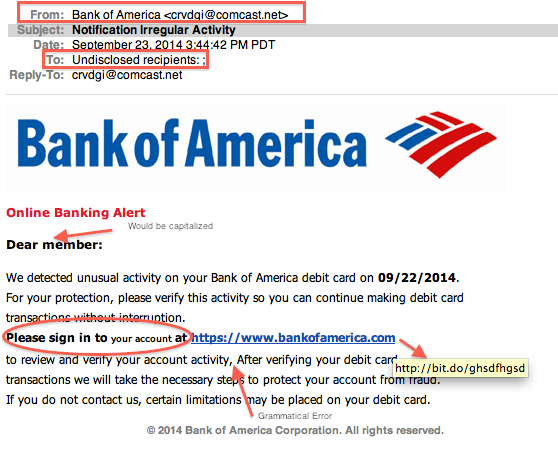
Phishing attempts can often target specific groups that can be exploited by malicious actors. In this instance, we see a phishing email targeting Bank of America customers. The email seems to be a security notification about “unusual activity” on the bank account and urgent care is required. The email even contains the logo of the bank and the official website linked in the body, so it must be a real notification, right? Not so fast. The email has a few tell-tale signs of its in-authenticity.
Take a look below:
Notice the way that the “Bank of America” display name does not match the email format in the “From” field.
In the “To” field as well as the greeting, there is a general salutation that is very vague and can be applied to anyone receiving the email.
While hovering your cursor over the link, it is clearly a different link than the one provided in the body of the email.
There are clear grammatical and spelling errors throughout the text, all of which indicate that the author is not very professional.
General Recommendations:
A phishing email will typically direct the user to visit a website where they are asked to update personal information, such as a password, credit card, social security, or bank account information. A legitimate company already has this sensitive information and would not ask for it again, especially via email.
Scrutinize your emails before clicking anything. Did you order, or ask for, anything for which you’re expecting a confirmation? Did the email come from a store you don’t usually order supplies from or a service you don’t use? If so, it’s probably a phishing attempt.
Verify that the sender is actually from the company sending the message.
Did you receive a message or email from someone you don’t recognize? Are they asking you to sign into a website to give Personally Identifiable Information (PII) such as credit card numbers, social security number, etc. A legitimate company will never ask for PII via instant message or email—this is a huge red flag.
Do not give out personal or company information.
Review both signature and salutation.
Do not click on attachments.
Do not click on unrecognized links. If you do proceed, verify that the URL is the correct one for the company/service and it has the proper security in place, such as HTTPS.
Be wary of poor spelling, grammar, and formatting. As can be seen with the with this email, there are multiple spelling, grammar, and formatting errors, leading us to believe that the message is illegitimate. If an email is visually unprofessional, the sender is likely not who they say they are.
Many phishing emails pose a sense of urgency or even aggressiveness to prompt a form of intimidation. Any email requesting immediate action or that is addressing you in a threatening manner should be questionable. Also, beware of messages that seek to tempt users into opening an attachment or visiting a link. For example, an attachment titled “Staff Pay Raises 2019” may seem like something you really want to know about, but it could just be a ploy to plant malware on your system or steal your credentials.
Cybersecurity Brief
In this week’s Cybersecurity Brief: Vulnerability in TP-Link Wi-Fi extenders Could Allow Remote Control to Attackers, Latest Phishing Scam Impersonates Apple Support
TP-Link Wi-Fi Extenders Vulnerability
A WiFi Extender is a device that repeats the wireless signal from your router to expand its coverage. It functions as a bridge, capturing the Wi-Fi from your router and rebroadcasting it to areas where the Wi-Fi is weak or nonexistent, improving the performance of your home Wi-Fi. With many internet users often not having enough coverage around their homes or office space, a simple solution is to use an extender to receive coverage to areas that are lacking it. However, TP-Link, a global leader in networking devices and accessories, disclosed that a vulnerability in the TP-Link RE365 Wi-Fi extender version 1.0.2 could allow an attacker to take complete control over the device.
The vulnerability, tracked as CVE-2019-7406, could allow a remote attacker to perform arbitrary command execution via specially crafted user agent fields in HTTP headers. The attack works by sending a malicious HTTP request to the Wi-Fi extender. The vulnerability of TP-Link’s Wi-Fi extender allows a potential attacker to execute commands from the request. The attacker would need to know the extender’s IP address to exploit the vulnerability, but you can find thousands of exposed devices on IoT search engines like Shodan. More sophisticated attacks can be carried out due to the level of access that an attacker would assume, including potentially redirecting people to pages with malware, as well as taking over the routers to use as part of a botnet.
The vulnerability affects home and office users alike, which can put private and business data at risk. the affected TP-Link devices are the RE365 model as well as the RE650, RE350 and RE500 devices. However, TP-Link responsibly disclosed the vulnerability and released software updates to patch the flaw.
To read more about the TP-Link vulnerability, click here.
Phishing Scam Impersonates Apple Support
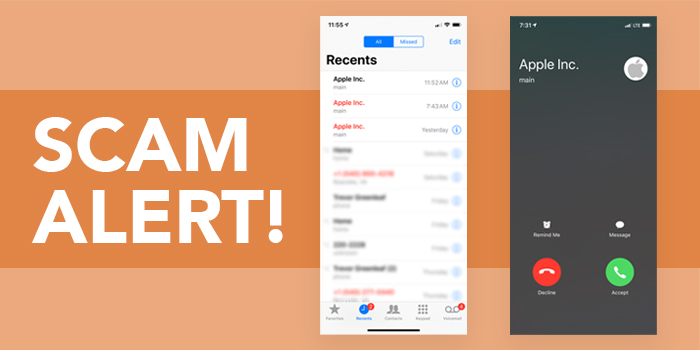
The telephone version of phishing is called vishing. Vishing relies on “social engineering” techniques to trick you into providing information that others can use to access and use your important accounts. People can also use this information to assume your identity and open new accounts. Vishing attacks are designed to generate fear and immediate response and therefore occur within short time frames. For example, a vishing perpetrator (visher) may gain access to a group of private customer phone numbers and call the numbers from the group. When a potential victim answers the phone, he or she hears an automated recording informing him that his bank account or social security information has been compromised. The victim is then instructed to call the “toll-free” number included in the message and also enter personal information like bank account numbers and social security numbers for “verification.” The victim’s entries are collected and then used to access their bank accounts or steal their identity.
The latest vishing scam making the rounds involves scammers pretending to be Apple Support Agents alerting Apple users that their account has fallen victim to a data breach. Scammers implement a spoofing technique to imitate the real Apple support telephone number, often showing up on Caller ID as ” 1 (800) MYAPPLE,” even though the fake call is coming from another country. On Apple devices, the fake call even displays the Apple logo and either “Apple Customer Service” or “AppleCare” to trick users into thinking the call is authentic. The goal of the scammers is to gather iCloud or Apple ID account information of victims. Apple announced that iOS 13 will include a feature that forces unknown calls to go straight to voicemail, a feature which will likely debut in the fall. In the meantime, Apple is advising users not to answer questionable phone calls from Apple Support. If you are concerned about the status of your Apple account, contact Apple directly.
The Big Picture:
No business or organization is invulnerable to a cyberattack, as these incidents prove. Business and safety operations can be heavily impacted and result in the loss of millions of dollars. To better protect your business or organization, take a proactive stance about cybersecurity.
How Can Netizen Help?
Netizen ensures that security gets built-in and not bolted-on. Providing advanced solutions to protect critical IT infrastructure such as the popular “CISO-as-a-Service” wherein companies can leverage the expertise of executive-level cybersecurity professionals without having to bear the cost of employing them full time.
We also offer compliance support, vulnerability assessments, penetration testing, and more security-related services for businesses of any size and type.
Additionally, Netizen offers an automated and affordable assessment tool that continuously scans systems, websites, applications, and networks to uncover issues. Vulnerability data is then securely analyzed and presented through an easy-to-interpret dashboard to yield actionable risk and compliance information for audiences ranging from IT professionals to executive managers.
Netizen is an ISO 27001:2013 (Information Security Management) certified company. We are a proud Service-Disabled Veteran-Owned Small Business that is recognized by the U.S. Department of Labor for hiring and retention of military veterans.
Allentown, PA: Netizen Corporation, an ISO 27001:2013 certified provider of cyber security and related solutions for defense, government and commercial markets, was awarded an $845,000 contract with the U.S. Army supporting the Project Manager Training Devices (PM TRADE) organization in Orlando, Florida. The work under the contract, which began on May 31st, includes Cyber Security Engineering support for Department of Defense (DoD) virtual training and simulation systems in Orlando, Florida and other locations across the United States and around the world.
Netizen is working to ensure that military information technology (IT) infrastructure for virtual training and simulation platforms is secure and protected from a variety of cyber threats while also compliant with the National Institute of Standards and Technology (NIST) Risk Management Framework (RMF), the Federal Information Management Security Act (FISMA), and other requirements. This is accomplished by leveraging uniquely skilled Netizen staff members that possess high levels of experience, education, and certification to provide cyber security engineering support for training and simulation products that are being built, upgraded, accredited, or deployed. This new contract is a follow-on to work that Netizen has been performing over the last two years.
“We are renowned for the high level of quality, skill, and expertise that we offer as well as our ability to recruit and retain some of the most talented professionals in the cyber security industry. As such, our customers can be certain that the service they receive will always be top-tier. Most of them continually renew and expand existing contracts specifically to retain the capabilities and innovation our team provides,” said Max Harris, Netizen’s Chief of Business Development. He added that Netizen, as a Veteran-Owned company, is very proud to continue supporting the nation’s warfighters by ensuring that the critical systems they rely on for training and simulation are secure and compliant.
Netizen is a highly specialized cyber security and compliance solutions provider that works in partnership with IT departments, information system owners/developers, and IT Managed Service Providers (MSPs) to ensure appropriate levels of security and compliance controls are implemented and maintained for all types of systems.
About Netizen Corporation: Named the Lehigh Valley’s “Veteran Owned Business of the Year” and a national Best Workplace by Inc. Magazine, Netizen is an Allentown, PA based Veteran-Owned company (SDVOSB) specializing in cyber security and related solutions for commercial and government markets with additional offices in Arlington, Virginia and Charleston, South Carolina. Netizen was also a recipient of the U.S. Department of Labor HIRE Vets Platinum Medallion Award for their commitment to veteran hiring and other accolades for superior contract performance and customer service. Learn more at NetizenCorp.com or call 1-844-NETIZEN (638-4936).
Microsoft Urges Users to Patch BlueKeep Security Flaw
U.S. Customs and Border Protection Data Breach
How Can Netizen Help?
Phish Tale of the Week
Malicious actors are constantly finding new ways to target a big payday. In the newest trend, these cyber criminals are using secured websites to run their own phishing campaigns.
The criminals are relying on people’s trust in landing pages that contain “HTTPS” in the URL and TLS secured sites. After a phishing email is sent and the victim clicks forward onto the link, they will see a secured certificate on the site, but it’s all a ruse. In reality, the landing pages are only secured to play on the trust of victims and will capture any login credentials or information that a victim submits. This tactic was used in phishing campaigns such as the one that imitated Netflix’s log-in page to harvest login credentials.
Take a look below:
While the login page seems very convincing and is almost too good to set apart from the real login page, notice the strange website URL that says “GroupNetflix”.
Notice the extra space between the “Sign Up Now” button and the period.
General Recommendations:
A phishing email will typically direct the user to visit a website where they are asked to update personal information, such as a password, credit card, social security, or bank account information. A legitimate company already has this sensitive information and would not ask for it again, especially via email.
Scrutinize your emails before clicking anything. Did you order, or ask for, anything for which you’re expecting a confirmation? Did the email come from a store you don’t usually order supplies from or a service you don’t use? If so, it’s probably a phishing attempt.
Verify that the sender is actually from the company sending the message.
Did you receive a message or email from someone you don’t recognize? Are they asking you to sign into a website to give Personally Identifiable Information (PII) such as credit card numbers, social security number, etc. A legitimate company will never ask for PII via instant message or email—this is a huge red flag.
Do not give out personal or company information.
Review both signature and salutation.
Do not click on attachments.
Do not click on unrecognized links. If you do proceed, verify that the URL is the correct one for the company/service and it has the proper security in place, such as HTTPS.
Be wary of poor spelling, grammar, and formatting. As can be seen with the with this email, there are multiple spelling, grammar, and formatting errors, leading us to believe that the message is illegitimate. If an email is visually unprofessional, the sender is likely not who they say they are.
Many phishing emails pose a sense of urgency or even aggressiveness to prompt a form of intimidation. Any email requesting immediate action or that is addressing you in a threatening manner should be questionable. Also, beware of messages that seek to tempt users into opening an attachment or visiting a link. For example, an attachment titled “Staff Pay Raises 2019” may seem like something you really want to know about, but it could just be a ploy to plant malware on your system or steal your credentials.
Cybersecurity Brief
In this week’s Cybersecurity Brief: Microsoft Urges Businesses to Patch “BlueKeep” Flaw, Hackers Steal Border Agency Traveler Photos
Microsoft Urges Businesses to Patch “BlueKeep” Flaw
Microsoft’s Security Response Team (MSRC) is warning organizations to patch BlueKeep (CVE-2019-0708), a critical remote code execution vulnerability it patched earlier this month. The flaw affects older versions of Windows and is found in Remote Desktop Services (RDS). The flaw requires no user interaction, a feature that can be a cause for concern if future malware is developed to exploit the bug and spread the malware across other vulnerable machines. Initially, when the patch was released on May 14, Microsoft had not seen the BlueKeep bug exploited in the wild. However, Microsoft acknowledged that it is “highly likely” that this bug can be exploited by malicious actors and cybercriminals. Now, Microsoft says they are “confident” that an exploit exists for this vulnerability and more than one million internet-connected machines remain vulnerable to BlueKeep.
In Microsoft’s official blog, the MSRC stated “It only takes one vulnerable computer connected to the internet to provide a potential gateway into these corporate networks, where advanced malware could spread, infecting computers across the enterprise. The scenario is even more dangerous for those who neglected to update internal systems, they continue, as future malware could try to exploit vulnerabilities that have already been patched.” The vulnerable systems are the ones still running Windows XP, Windows 7, Server 2008 and Server 2008 R2. Microsoft continues to urge users to update their systems to ensure the latest patches and security features are installed and enabled on their machines out of fear of a repeat of the 2017 ransomware attack known as WannaCry.
Security Researchers at Kenna Security are monitoring for any activity involving the BlueKeep bug and can confirm that there have already been attempts to reverse the patch and build an exploit by cybercriminals. The research group also estimates that there are still a significant amount of organizations that can be vulnerable to this attack, especially ones still using Windows 7 and Server 2008. One possible scenario in which cybercriminals can carry out an attack is exploiting BlueKeep by connecting to a target system via Remote Desktop Protocol RDP and sending specially crafted requests. If successful, criminals could execute code on a target system. Even if Windows 7 and Server 2008 are not exposed to the Internet, they’re susceptible to exploitation via a multi-pronged attack. Microsoft has released a patch for the vulnerability. If your business or organization operates a system running one of the listed vulnerable operating systems, Microsoft highly recommends that you update your systems to ensure the patch is installed.
Hackers Steal Border Agency Database of Traveler Photos
The U.S. Customs and Border Protection (CBP) agency revealed that one of its subcontractors has been breached and a database containing images of travelers and license plates was stolen. The Customs and Border Protection agency declined to reveal the breached subcontractor but there is mounting evidence that Tennessee-based company Perceptics is the victim. The company develops and produces license plate readers that are used by the CBP. The subcontractor was breached because it had stored license plate images and traveler’s images on its own network, without the knowledge of CBP. The agency has declined to reveal how many people have been affected or the size of the data breach, which can mean that it is larger than expected.
Surprisingly, this is not the first time that Perceptics has been involved in a data leak. An incident in May involved one hacker dumping hundreds of gigabytes of data stolen from Perceptics on the dark web. It is unknown if the two incidents are somehow connected but the Customs and Border Patrol agency insists that it had no knowledge to Perceptics data transfer. What’s more worrying, however, is that the CBP allowed a third party to access sensitive data without its knowledge and did not ensure that its subcontractors had the appropriate security measures in place.
The agency outlined its security standards in an official statement, saying “CBP requires that all contractors and service providers maintain appropriate data integrity and cybersecurity controls and follow all incident response notification and remediation procedures. CBP takes its privacy and cybersecurity responsibilities very seriously and demands all contractors to do the same.”
The Big Picture:
No business or organization is invulnerable to a cyberattack, as these incidents prove. Business and safety operations can be heavily impacted and result in the loss of millions of dollars. To better protect your business or organization, take a proactive stance about cybersecurity.
Netizen ensures that security gets built-in and not bolted-on. Providing advanced solutions to protect critical IT infrastructure such as the popular “CISO-as-a-Service” wherein companies can leverage the expertise of executive-level cybersecurity professionals without having to bear the cost of employing them full time.
We also offer compliance support, vulnerability assessments, penetration testing, and more security-related services for businesses of any size and type.
Additionally, Netizen offers an automated and affordable assessment tool that continuously scans systems, websites, applications, and networks to uncover issues. Vulnerability data is then securely analyzed and presented through an easy-to-interpret dashboard to yield actionable risk and compliance information for audiences ranging from IT professionals to executive managers.
Netizen is an ISO 27001:2013 (Information Security Management) certified company. We are a proud Service-Disabled Veteran-Owned Small Business that is recognized by the U.S. Department of Labor for hiring and retention of military veterans.















 Netizen Blog and News
You must be logged in to post a comment.